



Fiskey111
Members
-
Joined
-
Last visited
Everything posted by Fiskey111
-
One of my end goals of the MDT was to incorporate an API into it to give devs access to the report features and to allow a custom feedback system after I saw that was possible (thanks Albo for proving that it is!). Right now I'm mostly focusing on stability and adding a few features to it, but I like the idea! I'm not too sure what @PieRGud plans on doing with Computer+ (I didn't even know you were working on that, otherwise I would have talked to you about it!). I love that idea! I think that would be absolutely amazing to have! Let me know if you need anything from me PieRGud, I've got a decent amount of experience with Gwen now that I've run into way too many errors!
-
Hello! The following refers to the new MDT plugin PolicingMDT that you can download by clicking here. This is the new database for Field Interactions and Citations that YOU make! This will be an area where you are able to upload your .txt files and users are able to add your data to their own personal files in order to "update" their database! Field interactions are able to be pulled from a locally stored folder (LSPDFR/MDT/FIs). In this folder you will see a bunch of .txt files with random last names. Those are all the people you wrote your FIs about! Good work, officer! To better serve the community you need to make sure you update your database of FIs often. Because if you run into someone who already has had an interaction with another officer, that might change everything! Therefore, if you wish to upload your database, please follow this format when you post! Please zip your folder "FIs" that is found in LSPDFR/MDT and upload it here! Do not change the name of the folder so installation can be smooth! To install: Please download the attached file, go to your LSPDFR/MDT folder, then paste the "FIs" folder you dowloaded! If you received an "overwrite existing file" popup - click no! That means someone else met the ped you did too! Find out who that is by looking at the name of the file, then manually copy over their lines to the bottom of your file (yours is found in LSPDFR/MDT/LastNameFirstName.txt) Then voila! You have an updated database! (I'll upload a video sometime to show exactly how). I will periodically update this post with the most updated files!
-
5
-
Please check this thread and the following youtube channel! Good luck! http://www.lcpdfr.com/forums/forum/894-api-development/
-
I'm not sure if the son actually said that or not, however that is the officer and his son!
-
This happened very close to my hometown in MA. http://worcestermag.com/2016/05/25/43044/43044 The end of this article made me tear up.
-
*cough* shameless self advertising *cough*
-
Screenshots were acquired and Gwen.dll is in the directory and my .dll is in the Plugins>LSPDFR folder. I don't know what the issues is. Any ideas?
-
I'm currently awaiting screenshots of their important directories. The issue is that the main screen of the MDT as well as one of the parts of it (the search function, specifically) work fine. That's what's confusing me. I'll post back here when I get the screens.
-
Haha, yeah that comment is me trying to find the specific spot it crashes and to distinguish between my attempts. Thank you! I hope Albo, Stealth, LMS, Alexguirre or someone with GwenForm knowledge can help!
-
Nope, the crash occurs below. I told the person to re-install rage and to send me screenshots of their directories that the plugin deals with to see what the issue is!
-
They said they're using the Steam version, as am I! Yes it is! I'm just curious as to why it's searching for resources, as I don't have that anywhere in my Solution Explorer...
-
Hi everyone! Sorry to be a pain but I'm stuck at the moment. I'm having people Beta test my MDT, and I have one person saying they were able to play flawlessly for 3 hours with no crashes or freezes and one person who continually throws this error in two of the four sections of my MDT. Any ideas what "Not-so-lethal policing.resources" is and why it's unable to find it? I just don't get how one person can get the error and the other doesn't, especially when they all were sent the same file. Thanks!
-
This is a part of the Traffic Policer callout pack. Please refer to that callout's INI file to disable or lower the frequency of that callout!
-
Hi everyone! MDT work is going well! I've been wanting to add a background to the MDT (like the logo of the LSPD/LSSD) throughout the whole form (not the window like Computer+, the actual form itself). I've tried a bunch of different ways and I've scoured the object browser but for some reason I can't find out how (which means it's either not possible or I'm dumb haha)! Also, does anyone know how to close the window you've opened without pressing the red "x"? I've tried finding how but I can't! Thanks!
-
I used to use two computers- id have my laptop set up on a TV tray next to me and would have an MDT.exe program on it. If you look at the last part of the video it shows a still of the .txt fole the reports save as! It will add every report you write to the bottom of it, so you can always go back to look at them whenever you want!
-
1. It already is! 2. I found someone who sent me pictures! Thank you! Check out the newest video at the top of the page!
-
Updated Status: Citation Reports: DONE - Random residencies of perps & random citation numbers generated DONE - Citation report menu information fields (includes car information fields) DONE - Found someone with actual MDT experience who has helped me so much so far!!! (Thanks @xAKRONSFINESTx) PARTIAL - Integration into LSPDFR computer: 50% done. It pulls dates, but not the correct ones. PARTIAL - Writes reports to text files. It works, I just need to set it to put the information on new lines. NOT DONE - Arrest Report (might just make that a check box on citation menu, haven't decided yet) NOT DONE - Callouts -- started community policing, haven't worked on it lately.
-
While I won't port his work over to LSPDFR (even if I wanted to I don't know how, haha), I think I've captured most of that in the current state of the MDT. Community policing will certainly include those areas. I also want to include just some sidewalks around the city as well! I will be in touch if I need any help!
-
I never knew this existed!!! Thank you!!! Ahhhh okay, so that would return the info for that specific ped the person had stopped then, just like the LSPDFR computer? That makes sense! Thank you!
-
Hi guys! Just curious if its possible to access the LSPDFR name database without a Ped, similar to typing in the name in the computer. I'd like to add this to the MDT, if it's not possible I can just generate a list and make it pull random first/last names & DOBs. Thanks!
-
So that callout will be more of a report taking callout. Maybe sometimes it'll actually have the suspects (like a 5% chance or something of them being there) but I want to show the "boring" side of policing. So I plan on including it with the "Non-lethal policing" callout pack. Of course it will work with other callouts and perhaps (if I incorporate certain features) I can make an API for it so other packs can include its functions. This is all longshots though, as the MDT isn't even done yet! I know! I've always wanted one so I decided to make one!
-
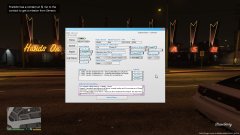
Ah right! So that is the function of the "Citation" menu (the last picture). It contains information on the citation, offender, their vehicle (last two being new functions), the location, conditions, and offenses! I'll add a "Total violation cost" option to add how much your citing them for!
-
Thank you!! I always hated that too, and I've definitely helped to contribute to that with Secondary Callouts. I think although this is a simple interface & callouts it will help to really increase the realism! I plan (note plan as I haven't tried it yet) to have your inputs written to a text file that can be read after the game so you can see your reports and share them! I'm not sure how possible this is though! What do you mean by tickets; can you elaborate? I was under the idea that citations and tickets are the same thing! No field is required, so I figured that it could be used for whatever you'd like it to be!
-
From the album: Personal MDT


