Dbeehler73
Members
-
Joined
-
Last visited
Everything posted by Dbeehler73
-
 It's been happening every once and a while, and it seems heavily involved with callouts from this pack. I've uninstalled it for now to see if it continues or not, but I haven't played much since I uninstalled it. It also doesn't just spawn one new ped, there are usually another 2 or 3 that spawn in the driver seat and start driving away. It mainly happens on the HotPursuit callout. I was testing them using callout manager last night, and I don't think it happened with any other callouts (or I couldn't get it repeated)...
- 1,034 comments
- 65 reviews
-
I don't know if this plugin is causing this issue, but I was on the police impersonator callout and the vehicle stopped, the suspect got out, and then another ped spawned into the vehicle, anyone else seeing this? This is in my rage log [11/20/2020 10:19:42 PM.270] LSPD First Response: [TRACE] Entering at Driver
- 1,034 comments
- 65 reviews
-
-
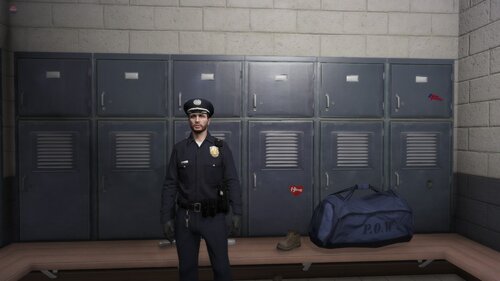 I redid my most downloaded file to be compatible with EUP 8.0! This ONLY adds outfits for male characters!!!! I've done the following: Added gloves to all, class B and C uniforms (LSPD, LSSD, SAHP, and BCSO) gloves for K-9 handlers updated small things I though were missing from the original outfits (i.e. LSPD winter uniform having no beanie, and BCSO task force with no gloves.) I might do female characters if asked, but I have no desire to do them otherwise. This was originally made by myself for myself. I thought I would share it with people who want to use it. I didn't add original "undercover" uniforms here because EUP comes with some that looked better than what I had made! EUP Law and Order 8.1 required:
 -
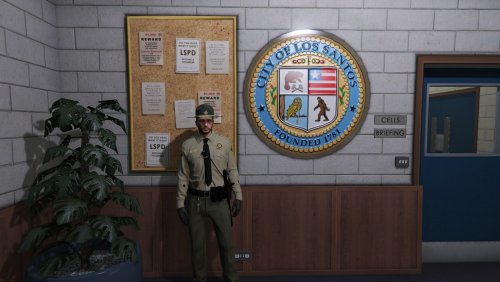 I will be creating a new file for it since its totally different. Please look soon for it!
- 6 comments
- 3 reviews
-
I was just thinking about it. I wouldn't bring over the custom like "tactical ones", but the gloves and hats I will. Ill upload soon.
- 6 comments
- 3 reviews
-
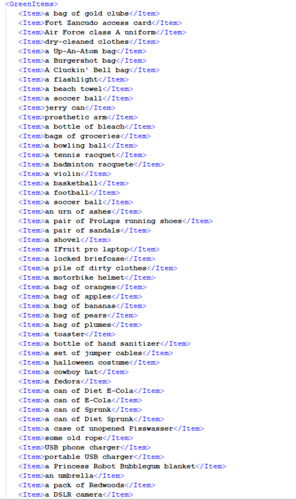 this adds over +200 lore friendly items to the StopThePed lists! (look at screenshots for examples of items) There are some repeats from person to vehicle, but this can happen in real life too! Adds green, yellow, and red items to the lists. I will continue adding to this when I feel like it. If you have any ideas for items leave a comment and I will think about adding it. I havent done any questions because I don't really use that feature. Install to the StopThePed folder, or drag and drop the file.
 -
-
 please make this not require Traffic Policer... There is no reason and Traffic Policer causes heavy FPS issues!
- 1,196 comments
- 127 reviews
-
-

- 1
-
-
I have an addon car and using Stop The Ped I cannot place him/her into the car. There is no option. Any ideas? I have a feeling that it has to do with something about the vehcilces.meta
-
 are the citations and arrest reports consistent? As in, do they come back if you stop the same ped again?
- 1,743 comments
- 172 reviews
-
 I debugged it myself, the comments at the top of presetoutifts.ini was throwing the script off. thanks!
- 195 comments
- 24 reviews
-
-
-
Ok.
-
Thanks, I tried the bottom file with no avail. I will continue looking at it.
-
-
from the old teasers from 0.4 it looked like the officers that were responding were "EUP" styles officers. Since I updated, I am getting the old Rockstar officers still responding. Can anyone confirm this was a feature implementation at this time? I was looking forward to having more diversity in the department!
-
.png.c9d7985327c89b11ec9e78df01a32c5b.png) please release these 😍😍😍😍
please release these 😍😍😍😍 -
-
.png.e560fa71cefcbda0336c1965036cc238.png) sweet! looking forward to it. where did your els pack go?
sweet! looking forward to it. where did your els pack go? -
els or nah?
-
-
-


.png.c9d7985327c89b11ec9e78df01a32c5b.png)
.png.e560fa71cefcbda0336c1965036cc238.png)