




Sniper296
Friends of LSPDFR
-
Joined
-
Last visited
Everything posted by Sniper296
-
Since some people have mistook my example for my actual build (with that spec over £5000, I wish), here is my current, ageing setup. Operating System Microsoft Windows 10 Home x64 Case Coolermaster Storm Sniper Motherboard AsRock Z68 Extreme4 ATX Processor Intel i7-2600k 3.4GHz Sandy Bridge LGA1155 Memory Corsair Vengence 16GiB (4x4GiB) DDR3 PC3-10700H 1866MHz Dual Channel Graphics Card(s) Nvidia GTX1070Ti 1607MHz 8GiB GDDR5 Storage Drive(s) Western Digital Black 6TB 7200RPM SATA 6Gbps 128MiB Cache Western Digital Black 1TB 7200RPM SATA 6Gbps 64MiB Cache Western Digital Green 500GB 7200RPM SATA 3Gbps 16MiB Cache Western Digital Blue 320GB 2.5" 5400RPM SATA 3Gbps 8MiB Cache Removable Drive(s) LG Super Multi Blue Internal 14x Blu-ray Disc Rewriter Various SanDisk Flash Drives Power Supply XFX Pro 850W 80 Plus Bronze Cooling System Stock CPU, GPU + case fans Monitor(s) HannsG HH251 25" 1920x1080 Widescreen Acer X193W 19" 1440x900 Widescreen Keyboard Logitech G910 Orion Spark RGB Romer-G Mouse Logitech G502 Proteus Spectrum RGB Peripherals/Other Logitech G230 Stereo Headset Logitech G29 Racing Wheel Saitek/Logitech X52 Pro TrackIR 5 Wacom Pen & Touch Medium CTH680
-
Sorry to close it so soon, but these topics get created every few months after slipping off to the next page of this forum. Please continue all future spec sharing here. If you feel this topic has been closed in error, please report this post.
-
Post your computer specs here! From custom built super–computers to off the shelf laptops and everything in–between. Show everyone how epic your machine is, or how surprised you are it can even manage to run Pong. If you did not custom build or order your machine, get your system info either from the manufacturer’s or retailer’s site, or by running: Windows: Open the About your PC app, Control Panel\System and Security\System or running msinfo32.exe. Mac: Open the Apple menu and click About This Mac. Linux/Unix–like: Don’t pretend you don’t know how, or can’t figure it out. Fill the details into the template below. [Optional] Add some pictures. Make sure to spoiler them. Template/Example [Note] All fields are optional. E.g., “build name”. Feel free to delete any surplus fields. Build Name Extremely Expensive Example Operating System Microsoft Windows 10 Pro x64 Case Corsair Carbide 200R Compact ATX Motherboard Asus X99-Deluxe II Intel X99 (Socket 2011) DDR4 ATX Processor Intel i7-6950X Extreme 3GHz (Broadwell-E) Socket LGA2011-V3 Memory Kingston Fury Black 64GiB (4x16GiB) DDR4 PC4-17000C14 2133MHz Quad Channel Graphics Card(s) PNY Nvidia Quadro P6000 24GiB GDDR5X 2–Way SLI Storage Drive(s) Samsung 960 PRO Polaris 2TB M.2 2280 PCI-e 3.0 x4 NVMe Intel 750 Series 1.2TB PCIe 3.0 x4 HHHL NVMe Samsung 2.0TB 850 EVO SSD 2.5" SATA 6Gbps 32 Layer 32 V-NAND Samsung 2.0TB 850 EVO SSD 2.5" SATA 6Gbps 32 Layer 32 V-NAND Seagate BarraCuda PRO 10TB 7200RPM SATA 6Gbps 256MiB Cache Seagate BarraCuda PRO 10TB 7200RPM SATA 6Gbps 256MiB Cache Removable Drive(s) Corsair 512GB Flash Voyager GS USB 3.0 Flash Drive Power Supply EVGA SuperNova P2 1600W 80 Plus Platinum Modular Cooling System Be Quiet! Silent Loop Superior Liquid CPU Cooler 120mm Sound Card Asus Xonar Essence STX II 7.1 Network Card TP-Link Archer T9E AC1900 Wireless Dual Band Monitor(s) Dell UltraSharp UP2715K 27" 2120x2880 IPS 5K Widescreen LED Keyboard Cherry MX Board 6.0 MX Red Red LED Backlight Mouse Logitech MX Master Wireless Peripherals/Other HTC VIVE VR Headset Logitech C922 Pro Stream Webcam Razer Tiamat 7.1 V2 Gaming Headset Previous Spec Sharing Topics https://www.lcpdfr.com/forums/topic/77797-what-pc-specs-do-some-of-you-have/ https://www.lcpdfr.com/forums/topic/76664-what-are-your-pc-specs/ https://www.lcpdfr.com/forums/topic/67949-just-post-your-specs/ https://www.lcpdfr.com/forums/topic/66573-list-your-computer-specs-here/ https://www.lcpdfr.com/forums/topic/33929-whats-everyones-pc-specs/ https://www.lcpdfr.com/forums/topic/23529-what-are-your-specs/ https://www.lcpdfr.com/forums/topic/1676-your-system-specs/
-
-
This topic has been moved to the appropriate forum. Please post in the correct location in the future.
-
-
This topic has been moved to the appropriate forum. Please post in the correct location in the future.
-
This topic has been moved to the appropriate forum. Please post in the correct location in the future.
-
This topic has been moved to the appropriate forum. Please post in the correct location in the future.
-
Your topic has been moved to LCPDFR Support Requests. Please post in the correct location in the future.
-
Your topic has been moved to LCPDFR Support Requests. Please post in the correct location in the future.
-
-
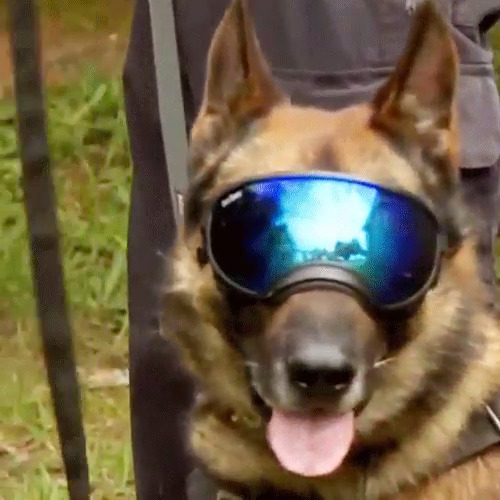
Don't watch Cops or LivePD. (Used to watch Cops.) But if I had to choose, I'd pick the one with the worlds coolest dog.
-
It's also what happens when sprinkler systems, which have been around since 1812, are not a legal requirement for all multi-residence buildings.
-
Your topic has been moved to GTA V Support, this is not LSPDFR related. Please post in the correct location in the future.
-
-
 I made an After Effects template for it. I might be able to release it after I remove the dependence on a plugin, but I'm not sure how useful it will be to people compared to a PSD or XCF.
 -
From the album: GTA V 🚗🚓🚓🚓🚁
© Copyright © 2017 Sniper296
-
Your topic has been moved to GTA V Support, this is not LSPDFR related. Please post in the correct location in the future.
-
Your topic has been moved to GTA V Support, this is not LSPDFR related. Please post in the correct location in the future.
-
Your topic has been moved to GTA V Support, this is not LSPDFR related. Please post in the correct location in the future.
-
This topic has been moved to the appropriate forum. Please post in the correct location in the future.
-
This topic has been moved to the appropriate forum. Please post in the correct location in the future.
-
This topic has been moved to the appropriate forum. Please post in the correct location in the future.
-
Do I have to ban everyone again for not mentioning Flashpoint?


