
Skip to content
View in the app

A better way to browse. Learn more.

LCPDFR.com

A full-screen app on your home screen with push notifications, badges and more.

To install this app on iOS and iPadOS
  1. Tap the Share icon in Safari
  2. Scroll the menu and tap Add to Home Screen.
  3. Tap Add in the top-right corner.
To install this app on Android
  1. Tap the 3-dot menu (⋮) in the top-right corner of the browser.
  2. Tap Add to Home screen or Install app.
  3. Confirm by tapping Install.

Traffic Control 1.1.1

(46 reviews)

4 Screenshots

Traffic Control for GTA V
Copyright (C) 2018 Stealth22. All rights reserved.

Any unauthorized modification, reverse engineering, or distribution (including re-uploading of any kind) is strictly prohibited.


Requirements
You must have version 0.63 (or newer) of RAGE Plugin Hook. You must have a fully legal, non-pirated version of GTA V.


Automatic Installation
- Extract the ZIP archive; ensure that setup.exe and Traffic Control.msi are both in the same folder
- DON'T run Traffic Control.msi unless you know what you're doing
- Run setup.exe, and ensure that the installation directory detected matches the main/root folder of your GTA V install directory
- If setup.exe is unable to detect your GTA V directory, or fails in some other fashion, start Traffic Control.msi, AND SELECT YOUR GTA V PATH AS THE INSTALL DIRECTORY


Manual Installation
- Copy the TrafficControl.dll and TrafficControl.ini files into the Plugins folder of your GTA V directory.
- Copy the Stealth.Common.dll and RAGENativeUI.dll files into your main/root GTA V directory.


Features
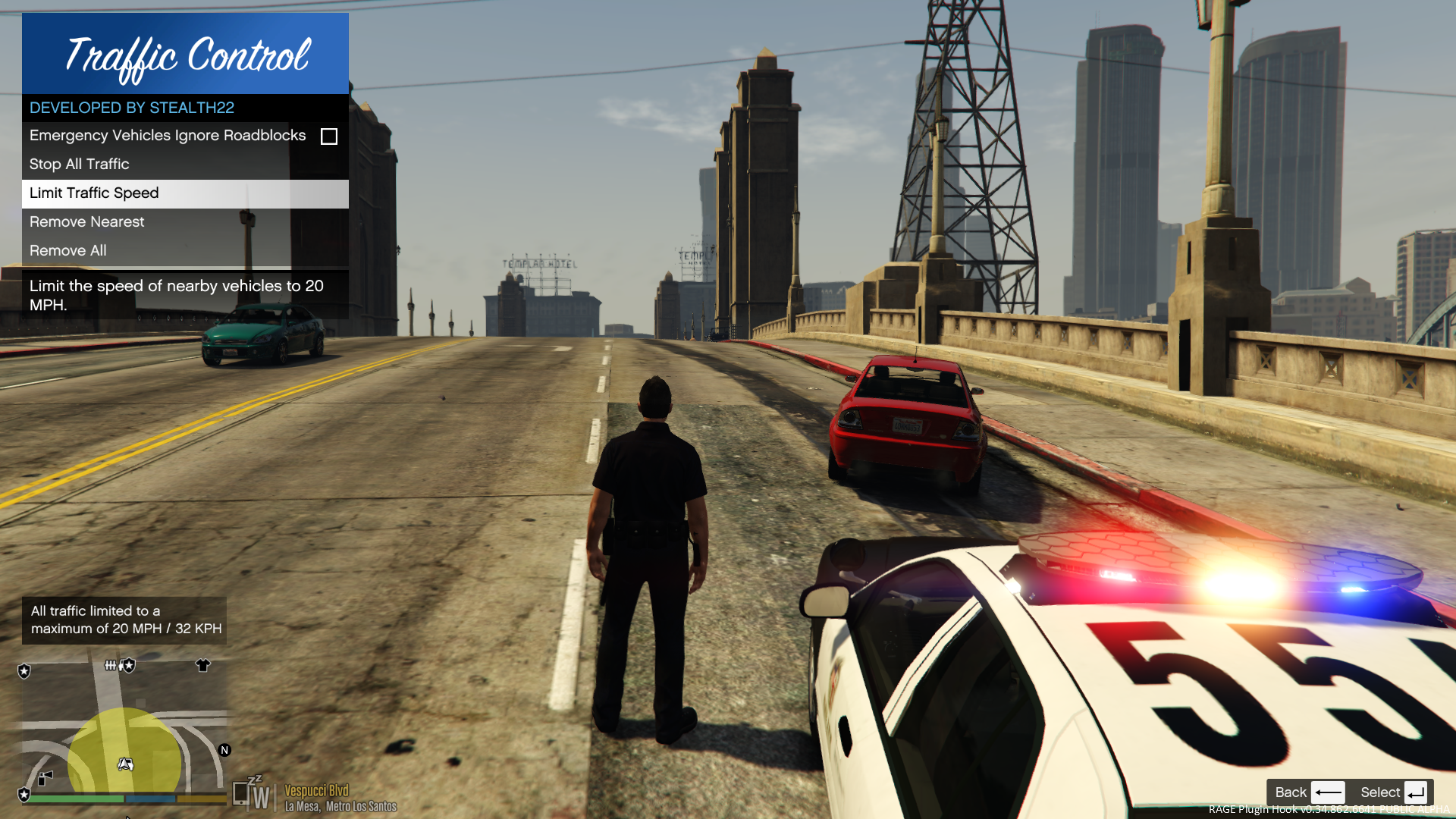
- Stop or slow down all traffic within a certain radius of the player, in order to close a road for investigative purposes, or for safety reasons during a traffic stop
- Multiple "roadblocks" or "speed zones" can be placed
- Roadblocks will remain in place until removed by the player
- A (beta) setting to allow any emergency vehicles to drive through "roadblocks"/"stop zones" can be enabled in the INI file ("Stop Traffic" orders only; speed restrictions are not affected)
- The above setting can also be changed on-demand through the new in-game menu
[NEW!] - Traffic Control now includes a new in-game menu, powered by RAGENativeUI!
[NEW!] - Keyboard shortcuts can now be changed in the INI file!
[NEW!] - Keyboard shortcuts can be disabled, if desired (to use the in-game menu exclusively)

[NEW!] - Integration with Police SmartRadio!


Usage
- Press the menu keybind (CTRL + F10 by default) to open the Traffic Control menu; use the menu options to place/remove roadblocks
- Alternatively, you can use the shortcut keys (see the INI file) to place/remove roadblocks
- Keyboard shortcuts can be disabled through the INI file, if you wish to only use the in-game menu


Forum Thread

http://www.lcpdfr.com/forums/topic/51961-rel-traffic-control-beta-close-off-the-road-while-you-investigate-and-clear-a-scene/ 

What's New in Version 1.1.1

Released

VERSION 1.1.1

  • Added missing Police SmartRadio files; fixed directory structure
  • Had some issues building the auto installer; this version will be manual drag and drop only
     

VERSION 1.1.0

  • This version requires RPH 0.62+, as well as RAGENativeUI v.1.6.3.0
  • This version also requires Stealth.Common v2.0+ (included; older versions will not work)
  • Brought this plugin into the 21st century, and best of all...
  • Integration with Police SmartRadio, built by our very own @Albo1125!!

User Feedback

Recommended Comments

Scottvdken

Members

32 minutes ago, jdwohlever said:

Do you have an ETA on an update?

Really missing this mod.


Same here. Los Santos drivers could give a F**** about the barriers. This was the only mod keeping me and my suspects semi-safe!


On 4/4/2016 at 2:44 PM, ricearoni said:

@Stealth22 This mod has become essential for my gameplay, and thank you for that! I do howver have a suggestion : Seeing as how you have managed to make a setting for emergency vehicles to ignore traffic blips, is there a way you could create a special traffic blip that ONLY emergency vehicles are effectd by. For example, sometimes the road is clear and safe for slow moving traffic but I want to keep a couple of additional units on scene while I finish up, If I could put out a blip (make it blue for all intensive purposes) that stops all emrgency vehicles but allows other traffic to flow it would make it much easier! thanks!

This would be amazing if you could do it @Stealth22. Often times my backup causes more carnage trying to leave the scene than what I'm trying to get cleaned up! Having the ability to hold them in place until I'm ready for them to leave would be clutch.

Kal74

Members

1 hour ago, John23 said:

This does not work on the new RAGE btw

He is already aware of it.. I'm sure he is working on updating it, just have to be patient.:thumbsup:

Stealth22

Friends of LSPDFR Author

46 minutes ago, Kal74 said:

He is already aware of it.. I'm sure he is working on updating it, just have to be patient.:thumbsup:

Should I delay it every time someone asks? :whistling:

Kal74

Members

Just now, Stealth22 said:

Should I delay it every time someone asks? :whistling:

lol hmmmmmm:whistling:


Stealth22

Friends of LSPDFR Author

(edited)

On 04/04/2016 at 0:44 PM, ricearoni said:

@Stealth22 This mod has become essential for my gameplay, and thank you for that! I do howver have a suggestion : Seeing as how you have managed to make a setting for emergency vehicles to ignore traffic blips, is there a way you could create a special traffic blip that ONLY emergency vehicles are effectd by. For example, sometimes the road is clear and safe for slow moving traffic but I want to keep a couple of additional units on scene while I finish up, If I could put out a blip (make it blue for all intensive purposes) that stops all emrgency vehicles but allows other traffic to flow it would make it much easier! thanks!

I can try. It may have undesired effects, though. The cops behave a little differently than normal peds...they don't really like it when they are blocked by something. I think it should be fine, but the game might make them drive off like madmen when you open the road up, or they might get out of their cars and walk away, lol. Actually, if a civilian ped decides to be an idiot, the cops might step out of their cars and shoot at them.

Traffic Control isn't an LSPDFR plugin, so I can't mark the cop peds as 'busy' (to prevent LSPDFR from taking control of them) like you can with a callout. (edit: And actually, for that matter, the whole shooting civilians thing is native GTA V logic, not LSPDFR. LSPDFR actually tries to prevent that from happening, or at least minimizes it)

Edited by Stealth22

Stealth22

Friends of LSPDFR Author

VERSION 1.0.1

  • No changes from v1.0.0, aside from allowing newer versions of RAGENativeUI to be run.
  • Note that the RAGENativeUI DLL packaged with this version is still the older version, v1.3.0. If you have the newer version installed, do not overwrite it!
  • I included an automatic installer as a courtesy, but all you really need to do is open the Manual Installation folder, and replace the TrafficControl.dll file in your Plugins folder. There are no other changes in this version.
  • Special thanks to @Kilyin and @Kal74 for helping me test this version yesterday!

Markadaliah

Members

EVERYONE GIVE A BIG THANK YOU TO @Stealth22 FOR CONTINUING TO DEVELOP THIS MOD AND UPDATING. I would love to "tip" or "donate". Add the button? :]

Scottvdken

Members

19 minutes ago, Markadaliah said:

 I would love to "tip" or "donate". Add the button? :]


vietbub

Members

Does this mod conflict with any other mod? 

Installed version 1.0.1 but still getting an error loading the plugin: error encountered in process thread -- Thread was being aborted. 

List of mods I have

Arrest manager 5.8.0.1

CalloutsV 0.3.1.6

Wilderness Callouts v0.5.2


Kal74

Members

(edited)

5 hours ago, vietbub said:

Does this mod conflict with any other mod? 

Installed version 1.0.1 but still getting an error loading the plugin: error encountered in process thread -- Thread was being aborted. 

List of mods I have

Arrest manager 5.8.0.1

CalloutsV 0.3.1.6

Wilderness Callouts v0.5.2


It shouldn't. I use all of those with no problem. 

Post your RagePluginHook log file to http://pastebin.com/ copy\paste the link to it here.

Also, update your Arrest Manager to 5.8.0.3

Go into your Main GTAV Directory and make sure your RAGENativeUI.dll is version 1.3.1.0

Written up top under the most recent change-log it says

"Note that the RAGENativeUI DLL packaged with this version is still the older version, v1.3.0. If you have the newer version installed, do not overwrite it!"


Edited by Kal74

tmcs1995

Members

hello so i'm in version 1.0.1 is this the latest ? for me there no other version except 1.0.0

i got the .ini and .dll in the plugin folder

here's the screen shot of the versions i can choose

http://imgur.com/BM9rgoI

and here is my plugin folder

http://imgur.com/KjcGZH1

osefjygyuh

Members

it crashed heres the report was able to reload after anyway. it asked to send report so here you go if its not what you need let me know. theres others in the file the last two are the traffic control crashes love it!


crash logs.txt

RogueTrooper

Members

I'm having a conflicton as well with Arrest manager its either one or the other that works. 

Kal74

Members

3 hours ago, RogueTrooper said:

I'm having a conflicton as well with Arrest manager its either one or the other that works. 

What conflict are you having?

Can you post your RagePluginHook logfile.. Use http://pastebin.com/ to upload your logfile.. Click Create new Paste and copy/paste the link to it here.

Post a screenshot of:

1. GTAV Folder

2. Plugins Folder

Upload the images to http://imgur.com/ copy/paste link to it here.

RogueTrooper

Members

21 hours ago, Kal74 said:

What conflict are you having?

Can you post your RagePluginHook logfile.. Use http://pastebin.com/ to upload your logfile.. Click Create new Paste and copy/paste the link to it here.

Post a screenshot of:

1. GTAV Folder

2. Plugins Folder

Upload the images to http://imgur.com/ copy/paste link to it here.

My apologies it seems that the Ragenative.ini is 1.3.1 and it wants the older 1.3.0 version.

Kal74

Members

1 hour ago, RogueTrooper said:

My apologies it seems that the Ragenative.ini is 1.3.1 and it wants the older 1.3.0 version.

I think you meant to say RAGENativeUI.dll 1.3.1 .... Do you have the updated versions of any or all of these installed (Arrest Manager, Traffic Policer, Assorted Callouts)

If you do, they all use the newer RAGENativeUI.dll 1.3.1

Under the changelog up top it says

  • Note that the RAGENativeUI DLL packaged with this version is still the older version, v1.3.0. If you have the newer version installed, do not overwrite it!

So if you are using the updated versions of those mods I mentioned above don't replace the RAGENativeUI.dll with the one that comes with Traffic Control.


RogueTrooper

Members

20 minutes ago, Kal74 said:

I think you meant to say RAGENativeUI.dll 1.3.1 .... Do you have the updated versions of any or all of these installed (Arrest Manager, Traffic Policer, Assorted Callouts)

If you do, they all use the newer RAGENativeUI.dll 1.3.1

Under the changelog up top it says

  • Note that the RAGENativeUI DLL packaged with this version is still the older version, v1.3.0. If you have the newer version installed, do not overwrite it!

So if you are using the updated versions of those mods I mentioned above don't replace the RAGENativeUI.dll with the one that comes with Traffic Control.


I updated all of them and they still are saying that it is all outdated and Traffic control still does not work. i have done all of that.


here is the link to screen shots of my folders.

http://imgur.com/a/o3wS6

What ragehook is saying.

http://imgur.com/uCAJldk


Kal74

Members

8 minutes ago, RogueTrooper said:

updated all of them and they still are saying that it is all outdated and Traffic control still does not work. i have done all of that.


here is the link to screen shots of my folders.

http://imgur.com/a/o3wS6

What ragehook is saying.

http://imgur.com/uCAJldk

Strange, do you have Traffic Control set to load automatically on startup in the RagePluginHook Config Console? If so, go in there and uncheck the box next to Traffic Control so it doesn't load automatically then go into the game and load it manually from the console and see if anything changes. Currently this is what I've been doing is just loading it manually in game. not sure why it seems to work at that point. 

RogueTrooper

Members


1 minute ago, Kal74 said:

Strange, do you have Traffic Control set to load automatically on startup in the RagePluginHook Config Console? If so, go in there and uncheck the box next to Traffic Control so it doesn't load automatically then go into the game and load it manually from the console and see if anything changes. Currently this is what I've been doing is just loading it manually in game. not sure why it seems to work at that point. 

Yes i currently has it set automatically. ill give her a shot right now to see what's going on and update you.

RogueTrooper

Members

14 hours ago, RogueTrooper said:


Yes i currently has it set automatically. ill give her a shot right now to see what's going on and update you.

Still no luck Kal im just not able to run both i guess ill have to wait for an update.

gamingsavage

Members

On ‎4‎/‎11‎/‎2016 at 2:30 AM, RogueTrooper said:

I updated all of them and they still are saying that it is all outdated and Traffic control still does not work. i have done all of that.


here is the link to screen shots of my folders.

http://imgur.com/a/o3wS6

What ragehook is saying.

http://imgur.com/uCAJldk


I'm using an updated RageNativeUI 1.3.1 but when I load in game I get an error message saying I have 1.3.1 and Traffic control can only run off 1.3.0 WTF? Was working perfectly fine yesterday :'(

Markadaliah

Members

Anyone else having issues removing traffic control points? They don't stop being yellow on the minimap, and they also continue to stop peds. @Stealth22 can you please take a look at this. Just need the line of code tweaked so it is not stopping us fro deleting roadblocks

gamingsavage

Members

On ‎4‎/‎18‎/‎2016 at 0:38 PM, Markadaliah said:

Anyone else having issues removing traffic control points? They don't stop being yellow on the minimap, and they also continue to stop peds. @Stealth22 can you please take a look at this. Just need the line of code tweaked so it is not stopping us fro deleting roadblocks

I cant even get the damn thing to work so be thankful. I'm using an updated RageNativeUI 1.3.1 but when I load in game I get an error message saying I have 1.3.1 and Traffic control can only run off 1.3.0 WTF? Was working perfectly fine a few days back. The author said it works with 1.3.1 but iv tried it all and it always says that

Kal74

Members

15 minutes ago, gamingsavage said:
On 4/18/2016 at 3:38 PM, Markadaliah said:

Anyone else having issues removing traffic control points? They don't stop being yellow on the minimap, and they also continue to stop peds. @Stealth22 can you please take a look at this. Just need the line of code tweaked so it is not stopping us fro deleting roadblocks

I cant even get the damn thing to work so be thankful. I'm using an updated RageNativeUI 1.3.1 but when I load in game I get an error message saying I have 1.3.1 and Traffic control can only run off 1.3.0 WTF? Was working perfectly fine a few days back. The author said it works with 1.3.1 but iv tried it all and it always says that

Try removing it from auto startup in the RagePluginHook Config Console under the Plugins Tab, then when you get in game manually load it.. See if it works then.

Stealth22

Friends of LSPDFR Author

On 24/04/2016 at 3:31 PM, gamingsavage said:

I cant even get the damn thing to work so be thankful. I'm using an updated RageNativeUI 1.3.1 but when I load in game I get an error message saying I have 1.3.1 and Traffic control can only run off 1.3.0 WTF? Was working perfectly fine a few days back. The author said it works with 1.3.1 but iv tried it all and it always says that

Uninstall it, delete any versions you have in your downloads folder, download the latest version again, and reinstall. You're using the older version that has that bug.

On 18/04/2016 at 1:38 PM, Markadaliah said:

Anyone else having issues removing traffic control points? They don't stop being yellow on the minimap, and they also continue to stop peds. @Stealth22 can you please take a look at this. Just need the line of code tweaked so it is not stopping us fro deleting roadblocks

There is nothing that stops it from removing roadblocks. See if there are any errors logged in your RagePluginHook.log file. Ensure you're using the correct keyboard shortcut, or try the menu. Removing roadblocks has always worked perfectly fine in testing.

Create an account or sign in to comment

Latest Mods

Account

Navigation

Search

Search

Configure browser push notifications

Chrome (Android)
  1. Tap the lock icon next to the address bar.
  2. Tap Permissions → Notifications.
  3. Adjust your preference.
Chrome (Desktop)
  1. Click the padlock icon in the address bar.
  2. Select Site settings.
  3. Find Notifications and adjust your preference.






