
Skip to content
View in the app

A better way to browse. Learn more.

LCPDFR.com

A full-screen app on your home screen with push notifications, badges and more.

To install this app on iOS and iPadOS
  1. Tap the Share icon in Safari
  2. Scroll the menu and tap Add to Home Screen.
  3. Tap Add in the top-right corner.
To install this app on Android
  1. Tap the 3-dot menu (⋮) in the top-right corner of the browser.
  2. Tap Add to Home screen or Install app.
  3. Confirm by tapping Install.

Traffic Control 1.1.1

(46 reviews)

4 Screenshots

Traffic Control for GTA V
Copyright (C) 2018 Stealth22. All rights reserved.

Any unauthorized modification, reverse engineering, or distribution (including re-uploading of any kind) is strictly prohibited.


Requirements
You must have version 0.63 (or newer) of RAGE Plugin Hook. You must have a fully legal, non-pirated version of GTA V.


Automatic Installation
- Extract the ZIP archive; ensure that setup.exe and Traffic Control.msi are both in the same folder
- DON'T run Traffic Control.msi unless you know what you're doing
- Run setup.exe, and ensure that the installation directory detected matches the main/root folder of your GTA V install directory
- If setup.exe is unable to detect your GTA V directory, or fails in some other fashion, start Traffic Control.msi, AND SELECT YOUR GTA V PATH AS THE INSTALL DIRECTORY


Manual Installation
- Copy the TrafficControl.dll and TrafficControl.ini files into the Plugins folder of your GTA V directory.
- Copy the Stealth.Common.dll and RAGENativeUI.dll files into your main/root GTA V directory.


Features
- Stop or slow down all traffic within a certain radius of the player, in order to close a road for investigative purposes, or for safety reasons during a traffic stop
- Multiple "roadblocks" or "speed zones" can be placed
- Roadblocks will remain in place until removed by the player
- A (beta) setting to allow any emergency vehicles to drive through "roadblocks"/"stop zones" can be enabled in the INI file ("Stop Traffic" orders only; speed restrictions are not affected)
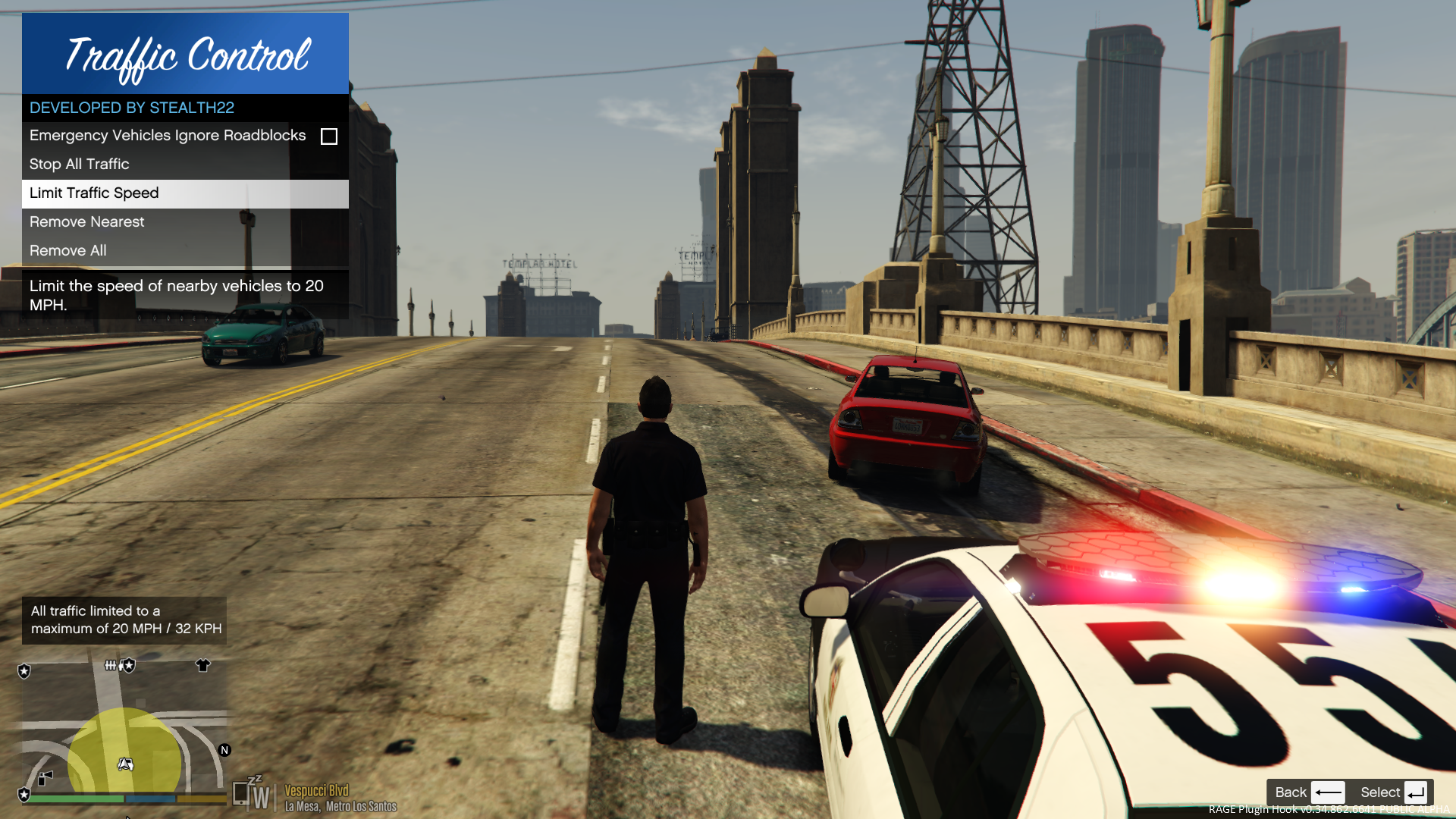
- The above setting can also be changed on-demand through the new in-game menu
[NEW!] - Traffic Control now includes a new in-game menu, powered by RAGENativeUI!
[NEW!] - Keyboard shortcuts can now be changed in the INI file!
[NEW!] - Keyboard shortcuts can be disabled, if desired (to use the in-game menu exclusively)

[NEW!] - Integration with Police SmartRadio!


Usage
- Press the menu keybind (CTRL + F10 by default) to open the Traffic Control menu; use the menu options to place/remove roadblocks
- Alternatively, you can use the shortcut keys (see the INI file) to place/remove roadblocks
- Keyboard shortcuts can be disabled through the INI file, if you wish to only use the in-game menu


Forum Thread

http://www.lcpdfr.com/forums/topic/51961-rel-traffic-control-beta-close-off-the-road-while-you-investigate-and-clear-a-scene/ 

What's New in Version 1.1.1

Released

VERSION 1.1.1

  • Added missing Police SmartRadio files; fixed directory structure
  • Had some issues building the auto installer; this version will be manual drag and drop only
     

VERSION 1.1.0

  • This version requires RPH 0.62+, as well as RAGENativeUI v.1.6.3.0
  • This version also requires Stealth.Common v2.0+ (included; older versions will not work)
  • Brought this plugin into the 21st century, and best of all...
  • Integration with Police SmartRadio, built by our very own @Albo1125!!

User Feedback

Recommended Comments

Reddington

Members

1 minute ago, Imasquidx said:


I'm having the same problem... this mod crashes my LSPDFR, and i updated everything and made sure everything was in correctly. He says you need 0.63 of rage, but that's not even a thing!


It was a small mistake on his part and can be ignored, he just meant the latest version of Rage.

Imasquidx

Members

Just now, Giordano said:


It was a small mistake on his part and can be ignored, he just meant the latest version of Rage.

But even so, this mod won't work, it always crashes my lspdfr and I traced it back to this mod. I looked back and saw a lot of others are having the same problem. Any way to fix?

Anyone know how to make this mod work? It crashes my LSPDFR every time. It lists code 3 callouts as well, so maybe they aren't compatible or something. I'm going to try it out right now, but if it doesn't work I'm gonna be pretty sad, as I loved using this mod.

Reddington

Members

1 hour ago, Imasquidx said:

But even so, this mod won't work, it always crashes my lspdfr and I traced it back to this mod. I looked back and saw a lot of others are having the same problem. Any way to fix?

Anyone know how to make this mod work? It crashes my LSPDFR every time. It lists code 3 callouts as well, so maybe they aren't compatible or something. I'm going to try it out right now, but if it doesn't work I'm gonna be pretty sad, as I loved using this mod.


Nothing we can do, sadly.  Stealth is the one who needs to fix it.

Imasquidx

Members

2 hours ago, Giordano said:


Nothing we can do, sadly.  Stealth is the one who needs to fix it.

Yeah, real shame. Hopefully he will come back one day. I loved his mods 🙂

Pazzi

Members

On ‎7‎/‎4‎/‎2018 at 5:09 PM, Imasquidx said:

Yeah, real shame. Hopefully he will come back one day. I loved his mods 🙂

there's an alternative to stop the cars. you might try the freeze driver feature from make the peds calm again.

PitBullTV

Members

dont work, lspdfr crashed if i went on duty.


HazyTube

Members

14 hours ago, PitBullTV said:

dont work, lspdfr crashed if i went on duty.


Stealth is been gone for a while, he needs to update the mod

PitBullTV

Members

12 hours ago, HazyTube said:

Stealth is been gone for a while, he needs to update the mod

thx for ur information ..:) 

HazyTube

Members

9 hours ago, PitBullTV said:

thx for ur information ..:) 

No problem 🙂 btw if you can try the freeze drivers option in the make peds calm again mod, this will stop traffic too

MCPhantomX

Members

Hmm... I got downloaded the script and installed it, but once in game none of the controls from the .ini work. Any suggestions? Thanks!

HazyTube

Members

15 hours ago, MCPhantomX said:

Hmm... I got downloaded the script and installed it, but once in game none of the controls from the .ini work. Any suggestions? Thanks!

This plugin doesn't work anymore...

Raido2X

Members

That works, but then ALPR+ don't work anymore


sorry got the wrong information

MCPhantomX

Members

4 hours ago, HazyTube said:

This plugin doesn't work anymore...

I finally got it working, unfortunately, I don't know how. I just reinstalled it AND Police Smart Radio, and it comes up in the radio as well as pressing Ctrl U, I, and O.

Raido2X

Members

1 hour ago, MCPhantomX said:

I finally got it working, unfortunately, I don't know how. I just reinstalled it AND Police Smart Radio, and it comes up in the radio as well as pressing Ctrl U, I, and O.

And its working for you now, I see only icons and i press Ctrl+I or Ctrl+O and nothing happend

HazyTube

Members

2 hours ago, MCPhantomX said:

I finally got it working, unfortunately, I don't know how. I just reinstalled it AND Police Smart Radio, and it comes up in the radio as well as pressing Ctrl U, I, and O.

Yeah that works, but traffic won't stop. It's a bug and stealth hasn't been around for a while, he needs to fix it

XTREMEHEAT

Members

5 hours ago, HazyTube said:

Yeah that works, but traffic won't stop. It's a bug and stealth hasn't been around for a while, he needs to fix it

Idk about any bugs tbh, it's been working for me ever since I installed it. It was updated about 3 months ago which isn't that really so long ago. Could it be something unique to your system?

HazyTube

Members

10 hours ago, XTREMEHEAT said:

Idk about any bugs tbh, it's been working for me ever since I installed it. It was updated about 3 months ago which isn't that really so long ago. Could it be something unique to your system?

No I dont think so, everyone has this, I think you are lucky 🙂 But, if you press on stop all traffic does that work? For me the cars still drive threw. And also wich version of the game are you on?

MCPhantomX

Members

22 hours ago, HazyTube said:

Yeah that works, but traffic won't stop. It's a bug and stealth hasn't been around for a while, he needs to fix it

Nope, it actually stops/slows down the traffic for me, but I agree that it needs to be fixed so everyone can use it.

HazyTube

Members

1 hour ago, MCPhantomX said:

Nope, it actually stops/slows down the traffic for me, but I agree that it needs to be fixed so everyone can use it.

But what version of gta and RPH are you on?

XTREMEHEAT

Members

13 minutes ago, HazyTube said:

But what version of gta and RPH are you on?

Ahhh I think I see your point. Are you saying that it is not working on the latest update of the game? I'm on rage 0.62 and gta 5 version 1365. I didnt update to latest one yet. ScripthookV and rage would have to update as well if you updated to latest version of gta 5. But I was referring to the version before latest update. Sorry!

HazyTube

Members

2 minutes ago, XTREMEHEAT said:

Ahhh I think I see your point. Are you saying that it is not working on the latest update of the game? I'm on rage 0.62 and gta 5 version 1365. I didnt update to latest one yet. ScripthookV and rage would have to update as well if you updated to latest version of gta 5. But I was referring to the version before latest update. Sorry!

Uhh lol I'm on that version too because of the same reasons but for me it's not working? did you download the stealth.common separately ?

XTREMEHEAT

Members

(edited)

5 hours ago, HazyTube said:

Uhh lol I'm on that version too because of the same reasons but for me it's not working? did you download the stealth.common separately ?

I do not remember but the one that is provided in the download seems to be the latest version anyways. Same goes for RageNativeUI. Both of them should be in main directory of GTA V. TrafficControl.ini and TrafficControl.dll should be in C:\Program Files (x86)\Steam\steamapps\common\Grand Theft Auto V\plugins\LSPDFR folder. The instruction on the mod page is wrong apparently because I did not install mine in the plugin folder in the main directory but rather the LSPDFR folder within the plugin folder and it works that way. Even shows on my policeradio and everything works perfect. Please test that out and let the others know if it works for you. I am almost 100% sure that this should work, the install directory for the TrafficControl ini and dll file is wrong on this page.

Edited by XTREMEHEAT

HazyTube

Members

11 hours ago, XTREMEHEAT said:

I do not remember but the one that is provided in the download seems to be the latest version anyways. Same goes for RageNativeUI. Both of them should be in main directory of GTA V. TrafficControl.ini and TrafficControl.dll should be in C:\Program Files (x86)\Steam\steamapps\common\Grand Theft Auto V\plugins\LSPDFR folder. The instruction on the mod page is wrong apparently because I did not install mine in the plugin folder in the main directory but rather the LSPDFR folder within the plugin folder and it works that way. Even shows on my policeradio and everything works perfect. Please test that out and let the others know if it works for you. I am almost 100% sure that this should work, the install directory for the TrafficControl ini and dll file is wrong on this page.

Dude, you have to put it in lspdfr folder I'm not a noob, however this location doesn't do anything with the mod itself, it's just a bug and the installation doesn't have to do anything with that.

Deactivated Member

Deactivated

On 6/30/2018 at 9:15 PM, Giordano said:

Sad to say, got another crash.  Might just have to go without this plugin, which is a huge shame.  I hope Stealth comes back and updates it.

I have recently been getting some crashes with this plugin too, however when I read the logs it appears it is being caused by the plugin not working with RageNativeUI. If you have Stop The Ped, this might be the cause of the issue. Stop The Ped uses a newer version of RageNativeUI than Traffic Control, however, I have found that Stop The Ped works on the older version of RagenativeUI that Traffic Control comes with. I still think this plugin needs to be updated, but I don't know when (or if) it will ever be again.

HazyTube

Members

8 hours ago, Mauvzel said:

I have recently been getting some crashes with this plugin too, however when I read the logs it appears it is being caused by the plugin not working with RageNativeUI. If you have Stop The Ped, this might be the cause of the issue. Stop The Ped uses a newer version of RageNativeUI than Traffic Control, however, I have found that Stop The Ped works on the older version of RagenativeUI that Traffic Control comes with. I still think this plugin needs to be updated, but I don't know when (or if) it will ever be again.

Stealth is been gone for a while, hopefully he will come back 1 day tho

Create an account or sign in to comment

Account

Navigation

Search

Search

Configure browser push notifications

Chrome (Android)
  1. Tap the lock icon next to the address bar.
  2. Tap Permissions → Notifications.
  3. Adjust your preference.
Chrome (Desktop)
  1. Click the padlock icon in the address bar.
  2. Select Site settings.
  3. Find Notifications and adjust your preference.


