Skip to content
View in the app

A better way to browse. Learn more.

LCPDFR.com

A full-screen app on your home screen with push notifications, badges and more.

To install this app on iOS and iPadOS
  1. Tap the Share icon in Safari
  2. Scroll the menu and tap Add to Home Screen.
  3. Tap Add in the top-right corner.
To install this app on Android
  1. Tap the 3-dot menu (⋮) in the top-right corner of the browser.
  2. Tap Add to Home screen or Install app.
  3. Confirm by tapping Install.
Due to overzealous filtering on Microsoft’s side, some emails to Outlook and Hotmail addresses may not be delivered. If you’re affected, please use a different email address or try again later.

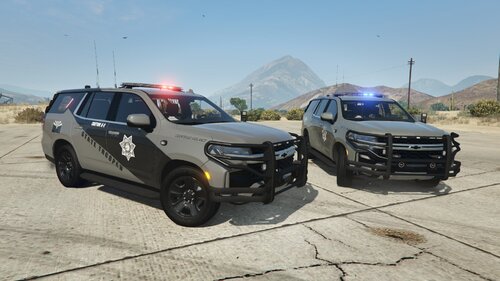
ParagouldPD 20 Exp livery 1.0.0

(0 reviews)

2 Screenshots

So basically i made that cuz i was doing a green county Fivem RP server but since we changed i am releasing that Paragould PD 2020 FPIU Livery that i made but now i am releasing it for free

for you guys.

Feedback is Appreciate !

and be cool cuz the livery was hard as f?ck to make

still in wip so i might add some other livery

I couldn't take the screenshots in game so i just took them in openiv

Edited by Code 3 Dev


Short Description

Paragould PD 2020 Explorer Livery

User Feedback

Recommended Comments

Zacks Dev Work

Members

Not spec, hate to be that guy but as a first livery it aint bad

Code 3 Dev

Members Author

i mean if you have the right font i can make it better but since i didn't find it i make it like that

Create an account or sign in to comment

Account

Navigation

Search

Search

Configure browser push notifications

Chrome (Android)
  1. Tap the lock icon next to the address bar.
  2. Tap Permissions → Notifications.
  3. Adjust your preference.
Chrome (Desktop)
  1. Click the padlock icon in the address bar.
  2. Select Site settings.
  3. Find Notifications and adjust your preference.