


.jpg.c77e153463f0bd0546533c7183551f54.jpg)

.jpg.afec9d5e950fdf449df6e28c9f8f38d3.jpg)
ApxRadio is a functional Motorola APX7000 style radio UI for LSPDFR. It includes a handheld and in-car radio for a nice visual display for dispatch plugins like, GrammarPolice, NexusDispatch, etc. It CAN be used with any dispatch plugin.
v1.3.1
Features include:
Interactive handheld and in-car radio controls
Up to 16 customizable zones with 16 channels per zone
Resize, reposition, and save both radios independently
Wi-Fi Smart Connect, Bluetooth, and GPS controls
GPS-based Nearest Location display
Zone, channel, clock, profile, information, and TMS menus
Time synchronized day and night displays
Animated signal, connection, and transmission indicators
Tunnel signal loss and water radio failure
Customizable callsign, keybinds, sounds, and voice prompts
Partial controller support
Extensive configuration through
apxconfig.ini
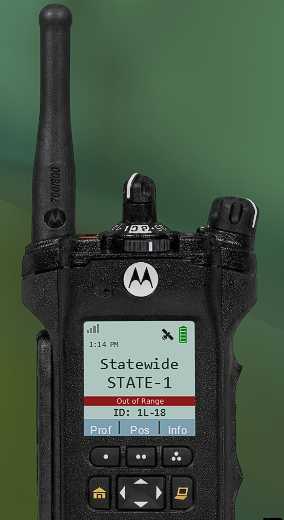
out of range photo example
Press "Left Shift" and "=", then left click to drag the radios and move them. Scroll to increase or decrease their size.
ApxRadio is a visual and immersion focused plugin and does not replace your existing dispatch plugin.
Video Demo & YouTube Previews
(Last video is a demo. Other two are examples of the radio in action!)
Check the Instructions.txt file for more information on setting this plugin up. After installation, you MUST match ApxRadio’s transmit keybind to the transmit keybind used by your primary dispatch plugin if you want the "transmitting" text to appear on your radio.
Requirements:
GTA V Legacy
RAGE Plugin Hook
LSPDFR
I tried to make it as "spec" as possible, I do intend on giving the in-car radio have better realism as right now it's just partial. Though if anyone has suggestions to improving please leave them in comments.
You may have noticed that I updated the plugin twice in one night. This second update includes a fix for the in-car radio bug affecting a small number of people. If the issue continues, you may be using an outdated version of LSPDFR or RagePluginHook and will need to update to the latest version.
Edited by OwenAb
v1.3.1 update
What's New in Version 1.3.1
Released
If you noticed that I updated the plugin twice in one night, this second update includes a fix for the in-car radio bug affecting a small number of people. If the issue continues, you may just be using an outdated version of LSPDFR or RagePluginHook and will need to update it to the newest version.
What's new in V1.3.1?
Overhauled audio and the ability to disable startup sound.
The minimum size for the in-car radio has been lowered slightly further. (75% to 55%)
Partial controller support added. (keybinds may need to be changed to something better I'm not to familiar with controllers)
The home button no longer resets to the primary channel when clicked, it's other functions still work. Only when it's now held for 2 seconds, will it return to Zone 1 Channel 1.
Added a 'Profiles' menu on the handheld radio allowing switching between day & night mode.
A new 'Position' button. Tells the players last known location. Requires the 2nd page gps/location toggle to be on for this to work.
Activiating Wifi allows for the Smart Connect feature to be activated, giving stronger connection and less dips in the signal.
Going into tunnels/certain covered areas will lead to the radio going Out of Range, and going into water will shut off the radio.
Plugin now labeled as recommended for newer versions. Most people having issues had older versions.
Patched the night time in-car radio and cursor bugs.
Short Description
AI disclosure
The author has disclosed that AI tools were used in creating the following aspects of this file:
- Mod and Mod Content (Moderate)
Fixing broken code/debugging.











.thumb.png.8cef6bf40847c87cdc7f2b84d14bb45d.png)
![[RELEASE] LASD/LSSD Livery Pack [WIP / Expanding]](http://s3-screenshots.int-cdn.lcpdfrusercontent.com/resize/500/-/monthly_2026_08/11CVPI-LCPDFR.thumb.png.5854e70536a1be65efd81c48874a99d2.png)

![[NON ELS / FiveM Ready] B/B 2021 FPIU Unmarked - ULC Compatible](http://s3-screenshots.int-cdn.lcpdfrusercontent.com/monthly_2026_08/fpiu1(1).thumb.png.6ba7b189c9a83d3aa873f4d24dead596.png)

Recommended Comments
Create an account or sign in to comment