Skip to content
View in the app

A better way to browse. Learn more.

LCPDFR.com

A full-screen app on your home screen with push notifications, badges and more.

To install this app on iOS and iPadOS
  1. Tap the Share icon in Safari
  2. Scroll the menu and tap Add to Home Screen.
  3. Tap Add in the top-right corner.
To install this app on Android
  1. Tap the 3-dot menu (⋮) in the top-right corner of the browser.
  2. Tap Add to Home screen or Install app.
  3. Confirm by tapping Install.
Due to overzealous filtering on Microsoft’s side, some emails to Outlook and Hotmail addresses may not be delivered. If you’re affected, please use a different email address or try again later.

TrafficAccident 1.0.2

(0 reviews)

7 Screenshots

TrafficAccident

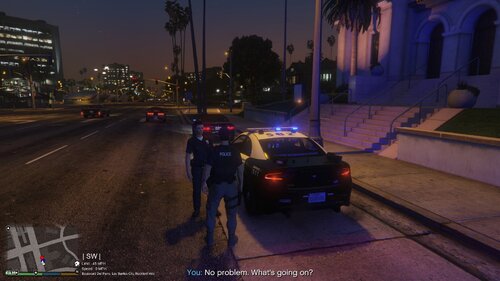
The script detects vehicle accidents in traffic and makes NPC drivers respond more realistically by slowing down, rolling out naturally, and activating their hazard lights to create believable post crash scenes.


Features:

  • Realistic Accident Detection AI vs AI & AI vs player

  • Authentic Vehicle Reaction After a Crash

  • Automatic Hazard Lights

  • More Realistic NPC Driver Behavior

Requirements:

  • ScriptHookV

  • ScriptHookVDotNet

Installation:

  • Place TrafficAccident.dll and TrafficAccident.ini in your scripts folder

Showcase:


Attention!

"Realistic Traffic AI" and other mods that affect traffic are not compatible because my mod changes the entire traffic system!

Edited by juriwpt

What's New in Version 1.0.2

Released

UPDATE 1.0.2

Changes:

  • Addet new INI support for RolloutTime, DamageThreshold and CleanupDistance.

  • Fixed so that the suspect can be arrested again.

Config:

  • N/A

Known Bugs:

  • N/A


Short Description

Detects NPC accidents, stops the vehicle, and automatically turns on the hazard lights.

AI disclosure

The author has disclosed that AI tools were used in creating the following aspects of this file:

  • Description
  • Images

User Feedback

Recommended Comments

juriwpt

Members Author

8 hours ago, 249Xeno said:

i understand. The part that I dont get is when you smashed into the AI as a demonstration; they just sit in the car with the hazard on.

Otherwise they'll panic and run away. You have to remember it's still GTA 5 AI, you have to treat it differently, that's why you can't make it perfectly realistic.

249Xeno

Members

20 hours ago, juriwpt said:

Otherwise they'll panic and run away. You have to remember it's still GTA 5 AI, you have to treat it differently, that's why you can't make it perfectly realistic.

That's true... if any case, the whole Ai has to be reprogrammed for that to happen... Do you know if there is anyone who can break down the GTA V Ai system and create a new one? lol... kidding.

I understand, GTA V needs a better Ai system to be honest.

juriwpt

Members Author

6 hours ago, 249Xeno said:

That's true... if any case, the whole Ai has to be reprogrammed for that to happen... Do you know if there is anyone who can break down the GTA V Ai system and create a new one? lol... kidding.

I understand, GTA V needs a better Ai system to be honest.

That would be really nice hahaha

Nemesisx101

Members

Be cool to see the NPCs get out of vehicle and get on the phone, curse, etc.

SlopCop

Members

Works well, but could use a condition for it not to affect AI you are in a pursuit with.

Create an account or sign in to comment

Account

Navigation

Search

Search

Configure browser push notifications

Chrome (Android)
  1. Tap the lock icon next to the address bar.
  2. Tap Permissions → Notifications.
  3. Adjust your preference.
Chrome (Desktop)
  1. Click the padlock icon in the address bar.
  2. Select Site settings.
  3. Find Notifications and adjust your preference.