Skip to content
View in the app

A better way to browse. Learn more.

LCPDFR.com

A full-screen app on your home screen with push notifications, badges and more.

To install this app on iOS and iPadOS
  1. Tap the Share icon in Safari
  2. Scroll the menu and tap Add to Home Screen.
  3. Tap Add in the top-right corner.
To install this app on Android
  1. Tap the 3-dot menu (⋮) in the top-right corner of the browser.
  2. Tap Add to Home screen or Install app.
  3. Confirm by tapping Install.

AIDispatch 1.1 (For Policing Redefined) 1.1 full release

(7 reviews)

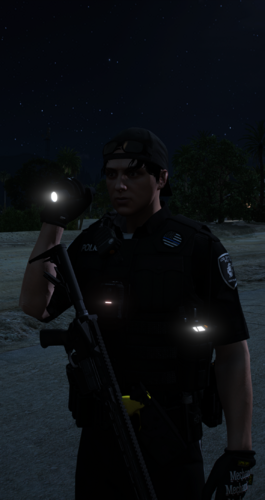
1 Screenshot

Support Development / AIDispatch 1.2 (NOW LIVE) Supporter Build

This public LCPDFR release is the AIDispatch v1.0 full release build.

If you enjoy AIDispatch and want to support continued development, you can follow the project on Patreon. Latest Builds available there.

Patreon: https://www.patreon.com/cw/Boboediting/posts

Discord - Free business icons

Discord channel for support on the mod and update on the devlopment.

https://discord.gg/9m5eWqK6Qw

BIG SHOUTOUT to FK for helping me test my mod!.He makes some good music, go check him out: https://www.youtube.com/watch?v=h5NdHisx0uE&list=PLrm0_QrSnNRIYWixIuWLOPaqZHoZvqtRz

AIDispatch - AI Voice Dispatch for Policing Redefined

AI Dispatch 1.1

AI Dispatch turns your microphone into an actual police dispatch channel for LSPDFR.

Instead of navigating menus or memorizing dozens of keybinds, simply talk to Dispatch naturally. Change your status, request backup and emergency services, run people or vehicles, report traffic stops, manage pursuits, request PIT authorization, ask for callouts, and more.

You can say things like "Dispatch, show me on a traffic stop," "Send me two additional units Code 3," "Run that plate," "What's my current location?" or "Do you have any calls for me?" and AI Dispatch handles the appropriate game action.

What's new in 1.1

Version 1.1 focuses heavily on making Dispatch feel more aware of what is actually happening during your patrol.

  • More reliable plate returns: A major issue where missing CDF information could be incorrectly treated as an all-clear return has been fixed. Vehicle information now comes directly from Policing Redefined's Common Data Framework.

  • Personalized callsigns: Dispatch can now address you directly using Adam or Lincoln callsigns, with numbers from 1 to 99.

  • New Status Panel: Press N for a quick overview of your callsign, current status, scene, location and incident state.

  • New Street / Location Widget: See your current street, cross street, direction and area, or simply ask Dispatch where you are.

  • Pedestrian Stops: Ped stops are now recognized and tracked separately from vehicle traffic stops.

  • Smarter traffic stops: Better context, corrections, vehicle descriptions, locations and follow-up communication.

  • More natural radio traffic: Dispatch can acknowledge routine scene updates without trying to turn everything you say into a command.

  • Request callouts by voice: Ask Dispatch if there are any calls available and receive one without navigating a menu.

  • Repeat information: Ask Dispatch to repeat your most recent plate or pedestrian return.

  • Improved emergency handling: Better Code 99, pursuit, road-name, cross-street and post-incident behavior.

1.1 takes the original AI Dispatch experience and makes it more contextual, more reliable and much more natural to use throughout an entire patrol.

Gemini API Key

AI Dispatch requires your own Google Gemini API key. get your own api key here: https://aistudio.google.com/api-keys

After installing the mod, open:

plugins\LSPDFR\AIDispatch.ini

Find:

[Gemini]
ApiKey=PUT_YOUR_GEMINI_API_KEY_HERE

Replace PUT_YOUR_GEMINI_API_KEY_HERE with your personal Gemini API key.

Never share your API key, screenshots containing it, or your configured INI file publicly.

Callsign Setup

AI Dispatch 1.1 supports personalized Adam and Lincoln callsigns from 1 through 99.

Open:

plugins\LSPDFR\AIDispatch.ini

Find the [OfficerCallsign] section and set your callsign.

For Adam 56:

[OfficerCallsign]
Enabled=true
Callsign=Adam 56
Family=Adam
Number=56

For Lincoln 21:

[OfficerCallsign]
Enabled=true
Callsign=Lincoln 21
Family=Lincoln
Number=21

Make sure Callsign, Family and Number all match the unit you want to use.

Callsign audio is read from:

lspdfr\audio\scanner\AIDispatch\Callsigns\Adam\TargetedFull\

or:

lspdfr\audio\scanner\AIDispatch\Callsigns\Lincoln\TargetedFull\

Place the appropriate callsign audio files in the matching folder.

Installation

  1. Install LSPDFR and RAGE Plugin Hook.

  2. Install Policing Redefined 1.0.0.5.

  3. Extract the AI Dispatch download.

  4. Copy the contents of the included Release folder into your main Grand Theft Auto V directory.

  5. Allow Windows to merge the folders when prompted.

  6. Open plugins\LSPDFR\AIDispatch.ini.

  7. Enter your Gemini API key under [Gemini].

  8. Configure your Adam or Lincoln callsign under [OfficerCallsign].

  9. Launch GTA V through RAGE Plugin Hook, go on duty and hold your configured dispatch talk key to speak.

Notes

  • AI voice recognition can occasionally mishear words, especially with background noise or unusual street-name pronunciation.

  • Hold your radio key for your entire transmission and release it when you finish speaking.

  • Avoid talking over active dispatcher/scanner audio.

  • The N key opens the AI Dispatch status panel.

  • HUD elements can be repositioned using the included F12 UI editor.

  • If you need support, include your AIDispatch.log, but never upload an INI or screenshot containing your Gemini API key.

Edited by boboediting
new version release

What's New in Version 1.1 full release

Released

  1. Fixed a major plate-return bug where missing CDF data could incorrectly be reported as an "all clear" vehicle return.

  2. Added personalized Adam and Lincoln callsign responses for status changes, incidents, backup, pursuits and important alerts.

  3. Added the new N-key Status Panel showing your callsign, duty status, current scene, location and incident state.

  4. Added the Street / Location Widget with current street, cross street, direction and area information.

  5. Added the ability to ask Dispatch for your current location by voice.

  6. Added a dedicated Pedestrian Stop system, allowing pedestrian encounters to be tracked separately from vehicle traffic stops.

  7. Significantly improved traffic-stop context, including vehicle descriptions, locations, corrections, follow-up information and fewer repeated prompts.

  8. Added natural acknowledgements for routine scene updates, allowing Dispatch to acknowledge non-command radio traffic without triggering unrelated actions.

  9. Added the ability to request an available callout directly through Dispatch.

  10. Added Repeat Last Plate and Repeat Last Ped commands for replaying recent database returns.

  11. Added improved Code 99 and post-incident handling, including a dedicated emergency state and better aftermath behavior.

  12. Improved road-name and cross-street recognition, including better handling of corrections and misheard locations.

  13. Improved radio command recognition and contextual follow-ups, reducing false commands and incorrect interpretations.

  14. Added cleaner GTA-style notifications and expanded HUD/UI functionality.


Short Description

AI-powered voice dispatch for LSPDFR that understands natural speech and triggers Policing Redefined dispatch actions.

AI disclosure

The author has disclosed that AI tools were used in creating the following aspects of this file:

  • Description
  • Mod and Mod Content (Substantial)

I'm absolutely terrible at codding. I always use AI to troubleshoot, help me create, give me feedback and ideas on what to upload next and how to keep a pase for the future updates.

User Feedback

Recommended Comments

manu450

Members

(edited)

I am getting an error if I speak just a little too long. AI service error. The remote server returned an error: (429) Too Many Requests. { "error": { "code": 429,...

. Never had that error in the previous version. Help?

AIDispatch.log

Edited by manu450

Jackal1T1

Members

Can you drag and drop all of Blueline dispatche’s audio files into this(as in the ones that would play for grammar police)? Or do you have to “replace” certain audio files with the ones you want from BLD like other comments suggest?

boboediting

Members Author

42 minutes ago, manu450 said:

I am getting an error if I speak just a little too long. AI service error. The remote server returned an error: (429) Too Many Requests. { "error": { "code": 429,...

. Never had that error in the previous version. Help?

AIDispatch.log

that is my fault...I uploaded the update with MY google API key in it so that means everyone has been using my API for an hour and it reached the maximum amount of use...so easy fix, go to the ini file and look for the:

[Gemini]

ApiKey=

and change it to your key again

manu450

Members

(edited)

39 minutes ago, boboediting said:

that is my fault...I uploaded the update with MY google API key in it so that means everyone has been using my API for an hour and it reached the maximum amount of use...so easy fix, go to the ini file and look for the:

[Gemini]

ApiKey=

and change it to your key again

I figure that out lol. I did change it to my API key. The error was still present. Dispatch is having a hard time understanding me. The last build was working fine. This one is almost unplayable. Maybe it is the PTT wav. file partially muting my voice when talking, you think?

AIDispatch.log

Edited by manu450

GoD5p33d666

Members

(edited)

I’m excited to use this mod! Can’t wait for your end game of an actual ai dispatcher to talk with,

One thing, I’m in Australia and we use completely different radio phrases. I see the custom phrases text but it only has a few examples of what I can change. Is there a full list of all commands like eg request_ems_code3, but for every command so I can add all of my Aussie phrases.

I can just tell on stream people are going to be constantly winging like uhhhhh your not in California dude 😂

Can’t wait man!

Edited by GoD5p33d666

GoD5p33d666

Members

I’m excited to use this mod! Can’t wait for your end game of an actual ai dispatcher to talk with,

One thing, I’m in Australia and we use completely different radio phrases. I see the custom phrases text but it only has a few examples of what I can change. Is there a full list of all commands like eg request_ems_code3, but for every command so I can add all of my Aussie phrases.

I can just tell on stream people are going to be constantly winging like uhhhhh your not in California dude 😂

Can’t wait man!

Ok so iv worked out the custom phrases! God daayyuuumm it all works with all of my new phrases. Worked out how to get the list! But now the only thing for me is call-out interface, when I normally push my talk button the plate shows up but now it doesn’t. So I can’t see what plate is showing up in front of me.

And would be nice to see your status whether you are available or on scene etc.

But other than that it’s an absolute masterpiece mate! Can’t wait for more updates!

WickedDreamzX

Members

does blueline dispatch work with this?

ZORIXQ

Members

I keep getting a “AI Service Error. unable to connect to the remote server.” I tried firewall tweaks, internet is fine, microphone is phone, I meet all requirements, I tried changing LiveModel, FallbackModel and the Main Model, I tried everything. How do I fix this issue? My API is perfectly fine, from Google AI Studio.

boboediting

Members Author

19 minutes ago, ZORIXQ said:

I keep getting a “AI Service Error. unable to connect to the remote server.” I tried firewall tweaks, internet is fine, microphone is phone, I meet all requirements, I tried changing LiveModel, FallbackModel and the Main Model, I tried everything. How do I fix this issue? My API is perfectly fine, from Google AI Studio.

Are you sure you put your own API key in the ini file? I uploaded a build yesterday with my own key by mistake and it started giving errors to people because we were all using my key all at once

ZORIXQ

Members

1 minute ago, boboediting said:

Are you sure you put your own API key in the ini file? I uploaded a build yesterday with my own key by mistake and it started giving errors to people because we were all using my key all at once

Yes, I made sure. I tried a new API key, the EXACT Gemini models and all other contents in the .ini file the same, just my API key I changed. Still getting this error.

yauling112

Members

Hello, would you be able to develop a version compatible with UB?

boboediting

Members Author

2 hours ago, ZORIXQ said:

Yes, I made sure. I tried a new API key, the EXACT Gemini models and all other contents in the .ini file the same, just my API key I changed. Still getting this error.

Can you send me the log inside the ai dispatch folder please

1 hour ago, yauling112 said:

Hello, would you be able to develop a version compatible with UB?

This is on the list of things to do but right now I’m focusing on policing redefined and once the mod is more polished I’ll focus on stop the ped and ultimate back up

2 hours ago, ZORIXQ said:

Yes, I made sure. I tried a new API key, the EXACT Gemini models and all other contents in the .ini file the same, just my API key I changed. Still getting this error.

Also this might be something with google. If there service is unavailable for wtv reason, it will break the mod till their service is back up

Nursin Clyr

Members

In which languages does it work?

boboediting

Members Author

15 minutes ago, Nursin Clyr said:

In which languages does it work?

english for now. Might not be hard locked english but it really depends if gemini' is capable of properly translating sutff so it might work ish with other languages

19 minutes ago, Nursin Clyr said:

In which languages does it work?

just tried a command in french and it worked so it might work in multiple languages

10 hours ago, WickedDreamzX said:

does blueline dispatch work with this?

it will use whatever dispatch files you have so if you replaced yours with blueline thats what it will use yes.

boboediting

Members Author

17 hours ago, ThatGuySens said:

Will there be a animation like grammar police when hitting the action button?

keep an eye out for next patch :)

GTA5 2026-06-02 16-07-58_220.jpg

boboediting

Members Author

16 hours ago, manu450 said:

I figure that out lol. I did change it to my API key. The error was still present. Dispatch is having a hard time understanding me. The last build was working fine. This one is almost unplayable. Maybe it is the PTT wav. file partially muting my voice when talking, you think?

AIDispatch.log

I figured out whats happening. The last update I made some change so that on more vague requests if the mod dosent understand right away what you're saying it falls back to using gemini 2.5 flash and flash lite and those have a very small amount of request allowed so for now to fix that got to the ini file and change this line to false UseTextFallbackOnLiveFailure=true

manu450

Members

4 minutes ago, boboediting said:

I figured out whats happening. The last update I made some change so that on more vague requests if the mod dosent understand right away what you're saying it falls back to using gemini 2.5 flash and flash lite and those have a very small amount of request allowed so for now to fix that got to the ini file and change this line to false UseTextFallbackOnLiveFailure=true

I figured this out because I got a message from Gemini that I have exceeded my limit, but I was able to talk fine with NPCAI. Something was telling me that it was using Gemini Flash in the new update.

boboediting

Members Author

16 hours ago, manu450 said:

I figure that out lol. I did change it to my API key. The error was still present. Dispatch is having a hard time understanding me. The last build was working fine. This one is almost unplayable. Maybe it is the PTT wav. file partially muting my voice when talking, you think?

AIDispatch.log

so after your feedback I did some testing and I'm gonna revert alot of the change I made to the phrasing and understanding part of the mod. The first build was really good at understanding anything, even if there were 1 or 2 false positive here and there but now the mod is way too strict and the way I went about going arround the strictness by sending multiple and deeper analysis to Gemini was bad because it started flooding our API keys with request and on top of that it started using the PAID model of gemini which has limited uses when using it for free so thats why you would get the 429 errors. After a while you would run out of tokens and when using a command that was not clear cut the mod would fall back to using the better AI model to understand the prompt better and it would use those tokens...I'm fixing that in the next update and for now using the 0.76 version of the mod would be better.

nova2727

Members

So this is really the old dispatch but she can’t chat to you like normal dispatch she only sends requests

Ethan01

Members

Hey can u make a vidio how to make a the gemini API Key

AndrewBones

Members

Really cool, would be nice to be able to chat with dispatch as well

boboediting

Members Author

7 minutes ago, Ethan01 said:

Hey can u make a vidio how to make a the gemini API Key

image.png

go to your google AI studio and click the button at the top right corner where it says create API key

2 minutes ago, AndrewBones said:

Really cool, would be nice to be able to chat with dispatch as well

thats the end goal, right now I'm just trying to get the dispatch to be fine tuned and understand everything really well even when vague. Once I added a bunch of options I will move on to that which is going to be the end goal.

20 minutes ago, nova2727 said:

So this is really the old dispatch but she can’t chat to you like normal dispatch she only sends requests

if by old dispatch you mean Grammar Police, yes right now its exactly like that but looser with the request you can ask dispatch.

nova2727

Members

Like this

boboediting

Members Author

46 minutes ago, nova2727 said:

Like this

yes I understand

21 hours ago, ThatGuySens said:

Will there be a animation like grammar police when hitting the action button?

new update

GTA5 2026-06-02 19-22-56_246.jpgGTA5 2026-06-02 19-21-46_649.jpg

boomer2840

Members

can we get controller support?

Create an account or sign in to comment

Account

Navigation

Search

Search

Configure browser push notifications

Chrome (Android)
  1. Tap the lock icon next to the address bar.
  2. Tap Permissions → Notifications.
  3. Adjust your preference.
Chrome (Desktop)
  1. Click the padlock icon in the address bar.
  2. Select Site settings.
  3. Find Notifications and adjust your preference.