Skip to content
View in the app

A better way to browse. Learn more.

LCPDFR.com

A full-screen app on your home screen with push notifications, badges and more.

To install this app on iOS and iPadOS
  1. Tap the Share icon in Safari
  2. Scroll the menu and tap Add to Home Screen.
  3. Tap Add in the top-right corner.
To install this app on Android
  1. Tap the 3-dot menu (⋮) in the top-right corner of the browser.
  2. Tap Add to Home screen or Install app.
  3. Confirm by tapping Install.
Due to overzealous filtering on Microsoft’s side, some emails to Outlook and Hotmail addresses may not be delivered. If you’re affected, please use a different email address or try again later.

Ko's Tactical Weapon Reanimations 1.1.0

(10 reviews)

20 Screenshots

Timeline1-ezgif.com-crop.gif

Title created by me, not generated by AI.

This pack includes custom YCD ClipMotion movement reanimations.

- Choose Your Style:

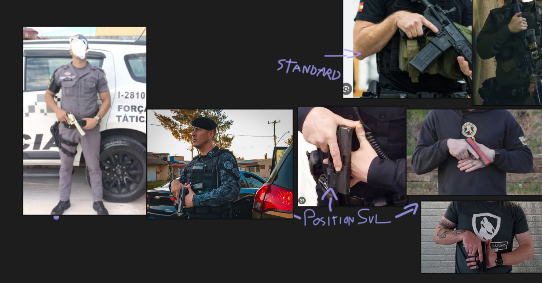
Position SUL / Temple Index / Low Ready / High Ready More CQB & Police Tactical.

The folder included in the pack allow you to choose different animation styles, including Move/Stealth/Cover.

Preview screenshots are included in each folder to help you choose your animation style.

Timeline3-ezgif.com-optimize (4).gif

All animations style are safe to use, it's recommend to test all the animations before playing game.

Be careful when using mods that replace weapon animation YCD files.

Follow Installation on README.txt

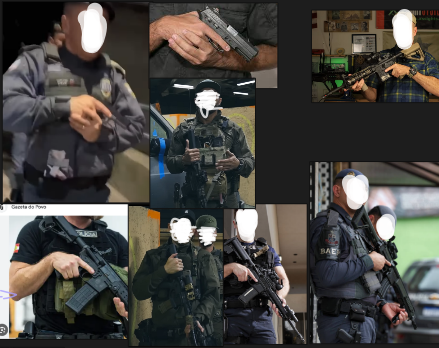
Making Off / Reference
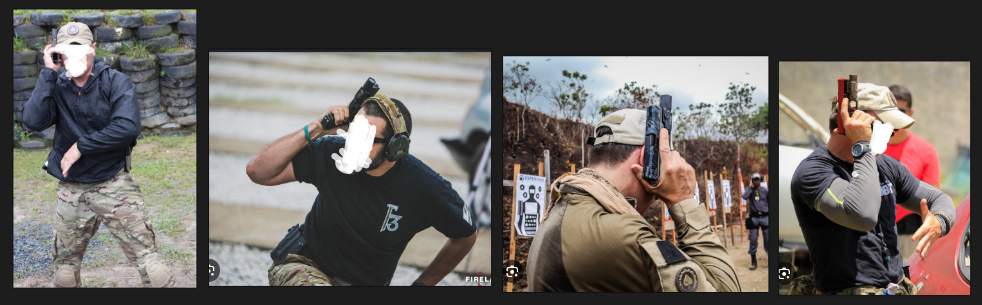
image.pngimage.pngimage.png

- Special Thanks:

ThugPlays

DehMods

Pedro

NsLziin

Beatriz

(for testing the animations and helping identify crash and bug ❤️)

Edited by Mr.KobraX
is > are / Added color text

What's New in Version 1.1.0

Released

KTWR - Changelog 1.1.0:

-New Animation:
Rifle M - (Position SUL)

Rifle M - (Position SUL + High Port Sprint)

Rifle M - (Position SUL + Sling Sprint)

-New Options:

DDM4 by TL Compatible Special Thank: @Cyanotic ❤️

Immersive Combat 1.8 by Artupaky01 Compatible


Short Description

Choose Your Style Tactical Animation Style Gameplay

User Feedback

Recommended Comments

TVIgod

Members

any updates on making this for fivem? these are fire

LimpBikit

Members

On 7/16/2026 at 2:24 PM, LimpBikit said:

I need some help, Why does my character hold his hand out like this for the carbinerifle and carbinerifle mk2 but correctly for other rifles?image.pngimage.png

Is there any fix to this? I still have this problem with my player holding out the left hand in a weird position when I hold the carbine rifle.

T0NIC

Members

(edited)

Hey Kobrax, first things first thank you for this masterpiece... So I made a complete conversion of your mod pack (of course with honest credits that gives the original link & author of the mod w/my Discord adress as converter of the mod, telling "I'm not claiming any of the copyrights of the mod, just converting 'Ko's Tactical Reanimations' mod to FiveM" in the read me file. Would you mind if I share it through communities at Discord, etc.?

I'll be honest with you, I already share it like 2-3 people on Discord via Wormhole: https://wormhole.app/2Q3W31#4yHy-MynpSyhivVBDbdC_g

I completely respect to your efforts and I just wanted to help others that having hard time with modding. And of course, you can add it this variation to your mod page with my name as credit, so you can keep the traffic on yourself.

Edited by T0NIC

Mr.KobraX

Members Author

16 minutes ago, T0NIC said:

Hey Kobrax, first things first thank you for this masterpiece... So I made a complete conversion of your mod pack (of course with honest credits that gives the original link & author of the mod w/my Discord adress as converter of the mod, telling "I'm not claiming any of the copyrights of the mod, just converting 'Ko's Tactical Reanimations' mod to FiveM" in the read me file. Would you mind if I share it through communities at Discord, etc.?

I'll be honest with you, I already share it like 2-3 people on Discord via Wormhole: https://wormhole.app/2Q3W31#4yHy-MynpSyhivVBDbdC_g

I completely respect to your efforts and I just wanted to help others that having hard time with modding. And of course, you can add it this variation to your mod page with my name as credit, so you can keep the traffic on yourself.

no problem, you have my permission. s2 thank so much.

T0NIC

Members

2 minutes ago, Mr.KobraX said:

no problem, you have my permission. s2 thank so much.

Appreciate that. Like I said, if you can add this file to the original mod page with my name, I'll be thankful.

Mr.KobraX

Members Author

2 hours ago, LimpBikit said:

Is there any fix to this? I still have this problem with my player holding out the left hand in a weird position when I hold the carbine rifle.

that strange, check in mods/update/update.rpf/dlc_patch/mpgunrunning/common/data/ai edit "weaponsanimation.meta" edit like this:image.png

if you dont have weaponsanimations.meta, reinstall KTWR Base again.

LimpBikit

Members

5 hours ago, Mr.KobraX said:

that strange, check in mods/update/update.rpf/dlc_patch/mpgunrunning/common/data/ai edit "weaponsanimation.meta" edit like this:image.png

if you dont have weaponsanimations.meta, reinstall KTWR Base again.

Could this and tactical grip from gta5mods be interfering with each other? This is what my weapons animations file shows in that path you told me to look.

image.png

LimpBikit

Members

(edited)

5 hours ago, Mr.KobraX said:

that strange, check in mods/update/update.rpf/dlc_patch/mpgunrunning/common/data/ai edit "weaponsanimation.meta" edit like this:image.png

if you dont have weaponsanimations.meta, reinstall KTWR Base again.

So, I reinstalled everything and now the Carbinerifle animation works but the pistol animation does not. I use tactical grip because both your mod and that mod are game changers for lspdfr. When I installed the mod last week everything was working fine together with tactical grip but now all of a sudden, I'm having issues. Pistol (Movement) is not working now, but Pistol stealth works and carbinerifle does too. I reinstalled pistol movement and it's still not working. It's starting to get confusing lol, any ideas?

LSPDFR_Screenshot_1.jpgLSPDFR_Screenshot_2.jpgLSPDFR_Screenshot_3.jpg

Edited by LimpBikit

LimpBikit

Members

After some more testing, animations for combat pistol work, It's just pistol that doesn't. I'm assuming it's something to do with tactical grip mod even though it they were both working before. Now the Carbine is working with animation and tactical grip but pistol animation is not. Here is a screen shot of my weaponanimations

and meta

image.png

image.png

Could contain: sky, tree, outdoor, plant, screenshot, person

Could contain: sky, outdoor, tree, flower, garden, ground, plant

Could contain: sky, tree, outdoor, plant, clothing, footwear, house, person, street

Could contain: sky, plant, outdoor, tree, flower, cloud, ground, garden

LimpBikit

Members

(edited)

The pistol animation started working on its own for some reason lol and now my hand is gone back to that weird position with the carbinerifle.

Edited by LimpBikit

Beautiful mod, just what I needed. My only issue is the hand offset for AI doesn't match with that of my player's. I have taken a screenshot for reference. Other than that, fantastic mod bro!

image.png

Mr.KobraX

Members Author

17 hours ago, LimpBikit said:

After some more testing, animations for combat pistol work, It's just pistol that doesn't. I'm assuming it's something to do with tactical grip mod even though it they were both working before. Now the Carbine is working with animation and tactical grip but pistol animation is not. Here is a screen shot of my weaponanimations

and meta

image.png

image.png

Could contain: sky, tree, outdoor, plant, screenshot, person

Could contain: sky, outdoor, tree, flower, garden, ground, plant

Could contain: sky, tree, outdoor, plant, clothing, footwear, house, person, street

Could contain: sky, plant, outdoor, tree, flower, cloud, ground, garden

you can fix it, you need change:

<MotionClipSetHash>weapons@submg@micro_smg@hi</MotionClipSetHash> to <MotionClipSetHash>weapons@pistol@pistol</MotionClipSetHash>

like this:

image.png

dont change firstperson, only <Item key="Default">

T0NIC

Members

(edited)

Hey man, today I've shared the FiveM converted mod on my own page. Thank you again for letting me do this!

Edited by T0NIC

Create an account or sign in to comment

Account

Navigation

Search

Search

Configure browser push notifications

Chrome (Android)
  1. Tap the lock icon next to the address bar.
  2. Tap Permissions → Notifications.
  3. Adjust your preference.
Chrome (Desktop)
  1. Click the padlock icon in the address bar.
  2. Select Site settings.
  3. Find Notifications and adjust your preference.