Skip to content
View in the app

A better way to browse. Learn more.

LCPDFR.com

A full-screen app on your home screen with push notifications, badges and more.

To install this app on iOS and iPadOS
  1. Tap the Share icon in Safari
  2. Scroll the menu and tap Add to Home Screen.
  3. Tap Add in the top-right corner.
To install this app on Android
  1. Tap the 3-dot menu (⋮) in the top-right corner of the browser.
  2. Tap Add to Home screen or Install app.
  3. Confirm by tapping Install.

Callout Launcher 1.8.0.1

(1 review)

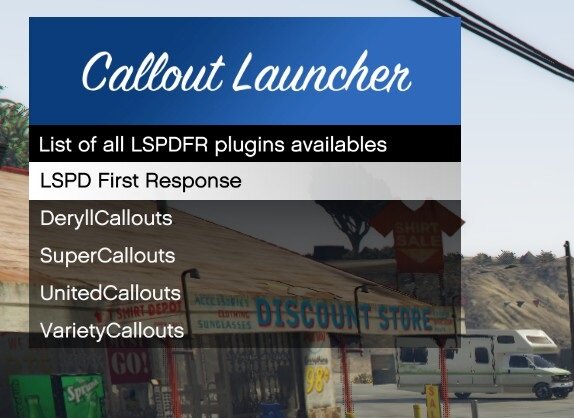
2 Screenshots

Callout Launcher


[EN 🇬🇧]

Callout Launcher is a script inspired by Callout Manager. It has the same functionality and works on the latest versions of LSPDFR and GTA V.


User configuration
You can configure the key to open the menu (default is F6).
You can translate the plugin. For the moment, two translations are available (‘en’ for English and ‘fr’ for French).

You can configure whether you want to close the menu after launching a callout.

You can configure the delay before the callout is launched (set to 0 by default).


Features
A system that warns you directly in-game as soon as you take your service (LSPDFR) whether there is an update or not.
A menu based on the same principles as Callout Manager.
A translation system. You can either use the four default translations (English, French, Spanish and Germany), or create your own translation in the Plugins folder.

Automatic detection of the game language. This means that the language of the plugin (if available) will be the same as that of the game.

A delay used to define the time before the callout is launched after the button is pressed. By default, this is set to 0 and can be configured in the .ini file.


Mod Requirements
• LSPDFR
RAGENativeUI


[FR 🇫🇷]
Callout Launcher est un script inspiré de Callout Manager. Il remplit les mêmes fonctionnalités et est fonctionnel sur les dernières versions de LSPDFR et GTA V.


Configuration Utilisateurs
Vous pouvez configurer la touche pour ouvrir le menu (par défaut sur F6).
Vous pouvez traduire le plugin. Pour l'instant, deux traductions sont disponibles ("en" pour l'anglais et "fr" pour le français).

Vous pouvez configurer si vous souhaitez fermer le menu après avoir lancé un callout.

Vous pouvez configurer le délai avant le lancement du callout (réglé par défaut sur 0).


Fonctionnalités
Un système qui vous prévient directement en jeu dès la prise de votre service (LSPDFR) s'il y a une mise à jour ou non.
Un menu qui reprend les mêmes bases que Callout Manager.
Un système de traduction. Vous pouvez soit utiliser les quatre traductions par défaut (anglais, français, espagnol et allemand), soit créer votre propre traduction dans le dossier Plugins\LSPDFR\CalloutLauncher\languages.

Détection automatique de la langue du jeu. Cela signifie que la langue du plugin (si elle est disponible) sera la même que celle du jeu.

Un délai permettant de définir le temps avant le lancement du callout après l'appui sur le bouton. Par défaut, il est réglé sur 0 et peut être configuré dans le fichier .ini.


Requis
• LSPDFR
RAGENativeUI


Credits

@PieRGud

Edited by Vitroze Gaming

What's New in Version 1.8.0.1

Released

Add :

The library will create the following command consoles:

- copypos

- copyangles

- setpos

- setspeed

- forceenter_car

🟧 Fix
* Fixed an issue where some callouts could not be launched

* Fixed an issue where the version verification system did not always work (timed out).

Delete

* Removing extra spaces in language files

* Removal of unnecessary files (http and language) as they are now included in the library.


Short Description

Callout Launcher is a script that lets you launch callouts manually. Inspired by Callout Manager

User Feedback

Recommended Comments

khorio

Members

54 minutes ago, Vitroze Gaming said:

As I said earlier, I had no idea that it already had these functions in the scripts you mention. I only thought it existed on Callout Manager and since it no longer works on the latest versions, I decided to redo it. And as I said before, some people just want this functionality without the Grammar or Callout Interface features.

You're not creating endless fibers and you're not using a shifty custom rnui lib to avoid having to use Math.Lerp.

A+


BlueLine Vibes

Members

I appreciate your upload and yes I can see how it could be useful for those that do not have Callout Interface installed.

I do have two suggestions.  I am not a coder, but I do know a lot about preferences for the player.

1. I am unsure why you included LSPDFR itself in your upload.  Although the experienced player, would know not to install this if they are playing on an older version (Yes, there are many of us out there that play on older stable versions of GTA 5)  there will be some that accidently just drag the plugins folder into the game directory thinking that it will be an easy drag and drop and now .... you just completely updated their LSPDFR to a possible different version.  Your plugin works fine on version 3028, by the way.

2.  I would recommend that you add a delay that the user can set in the config. When I use the Callout Interface Callout manager built in,  I like to add a delay up to 12 seconds,  this allows seamless edits for those that like to produce content,  and it also allows the player to take those extra few seconds to have a small bit of immersion of actually getting the call instead of a instant forced call.    

Just my suggestions

Vitroze Gaming

Members Author

Hello, 

22 hours ago, BlueLine Vibes said:

1. I am unsure why you included LSPDFR itself in your upload.  Although the experienced player, would know not to install this if they are playing on an older version (Yes, there are many of us out there that play on older stable versions of GTA 5)  there will be some that accidently just drag the plugins folder into the game directory thinking that it will be an easy drag and drop and now .... you just completely updated their LSPDFR to a possible different version.  Your plugin works fine on version 3028, by the way.
 

This is a total oversight on my part regarding LSPDFR. I forgot to remove it from the archive. Thank you for your comment!


22 hours ago, BlueLine Vibes said:


2.  I would recommend that you add a delay that the user can set in the config. When I use the Callout Interface Callout manager built in,  I like to add a delay up to 12 seconds,  this allows seamless edits for those that like to produce content,  and it also allows the player to take those extra few seconds to have a small bit of immersion of actually getting the call instead of a instant forced call.    
 

I'll take note of your suggestion. I hadn't thought of that, I'll add it in a new update 😉


Thank you for your comment, 
Have a nice day!
 

UnknownRK

Members

(edited)

Thanks for a great plugin. The addition of the delay setting in the config was very helpful.

One thing I was wondering, do you plan to add a modifier key to the menu open key in a future update?

The entire keyboard, including the numeric keypad, is used for other menus, which can be a little inconvenient. Maybe it is just me, Thank you for your consideration.


(DeepL Translation)

Edited by UnknownRK

Vitroze Gaming

Members Author

6 minutes ago, UnknownRK said:

Thanks for a great plugin. The addition of the delay setting in the config was very helpful.

One thing I was wondering, do you plan to add a modifier key to the menu open key in a future update?

The entire keyboard, including the numeric keypad, is used for other menus, which can be a little inconvenient. Maybe it is just me, Thank you for your consideration.


(DeepL Translation)

Hello,
Thank you for your comment, I already have. You can change the key to open the menu. The configuration is called: OpenMenu


I don't know the exact key for the numeric keypad. I'll do some research and get back to you.

UnknownRK

Members

(edited)

19 minutes ago, Vitroze Gaming said:

Hello,
Thank you for your comment, I already have. You can change the key to open the menu. The configuration is called: OpenMenu


I don't know the exact key for the numeric keypad. I'll do some research and get back to you.

Sorry, maybe I didn't communicate it well. To be more specific, I would like to have a setting where two keys are used to open menus.


The most obvious example would be a setting where you have to press “LShift” and “F6” at the same time to open the menu. The plugin that actually has this functionality has a setting named “ToggleKeyModifier”.


I am relying on a translator, but I hope I have conveyed my intention correctly. Thank you in advance.


By the way, the numeric keypad can be set by NumPad0 to NumPad9

Edited by UnknownRK

Vitroze Gaming

Members Author

Just now, UnknownRK said:

Sorry, maybe I didn't communicate it well. To be more specific, I would like to have a setting where two keys are used to open menus.

The most obvious example would be a setting where you have to press “LShift” and “F6” at the same time to open the menu. The plugin that actually has this functionality has a setting named “ToggleKeyModifier”.

I am relying on a translator, but I hope I have conveyed my intention correctly. Thank you in advance.

By the way, the numeric keypad can be set by NumPad0 to NumPad9

Ah, now I understand your request. I'll see what I can do for a future update 😉

  • Community Team

I think it would be a good idea to add RageNativeUI to your download. So users do not have to download it separately.

Vitroze Gaming

Members Author

1 hour ago, Yasd said:

I think it would be a good idea to add RageNativeUI to your download. So users do not have to download it separately.

This was already the case at the beginning, but the rules of the LCPDFR prohibit it.

  • Community Team
5 hours ago, Vitroze Gaming said:

This was already the case at the beginning, but the rules of the LCPDFR prohibit it.

RNUI allows redistribution and it's something we allow. The original issue that I hid your file for was due to you including LSPDFR itself as a download, which does not allow redistribution.

Vitroze Gaming

Members Author

9 hours ago, SuperPyroManiac said:

RNUI allows redistribution and it's something we allow. The original issue that I hid your file for was due to you including LSPDFR itself as a download, which does not allow redistribution.

Oh right, thanks for the clarification! Given that the DLL didn't belong to me, I thought I didn't have the right 😉

IceGuy221

Members

you don't need this if you run callout interface. I haven't noticed anything different about this. callout interface already this a launcher of its own that is the same. just go into your files and find the menu key for it, and change the keybind to your preference. this looks more stripped to me, but maybe I'm wrong

  • Community Team
7 hours ago, IceGuy221 said:

you don't need this if you run callout interface. I haven't noticed anything different about this. callout interface already this a launcher of its own that is the same. just go into your files and find the menu key for it, and change the keybind to your preference. this looks more stripped to me, but maybe I'm wrong

For users who just want a callout launcher plugin without lots of other functions Callout Interface brings this is a good choice.

Nemesisx101

Members

(edited)

I’d like to see an option for callouts to be delivered to the Player automatically like they normally would based on distance, to overcome backend dev probabilities so every callout has a equal chance to trigger if within given distance.

Edited by Wolfx101

Vitroze Gaming

Members Author

18 minutes ago, Wolfx101 said:

I’d like to see an option for callouts to be delivered to the Player automatically like they normally would based on distance, to overcome backend dev probabilities so every callout has a equal chance to trigger if within given distance.

Hi,

I didn't understand the request :')

BlueLine Vibes

Members

(edited)

11 hours ago, Vitroze Gaming said:

Hi,

I didn't understand the request :')


I think he might be referring to an AOP?  (Area of Patrol) - But correct me if I am wrong here, I think your plugin is meant to trigger the callout.  He might be thinking of how Callout Interface and Callout Manager worked,  you could put in a certain distance like 500m (just an example)   that way if a call triggered on Mount Chiliad, you would not get that call if you were down in the city.   Maybe I am totally wrong as to what he was asking about 😁   Either way,  not a bad idea to perhaps include that into this plugin if possible.

Edited by BlueLine Vibes

pulldabaddest

Members

how to install? sorry having trouble

Vitroze Gaming

Members Author

12 hours ago, pulldabaddest said:

how to install? sorry having trouble

Hi, there,


To install my script you just need to drag the Plugins folder and the RAGENativeUI.dll file into the root of your GTA V folder.

If you need to configure the script, just go to the root of your GTA V folder then Plugins\LSPDFR\CalloutLauncher and you'll find CalloutLauncher.ini

I hope I've helped you,


Best regards,
Vitroze

BlueLine Vibes

Members

Can you explain what these mean in your update?
- copypos

- copyangles

- setpos

- setspeed

- forceenter_car

Didn't see this in your description of the Callout Launcher, I can guess what they do, but want clarification.

Vitroze Gaming

Members Author

On 12/23/2025 at 1:26 AM, BlueLine Vibes said:

Can you explain what these mean in your update?
- copypos

- copyangles

- setpos

- setspeed

- forceenter_car

Didn't see this in your description of the Callout Launcher, I can guess what they do, but want clarification.

These commands are executed in the Rage console, which is used for debugging and to simplify my programming. They are not included directly in the Callout Launcher DLL, which is why I haven't mentioned it in the description, but they are included in the library.

Here's a quick summary of the commands:

  • coypos

Allows you to copy the current position of the player or the entity the player is targeting into the clipboard.

  • copyangles

Allows you to copy the player's current angle or the entity the player is aiming at to the clipboard.

  • setpos

It has 3 arguments and allows teleportation to the entered coordinates.

  • setspeed

Allows you to define the speed of a vehicle (in km/h)

  • forceenter_car

Has one argument. Allows entry into the target vehicle; the vehicle's position must be provided (currently only accepts positive integers)

Hopefully this helped you

nova2727

Members

i still prefer callout interface over this. callout interface you only need put into plugins this mod you have included lspdfr which in turn will update the version that the player has.if the player wants to stay on a older version you can with callout interface. but your mod you not given the player a choice your updating the version there on

BlueLine Vibes

Members

(edited)

2 hours ago, nova2727 said:

i still prefer callout interface over this. callout interface you only need put into plugins this mod you have included lspdfr which in turn will update the version that the player has.if the player wants to stay on a older version you can with callout interface. but your mod you not given the player a choice your updating the version there on


Callout Interface goes into plugins > LSPDFR and relies on LSPDFR and on duty to be active. Same with this plugin. This mod does NOT include LSPDFR anymore.

This mod still has value for the players that do not wish to have the extra features included with Callout Interface.

12 hours ago, Vitroze Gaming said:

These commands are executed in the Rage console, which is used for debugging and to simplify my programming. They are not included directly in the Callout Launcher DLL, which is why I haven't mentioned it in the description, but they are included in the library.

Here's a quick summary of the commands:

  • coypos

Allows you to copy the current position of the player or the entity the player is targeting into the clipboard.

  • copyangles

Allows you to copy the player's current angle or the entity the player is aiming at to the clipboard.

  • setpos

It has 3 arguments and allows teleportation to the entered coordinates.

  • setspeed

Allows you to define the speed of a vehicle (in km/h)

  • forceenter_car

Has one argument. Allows entry into the target vehicle; the vehicle's position must be provided (currently only accepts positive integers)

Hopefully this helped you

Yes, thank you.

Edited by BlueLine Vibes

Create an account or sign in to comment

Latest Mods

Account

Navigation

Search

Search

Configure browser push notifications

Chrome (Android)
  1. Tap the lock icon next to the address bar.
  2. Tap Permissions → Notifications.
  3. Adjust your preference.
Chrome (Desktop)
  1. Click the padlock icon in the address bar.
  2. Select Site settings.
  3. Find Notifications and adjust your preference.









