





# Greek Ambulance Livery for FiveM Vehicle
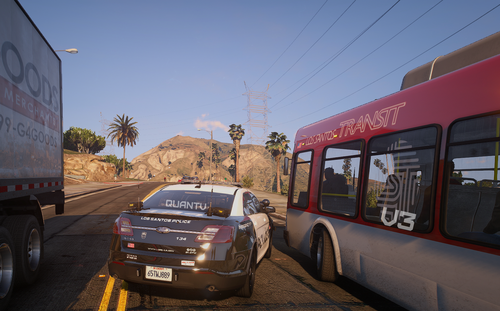
This texture pack provides a Greek Ambulance livery for the FiveM Mercedes S63 model. Please note that I am not the original creator of the vehicle model. The original model can be found [here](https://www.lcpdfr.com/downloads/gta5mods/vehiclemodels/44526-fivem-mercedes-s63-politi-pack/).
## Contact Information
- **Email**: *****@*****.tld
- **Discord Username**: fronxofficial
- **Discord Server**: [Link to Discord Server](https://discord.gg/kq3vvREwV5)
## Instructions
To apply the Greek Ambulance livery, follow these steps:
1. Download the model from [here](https://www.lcpdfr.com/downloads/gta5mods/vehiclemodels/44526-fivem-mercedes-s63-politi-pack/).
2. Open `ndds63.ytd` (it will be inside of stream/ndds63 folder) in OpenIV.
3. Replace "23s63_sign_1" with "23s63_sign_1.png" that I have provided.
4. Replace "spizzywindow" with "spizzywindow.png".
5. Spawn the vehicle in-game.
## Credits
- Base: RAZ3R - Officertenpenny OR Inc. - 23S63
- Standby W3: GGM Modding
- Interior Equipment: Norwegian Develop Design (NDD)
- Other lights: RAZ3R - Officertenpenny OR Inc
- NORWEGIAN DEVELOP DESIGN
## Terms of Service
Please adhere to the original author's Terms of Service. This livery is not intended for commercial purposes. Do not use this livery for profit-making activities.
Edited by Fronx
new pictures
Short Description
- Standby W3: GGM Modding
- Interior Equipment: Norwegian Develop Design (NDD)
- Other lights: RAZ3R - Officertenpenny OR Inc
- NORWEGIAN DEVELOP DESIGN
- Greek livery Fronx







.thumb.png.601e0948b0e617ff71bf98da00273c2a.png)
![[LSPDFR] sCallout - New Callouts, Advanced AI & Interaction System (EN/PL)](http://s3-screenshots.int-cdn.lcpdfrusercontent.com/monthly_2026_05/4e930439-3362-4980-8acd-cddd1c01602e.thumb.jpg.87fbd6bbbd416ed3ef00517e26d9ea74.jpg)
Recommended Comments
Create an account or sign in to comment