


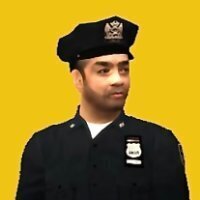


After losing ground on the West Coast to companies like SecuroServ and Merryweather, Gruppe Sechs is cashing on LC crime with an expansion of its armed security services to meet a spike in demand across Liberty City and Alderney. Now you can rest assured that your neighborhood banks, oil refineries and even your own apartment are protected under the watchful eyes of your very own Gruppe Sechs Armed Response Security Officer!
I know I'm not the first person to address the problems surrounding GTA 4's security guards, but since I decided to come up with my own fix, I figured I might as well share what I came up with. I created an improved Gruppe Sechs security guard, with simple tweaks to improve behavior and animations in a manner that totally overhauls their role, as well as retextured clothing and details designed to evoke modern corporate security services in the style of companies like Securitas and Allied Universal.
This pack features:
-New guards with modernized uniforms- These new guards are ready for action with body armor and utility belts, while higher-ranking personnel wear jackets and ties.
-Custom Pedprops- Choose from either the original riot helmets or a peaked cap and baseball cap!
-Friendly behavior- No more three-way firefights. Security Guards will now rush to assist the player and police to help fight criminals!
-Better movement- Uses police animations, allowing them to sprint after suspects, roll to cover and fire faster and more accurately than before.
-Enhanced abilities- Attacking a guard with a firearm will result in a three-star wanted level. Security Guards will also report any crime committed in their line-of-sight as well as chase and search for the player when wanted, expanding the reach of law enforcement in LC and Alderney and greatly enhancing security at places like the Acter Industrial Park and FIA.
-Security livery for Ooboy's enhanced LCPD cars- A made-from-scratch livery for G6 that draws inspiration from other Gruppe Sechs vehicles such as the Securicar!
-Retexture for m_m_armoured- A .WTD file that retextures the normal Armoured Guards with my custom textures!
WHAT'S NEW - Version 1.1
-Six new high-quality face textures
-New white shirt textures for uppr_000 (shirt and vest)
-New pedprops option- Classic peaked cap, sunglasses and baseball cap from M_M_FIRECHIEF
-Fixed pedVariations.dat- works with both pedprops options
DISCLAIMER: My rule is that I do not want to see my mods redistributed elsewhere without permission, and this pack is ONLY to be uploaded on LCPDFR.com. It IS NOT to be uploaded anywhere else!
I hope you have as much fun with this mod as I had making it!
Edited by GQ Supply Co. LTD
Updated description
What's New in Version 1.1
Released
WHAT'S NEW - Version 1.1
-Six new high-quality face textures
-New white shirt textures for uppr_000 (shirt and vest)
-New pedprops option- Classic peaked cap, sunglasses and baseball cap from M_M_FIRECHIEF
-Fixed pedVariations.dat- works with both pedprops options







![[ELS-HYBRID] [ADD-ON] 2022 Georgia State Patrol Charger](http://s3-screenshots.int-cdn.lcpdfrusercontent.com/monthly_2026_08/Screenshot_3458.thumb.png.f02442abb5a7117261267d1a818aa00b.png)


![[ELS][Addon] Los Santos County Sheriff's Department](http://s3-screenshots.int-cdn.lcpdfrusercontent.com/monthly_2026_08/PGTA52115079501.png.be571ddbe42a9ab8437eb2035f2fd5bc.thumb.png.4e47642158ad4c67138b7a707ad2bc05.png)



![[ELS-Hybrid | Addon] Sandy Shores 2011 CVPI Pack](http://s3-screenshots.int-cdn.lcpdfrusercontent.com/monthly_2026_06/1.thumb.png.0352936a973262bab2cefb608858e393.png)

Recommended Comments
Create an account or sign in to comment