Skip to content
View in the app

A better way to browse. Learn more.

LCPDFR.com

A full-screen app on your home screen with push notifications, badges and more.

To install this app on iOS and iPadOS
  1. Tap the Share icon in Safari
  2. Scroll the menu and tap Add to Home Screen.
  3. Tap Add in the top-right corner.
To install this app on Android
  1. Tap the 3-dot menu (⋮) in the top-right corner of the browser.
  2. Tap Add to Home screen or Install app.
  3. Confirm by tapping Install.

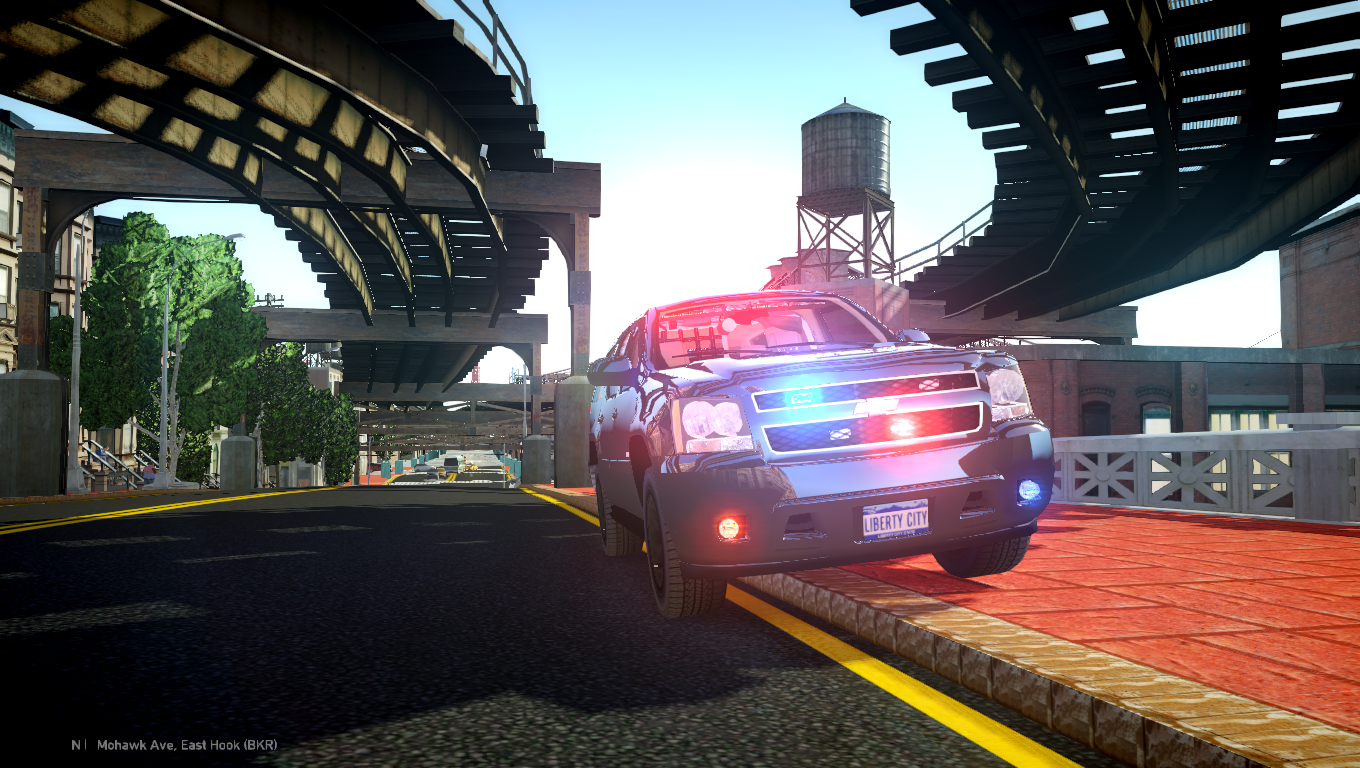
Slicktop 2008 Chevy Tahoe V1

(14 reviews)

9 Screenshots

Hope you guys enjoy! In the second version I will upload 1080p screenshots. The current ones are 1360x768.

NAME: Slicktop 2008 Chevy Tahoe Whelen inner edge

- VERSION: 1.0

- LIGHTBAR: Whelen Inner edge

- OTHER EQUIPMENT: Decatur Genesis I Radar, Rockwell Collins Laptop, SoundOff Signal LED3, Setina The Bodyguard Partition, Dual avengers, Whelen PAR32

- MULTIPLE LIVERIES: Yes

- OPTIMIZED FOR: Polpatriot

Credits:

-Model is original "Chevrolet Tahoe" by 4x4 Full Driver - Hummer H2, converted to GTAIV by Stiopa.

-Decatur Genesis I Radar Made & Converted by Bxbugs123

-Dual avengers by Traumapak

-Whelen PAR32 UNLOCKED by Corleone

-Rockwell Collins Laptop Made & Converted by Bxbugs123

-SoundOff Signal LED3 Mini Light EL3SN UNLOCKED by corleone

-Setina The Bodyguard Partition by Bxbugs123

-Whelen Inner Edge models made & converted for GTA IV by Bxbugs123

-Screenshots by 1ian20

User Feedback

Recommended Comments

c13

Friends of LSPDFR

I may have found a new favorite tahoe. Only suggestion is to put a partition in between the rear seats and the trunk area. Police usually store weapons back there (depending on department of course) and suspects could try to kick their way out through the back.

Pengi

Members

I would recommend removing the tahoe tags as a police edition would not have anything besides the Chevrolet badge.

MayhemMercenary

Members Author

I may have found a new favorite tahoe. Only suggestion is to put a partition in between the rear seats and the trunk area. Police usually store weapons back there (depending on department of course) and suspects could try to kick their way out through the back.

Thank you for the kind words! Do you think that two partitions might look a bit weird? Ill try it out and see how it looks. Thanks again!

MayhemMercenary

Members Author

I would recommend removing the tahoe tags as a police edition would not have anything besides the Chevrolet badge.

Hilth0

Members

Has a good idea! But its was not pulled off as well, 3/5

Newmillz

Members

i loved testing it, came out great. Keep em' coming. 5/5

MmmTastyEggs

Members

suggest caged windows

cruiser

Members

IM IN LOVE WITH THIS CAR!!!!!! one thing tho could u put a rifle rack and some caged back windows thx

MayhemMercenary

Members Author

Has a good idea! But its was not pulled off as well, 3/5

I really don't see what you mean.

MayhemMercenary

Members Author

Wow! Thank you so very much! I don't know what's up with those trunk lights though. Ill have to mess around with them.

sam braddock

Members

how to play this game i dont know how

jackson1999

Members

Alright! Ill make sure I remove those before the next release.

KN1IGHT

Members

Thank you for the kind words! Do you think that two partitions might look a bit weird? Ill try it out and see how it looks. Thanks again!
I've downloaded 1-2 tahoes, that have two partitions, and it actually doesn't look bad. It also makes sense to have two partitions, however I have yet to see a real life Tahoe that has two partitions

Mark Stavaros

Members

I think this is the best slicktop Tahoe. This is one I will never replace

MayhemMercenary

Members Author

Update: I lost the files to this Tahoe so no updates can be made, hopefully everyone still enjoys it. :)

rcpd33

Members

Can you please provide the Configuration els.ini file for this vehicle

Create an account or sign in to comment

Account

Navigation

Search

Search

Configure browser push notifications

Chrome (Android)
  1. Tap the lock icon next to the address bar.
  2. Tap Permissions → Notifications.
  3. Adjust your preference.
Chrome (Desktop)
  1. Click the padlock icon in the address bar.
  2. Select Site settings.
  3. Find Notifications and adjust your preference.















