


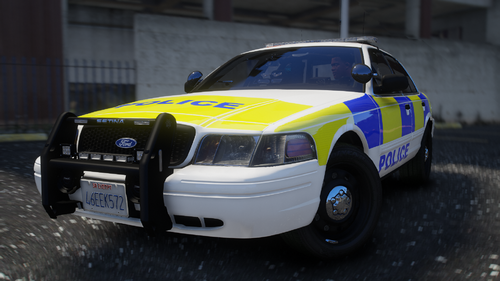
NEW Spitfire7's El Segundo [REALISTIC 3-STAGE LIGHTING] V6.2 NEW Code3 X2100 resembling lightbar and textures
[New mirror and rambar lights (front/side rambar placement)], and Steady burns no takedowns edition.
ELS6 Settings
Secondaries: C-04
Takedowns flashing "O" option
Primaries: A-07
WHATS NEW FOR 6.2?
-Fixed dirty lightbar texture mistake.
WHATS NEW FOR V6.1?
-Texture error on mirror and grill lights fixed.
WHATS NEW FOR V6?
-Brand new modded Code 3 X2100 similar lightbar and textures. Heavily modded from the Whelen Liberty LFL by KevinDV of Accurate Studio to a really close resembling Code 3 X2100 lightbar. See for yourself. Also has a 3 stage realistic lighting
option for those traffic stops, cautions, and full code 3 events.
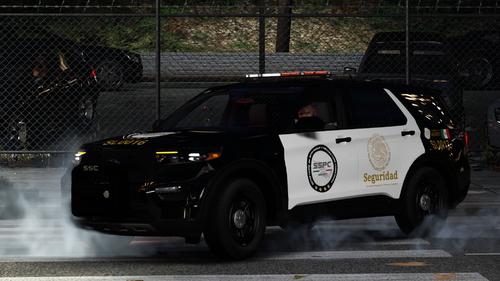
Here's my car:
Here is a video of the real car:
(This is an older model and doesn't have the rear reverse lights like the new models do.)
WHATS NEW FOR V5?
-Mirror lights
-fixed 3 stage lighting system for more accurate and realistic
*light setting 1: Only rear flash
*light setting 2: Additional rear lights flash as well as front steady burns
*Light setting 3: Full code3 without white takedown lights flashing. This is realistic.
WHATS NEW FOR V4?
-Made a new 3 stage lighting system for ELS7. It now has 3 light settings realistic to the real car.
*light setting 1: Only rear flash
*light setting 2: Additional rear lights flash as well as front steady burns
*Light setting 3: Full code3 without white takedown lights flashing. This is realistic.
WHATS NEW FOR V3?
-Moved front wig wag lights to indicator light area like the real car.
-Changed rear secondaries to more realistic secondary pattern.
-Fixed hotfoot light position
-Fixed rambar
WHATS NEW FOR V2?
-Added hotfoot lights for takedowns like the real car.
-Added full rear tailing stobes instead of just the lower signal part.
CREDITS:
- Model is Ford Crown Victoria from Driver SF, converted to GTA IV by F5544, modified by KevinDV and Cj24.
- Divider by Lt.caine.
- Center Console by Unknown Author, Modified by Tim98.
- Panasonic Toughbook by PFCBarefoot.
- Rims by Bxbugs123, Textures by Lt.Caine, hubcaps by EVI/yakadafi.
- Honeycomb Grill made by KevinDV.
- Spotlight made by Cj24.
- Skin by Dumfound Crative/Accurate Studios and fully re-edited an converted to Driver SF CVPI by Spitfire7
- Lightbar is Whelen Liberty LFL by KevinDV of Accurate Studio. Completely re-Edited and reworked by Spitfire7 to look similar to the Code 3 RX2100
- Lightbar textures by Robin24k, light emis by Spitfire7
- Rear deck lights by Spitfire7 with BxBugs' talon textures.
- Rambar by BxBugs
- Antennas by Rockstar
- Radar by Tim98
- Hotfoot lights by EVI
- Rambar and mirror lights by WHELEN ENGINEERING COMPANY®, TraumaPak™ : 3D Creation, Edited by Spitfire7
What's New in Version 6.2
Released
- WHATS NEW FOR 6.2?
- -Fixed dirty lightbar texture mistake.
- Divider by Lt.caine.
- Center Console by Unknown Author, Modified by Tim98.
- Panasonic Toughbook by PFCBarefoot.
- Rims by Bxbugs123, Textures by Lt.Caine, hubcaps by EVI/yakadafi.
- Honeycomb Grill made by KevinDV.
- Spotlight made by Cj24.
- Skin by Dumfound Crative/Accurate Studios and fully re-edited an converted to Driver SF CVPI by Spitfire7
- Lightbar is Whelen Liberty LFL by KevinDV of Accurate Studio. Completely re-Edited and reworked by Spitfire7 to look similar to the Code 3 RX2100
- Lightbar textures by Robin24k, light emis by Spitfire7
- Rear deck lights by Spitfire7 with BxBugs' talon textures.
- Rambar by BxBugs
- Antennas by Rockstar
- Radar by Tim98
- Hotfoot lights by EVI
- Rambar and mirror lights by WHELEN ENGINEERING COMPANY®, TraumaPak™ : 3D Creation, Edited by Spitfire7





![Civ Country Outfit [FiveM Ready]](http://s3-screenshots.int-cdn.lcpdfrusercontent.com/resize/500/-/monthly_2026_07/ProductRender.thumb.png.cc96d42af8e65a2524d9c2a8479244c8.png)
Recommended Comments