Skip to content
View in the app

A better way to browse. Learn more.

LCPDFR.com

A full-screen app on your home screen with push notifications, badges and more.

To install this app on iOS and iPadOS
  1. Tap the Share icon in Safari
  2. Scroll the menu and tap Add to Home Screen.
  3. Tap Add in the top-right corner.
To install this app on Android
  1. Tap the 3-dot menu (⋮) in the top-right corner of the browser.
  2. Tap Add to Home screen or Install app.
  3. Confirm by tapping Install.

Unsafe Callouts 1.4.1

(3 reviews)

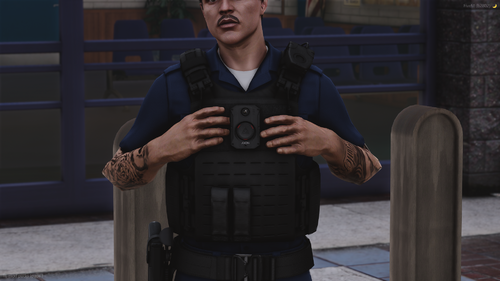
1 Screenshot

Unsafe Callouts

1.4.1


Current Callouts:

ANPR Hit On A Drug Dealer Car

Armed Pursuit

Homicide

Nightclub Disagreement

Person Carrying A Machete

Possible Violation Of Protective Order

Pursuit Intervention

Person Threatening An Officer With A Firearm


Requirements:

StopThePed by BejoIjo

Ultimate Backup by BejoIjo


Recommended for more realism:

Deadly Weapons by SuperPyroManiac

Callout Interface by opus49


Edited by L33dy
1.4.1

What's New in Version 1.4.1

Released

Unsafe Callouts

Build Update 1.4.1


New Callouts:

- No changes.


Improvements:

- No changes.


Changes and fixes:

- Added crucial audio files to the callout install pack. (Please install them for full functionality and realism).


Short Description

Unsafe Callouts for LSPDFR

User Feedback

Recommended Comments

Schroeder

Members

2 hours ago, SlimInAR said:

Does your Person Carrying A Weapon callout include someone (not the original subject) stealing the officer's police car? Or was that just a coincidence? I was on that call - arrived on scene and the subject with the weapon was walking with another individual. After a gun battle, the subject was down; I turn around and the other AI jumps into my patrol unit and drives away.

This happens to me in an odd-ball, once-in-a-blue-moon.
May be part of other call-out packages/LSPDFR or, from what I've been told and witnessed, an issue where GTA does not register your vehicle as a PD car and marks the civ as the 'owner' who then walks up and drives off to clear the area of vehicles post-incident panic (where some jump out of their cars and run off).

L33dy

Members Author

On 2/8/2022 at 4:40 PM, SlimInAR said:

Does your Person Carrying A Weapon callout include someone (not the original subject) stealing the officer's police car? Or was that just a coincidence? I was on that call - arrived on scene and the subject with the weapon was walking with another individual. After a gun battle, the subject was down; I turn around and the other AI jumps into my patrol unit and drives away.

No that is just pure coincidence but it sounds quite interesting! 😄 

Skyden

Members

Hey, im having the issue with Person Carrying A Weapon callout, it automatically goes Code 4 - disregard after i accept it, any idea why? 🙂

L33dy

Members Author

8 hours ago, Skyden said:

Hey, im having the issue with Person Carrying A Weapon callout, it automatically goes Code 4 - disregard after i accept it, any idea why? 🙂

Can you send the log? Do you have the issues just with this callout?

Cratos

Members

tacticool callouts 🙂

Skyden

Members

17 hours ago, L33dy said:

Can you send the log? Do you have the issues just with this callout?

Yeah, just this callout - everything else from your pack works perfectly:)

RagePluginHook.log

DeathOfDaws

Members

(edited)

There is no audio folder in my LSPDFR files. Do i make one or what?

Correction i found it. I was in my plug ins not the other one. Apologies i am farely new to how all this works 


Edited by DeathOfDaws

On 1/20/2022 at 1:09 PM, L33dy said:

Or maybe finding a sniper and arresting him? 


Very late lol but, yeah but maybe he would actually be shooting.

bullsey83

Members

Hi, i suffered a crash during the callout "possible violation of protective order". After arriving on the scene and talking to the victim the screen faded to black (that's intended i guess) but then lspdfr crashed and a loading screen appeared. After a while i tried to reload all plugins with the console. But nothing happened and i had to shut gta down.

RagePluginHook.log

thegamer5563

Members

please tell me how I fix Code 4 - Disregard? after getting the "Person Carrying A Weapon" call?


Realize

Members

Same here on both of the above spotted issues with literally the same outcome.

officerIIIburak

Members

can you add maxrcalloutrange to .ini file? i dont want take callout from too far place.

Sh40wX19

Members

Can you add this callout: Person Shooting at civs? it fits the name of this pack 

(edited)

  • Community Team
On 2/18/2022 at 9:13 PM, bullsey83 said:

Hi, i suffered a crash during the callout "possible violation of protective order". After arriving on the scene and talking to the victim the screen faded to black (that's intended i guess) but then lspdfr crashed and a loading screen appeared. After a while i tried to reload all plugins with the console. But nothing happened and i had to shut gta down.

RagePluginHook.log 298.34 kB · 4 downloads

Yes, i have the same crash.

While playing the callout "Violation of Protective Order", you talk to the person, then the screen fades to black, then comes the crash.

I tried the callout with 2 different locations. I've tried it with your plugin version 1.3 and the newest, 1.4.1.


Here are the logs with the crash.


RagePluginHook.log RagePluginHook_26032022_172816.log

Edited by OfficerChris1

BaenkeBideren

Members

theres a lot of grammar mistakes and You Type Like This Is Really Annoying To Look At, but other than that it's pretty good

James20001120

Members

Homicide spawn two orange point at same time and same place when dispatch get the suspect position. And then, when the callout is end, only one orange point disappear, the other one still on the minimap until I  end game.

Kingisaac

Members

gtsaki

Members

Nice mod, callout ideas are good.  Some bugs I encountered that others haven't already reported (or at least I didn't see):

  1.When trying to force (through LSPDFR menu) the person carrying a machete or the person threating police officer callouts i get an immediate code 4 - disregard. If they     are started randomly, they work great.

   2.I couldn't force the homicide call unless I was in the Vinewood hills area.

Keep up the good work.


why is person carrying a machete can't respond?

  • Community Team
On 4/9/2022 at 1:47 AM, BaenkeBideren said:

theres a lot of grammar mistakes and You Type Like This Is Really Annoying To Look At

My guess is that English isn't their first language. Might help for them to get someone to revise the scripts that is. But either way, it's not the biggest issue.

Additionally, like was said many times before, the Violation of Protective Order callout does not work. Though doubt it will get a fix seeing as all the comments are roughly a year old.

On 5/22/2023 at 11:05 AM, UnknownBastion said:

My guess is that English isn't their first language. Might help for them to get someone to revise the scripts that is. But either way, it's not the biggest issue.

Additionally, like was said many times before, the Violation of Protective Order callout does not work. Though doubt it will get a fix seeing as all the comments are roughly a year old.

yeah that's similar to me i think mabye will get fixed in the next update of this callouts pack

ZackP

Members

Great Callouts

UpperMidnight

Members

On 8/21/2022 at 6:55 AM, LSPDFR Cop said:

Violation of Protective Order is broken. After you finish the conversation, the game crashes. 

RagePluginHook.log 261.08 kB · 44 downloads


On 10/1/2023 at 5:58 AM, Firerescueowl said:

I, too, am experiencing this issue.

"Possible Violation Of Protective Order"

this call seems to always crash my game after my conversation with the woman and it seems like I'm not the only one, is there a fix for that?

Create an account or sign in to comment

Latest Mods

Account

Navigation

Search

Search

Configure browser push notifications

Chrome (Android)
  1. Tap the lock icon next to the address bar.
  2. Tap Permissions → Notifications.
  3. Adjust your preference.
Chrome (Desktop)
  1. Click the padlock icon in the address bar.
  2. Select Site settings.
  3. Find Notifications and adjust your preference.