

Skip to content
View in the app

A better way to browse. Learn more.

LCPDFR.com

A full-screen app on your home screen with push notifications, badges and more.

To install this app on iOS and iPadOS
  1. Tap the Share icon in Safari
  2. Scroll the menu and tap Add to Home Screen.
  3. Tap Add in the top-right corner.
To install this app on Android
  1. Tap the 3-dot menu (⋮) in the top-right corner of the browser.
  2. Tap Add to Home screen or Install app.
  3. Confirm by tapping Install.

This file has been reported as outdated or no longer maintained. For further information, see the file comments.

SirenSetting Limit Adjuster 2.0.3

(15 reviews)
Message added by SuperPyroManiac,

As of update v3788 it is known to cause issues. We do not know when or if this will be updated.
There is currently another developer testing an updated version on their Discord: https://discord.gg/VMvvuFxArY

We do not validate files off platform, visit the Discord at your own discretion.

9 Screenshots

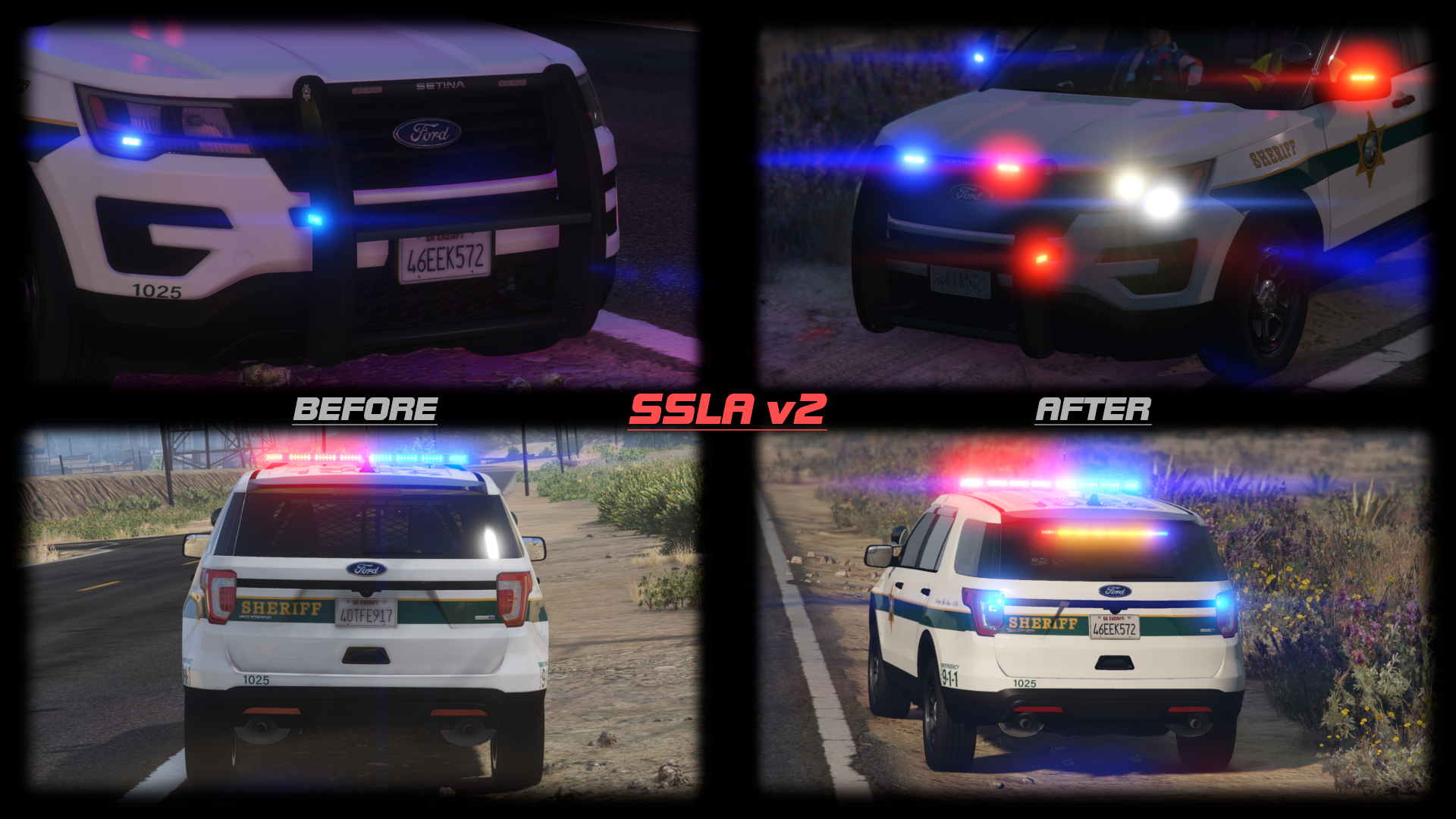
This mod raises various siren limits in GTA V.


The per-vehicle siren limit is raised from 20 to 32. Vehicles can now have siren1 through siren32, which are all fully functioning and independent. The siren_glass limit is also raised to 32. Note that the limit of 128 total bones on a vehicle still exists.


The maximum value of a siren setting ID in carcols is raised to 65535. In the base game, siren settings can conflict if one of them has a value over 255. Now, siren setting IDs can go up to 65535 without conflicting with each other.


This mod also expands the maximum number of unique siren settings you can have. If you have 400 cars, and they all have unique light patterns, that'll work.


Installation

Copy the included ASI to your game folder.


Usage

For additional lights, just use siren21 through siren32 and add extra entries to the siren settings in carcols.meta. Again, note that there is still a limit of 128 total bones on a single vehicle.


For the increased ID limit, just use a number bigger than "255" as the ID. The values 0, 255, and 65535 are reserved, so don't use those specific values. No additional configuration is required.


RPH Users

SSLA does not require RAGEPluginHook, but it is compatible with it. However, it is ONLY compatible with the latest version! RPH version 1.98 has a compatibility patch that will play nicely with SSLA v2. The latest RPH version can be found bundled with LSPDFR, or on the RAGEPluginHook Discord server.


If you had RAGEPluginHook and SSLA v1, you may have had a compatibility DLL in your Plugins folder. This DLL is no longer required and should be removed. RPH now talks directly to SSLA.


RPH plugins that deal with emergency lighting will continue to function, but may need to be updated to support lights 21 through 32.


FiveM Users

SSLA v2 is compatible with FiveM. The server owner must enable ASIs in server.cfg with sv_scripthookallowed true, and Each user must copy the ASI into the plugins folder in their FiveM Application Data. No changes are required to the server config.


RPH Developers

In RPH version 1.98 and up, the Lights member of an EmergencyLighting will be length EmergencyLighting.MaxLights (a static class property) instead of necessarily being length 20. They will still all have the same length, it's just that that length will be longer than 20 if SSLA is installed.


Logging

This ASI produces a SirenSettings.log file in your game directory. It records:

  • Every loaded SirenSetting, its name, its ID, and its internal index;
  • Every loaded vehicle, its name, its siren ID, and the index it was matched to;
  • Any conflicts, where two SirenSetting entries have the same ID.

License

Please link to an official upload instead of redistributing this yourself.

What's New in Version 2.0.3

Released

2.0.3: Fix compatibility with game build 3258.

2.0.2: Remembered to set the file version number properly.

2.0.1: Fixed some bugs.

2.0.0: Enabled the use of up to 32 sirens. Also reworked RPH compatibility and added FiveM support.

1.1.0: Removed compatibility with RPH build 1.78 (for GTA build 1868.1). Added compatibility with RPH build 1.81 (for GTA build 2060).


Short Description

For more and more varied sirens

User Feedback

Recommended Comments

casey24kessler

Members

8 hours ago, Swedsson said:

A video wouldn’t really show anything except lights working instead of conflicting though

I believe what they are asking and as well what I would like to know is, where do you then change the id's once the conflicts are found. I've tried digging in the rpf files to no avail. Thanks in advance.

vedrxssi.sz

Members

Hey, I looked everywhere to find a place to change the siren ID, but I can't seem to find it. If anyone could help me it would be much appreciated.

Swed

Members

On 9/6/2020 at 7:46 AM, casey24kessler said:

I believe what they are asking and as well what I would like to know is, where do you then change the id's once the conflicts are found. I've tried digging in the rpf files to no avail. Thanks in advance.


On 9/7/2020 at 12:28 AM, Feltzy said:

Hey, I looked everywhere to find a place to change the siren ID, but I can't seem to find it. If anyone could help me it would be much appreciated.

You change it in the carcol and carvar files of the vehicle packs you have installed.

Phil143

Members

Hey, does anyone know where i can get that State Parks Ambulance on the photos? The white and green one that says San Andreas MP Parks or something. Thanks in advance !

Enzo CHP

Members

(edited)

Hello, I have the impression that the plugin is still out of order.

Edited by Enzo CHP

RetroRanger91

Members

On 10/26/2020 at 5:08 AM, Phil143 said:

Hey, does anyone know where i can get that State Parks Ambulance on the photos? The white and green one that says San Andreas MP Parks or something. Thanks in advance !

Here you go

Officer Rempe

Members

I'm getting a "Error applying hook" message. I don't have any conflicts because I fixed those in the carcols.ymt and carvariations.ymt so I'm a little confused. 

KittyDotX

Members

On 11/12/2020 at 12:33 AM, Officer Rempe said:

I'm getting a "Error applying hook" message. I don't have any conflicts because I fixed those in the carcols.ymt and carvariations.ymt so I'm a little confused. 

same for me. i got the same message

James20001120

Members

Excuse me. If I use SirenSetting Limit Adjuster for setting light,which file I need to adjust? Only SirenSettings.log? Or more?

Hyfrith

Members

This plugin was a game changer when it was released, finally solving the growing issue of overlapping carcols and conflicting siren IDs as more and more add-on emergency vehicles are released.

However, as of February this mod is now outdated and non-functioning, leaving an "error applying hook" message when activated. Here's to hoping that the author finds time to update it! This mod is basically essential nowadays.

Drakonir

Members

As the above stated, the mod doesn't work with the current version of LSPDFR, leaving it outdated.


I'm not a huge expert on what it really does and I installed it because it was needed for a car pack, but I hope that unninstalling this one doesn't cause much of a disturbance.

Decapitated

Members

I can only repeat what the fellas above have said. Game changer mod when released, now required by most mods, that is sadly outdated. Really hope cp can find the time to fix it.

VoMinhCao

Members

On 7/4/2020 at 9:25 AM, James20001120 said:

But after I install both files and load RPH,my game send me a error message.It say 


Siren Setting_Limit_Adjuster log creation failed with error: The program cannot access the file because the file is being used by another program

IMAG0025~2.jpg

I think I install correct.


IMAG0027~2.jpg

i also got the same error, how to fix it ?

Holden02

Members

Hello. I having problems about that error applying hook.

I really appreciate if you help me.

Guzzo

Members

Error applying hook. The mod is broken

Aging.Tortoise

Members

Hey folks,


I myself was sad when this mod would not work, however after looking at everybody's problems it looks like an RPH update broke the mod.


Solution: Don't install the RPH part,  even in the mod descrip it says "if". As long as you have as ASI loader and the ASI mod file is in your GTA5 directory, it works in game and creates the file too. Just by installing it a lot of my conflicts were solved without me having to touch anything.


Hope it works for you folks too, had to log in to comment on this discovery, I'm usually just a lurker

SkaroCult

Members

On 11/28/2021 at 12:35 PM, cooloman1 said:

Hey folks,


I myself was sad when this mod would not work, however after looking at everybody's problems it looks like an RPH update broke the mod.


Solution: Don't install the RPH part,  even in the mod descrip it says "if". As long as you have as ASI loader and the ASI mod file is in your GTA5 directory, it works in game and creates the file too. Just by installing it a lot of my conflicts were solved without me having to touch anything.


Hope it works for you folks too, had to log in to comment on this discovery, I'm usually just a lurker

Thank you for the heads up solution! It worked like a charm! I was wondering if this would work, but was afraid to test it out after reading so many posts about the error and the mod being outdated. You just saved me from having to replace a vehicle pack that I truly enjoy.  I've had it for months, then all of a sudden the lights on certain vehicles went haywire.  Your solution fixed everything, though.  Very much appreciated.  Have a good one, and thanks again!

Blu's Designs

Members

On 11/28/2021 at 12:35 PM, cooloman1 said:

Hey folks,


I myself was sad when this mod would not work, however after looking at everybody's problems it looks like an RPH update broke the mod.


Solution: Don't install the RPH part,  even in the mod descrip it says "if". As long as you have as ASI loader and the ASI mod file is in your GTA5 directory, it works in game and creates the file too. Just by installing it a lot of my conflicts were solved without me having to touch anything.


Hope it works for you folks too, had to log in to comment on this discovery, I'm usually just a lurker

i tried doing this but it didnt work, just crashes the game on start up. i just dragged the asi file into the gta v main folder like u said and it just keeps crashing the game

greetex2

Members

Hello everyone, I downloaded this file and my game crashes, I have several packs of cars, does anyone know what the problem is?

Fundati

Members

On 2/13/2022 at 9:48 AM, greetex2 said:

Hello everyone, I downloaded this file and my game crashes, I have several packs of cars, does anyone know what the problem is?

seems this mod is completely broken and unusable 😕

EnemyoftheState

Members

has anyone ever figured out how to apply this to FiveM

Lunaveli

Members

This doesnt work anymore, crashes games on startup unless people know how to bypass that


mtloya

Members

This seems to be constantly failing for me. Game will launch and everything will be fine, but ambient vehicle spawns kill the lights on the car that I'm driving, and very frequently the sirensettings for multiple vehicles on scene will immediately stop or bug out as well.

londonrials

Members

On 5/31/2022 at 9:31 AM, Lunaveli said:

This doesnt work anymore, crashes games on startup unless people know how to bypass that


I didn't use the copy here but rather the copy over on GTA 5-Mods. It works fine for me. Haven't been updated since 2020 and I haven't had any issues with it. You might want to troubleshoot some more. I was able to have a full on 2 hour patrol with no major issues (or any issues relating to this mod).

Create an account or sign in to comment

Latest Mods

Account

Navigation

Search

Search

Configure browser push notifications

Chrome (Android)
  1. Tap the lock icon next to the address bar.
  2. Tap Permissions → Notifications.
  3. Adjust your preference.
Chrome (Desktop)
  1. Click the padlock icon in the address bar.
  2. Select Site settings.
  3. Find Notifications and adjust your preference.




