
Skip to content
View in the app

A better way to browse. Learn more.

LCPDFR.com

A full-screen app on your home screen with push notifications, badges and more.

To install this app on iOS and iPadOS
  1. Tap the Share icon in Safari
  2. Scroll the menu and tap Add to Home Screen.
  3. Tap Add in the top-right corner.
To install this app on Android
  1. Tap the 3-dot menu (⋮) in the top-right corner of the browser.
  2. Tap Add to Home screen or Install app.
  3. Confirm by tapping Install.

This file has been reported as outdated or no longer maintained. For further information, see the file comments.

SirenSetting Limit Adjuster 2.0.3

(15 reviews)
Message added by SuperPyroManiac,

As of update v3788 it is known to cause issues. We do not know when or if this will be updated.
There is currently another developer testing an updated version on their Discord: https://discord.gg/VMvvuFxArY

We do not validate files off platform, visit the Discord at your own discretion.

9 Screenshots

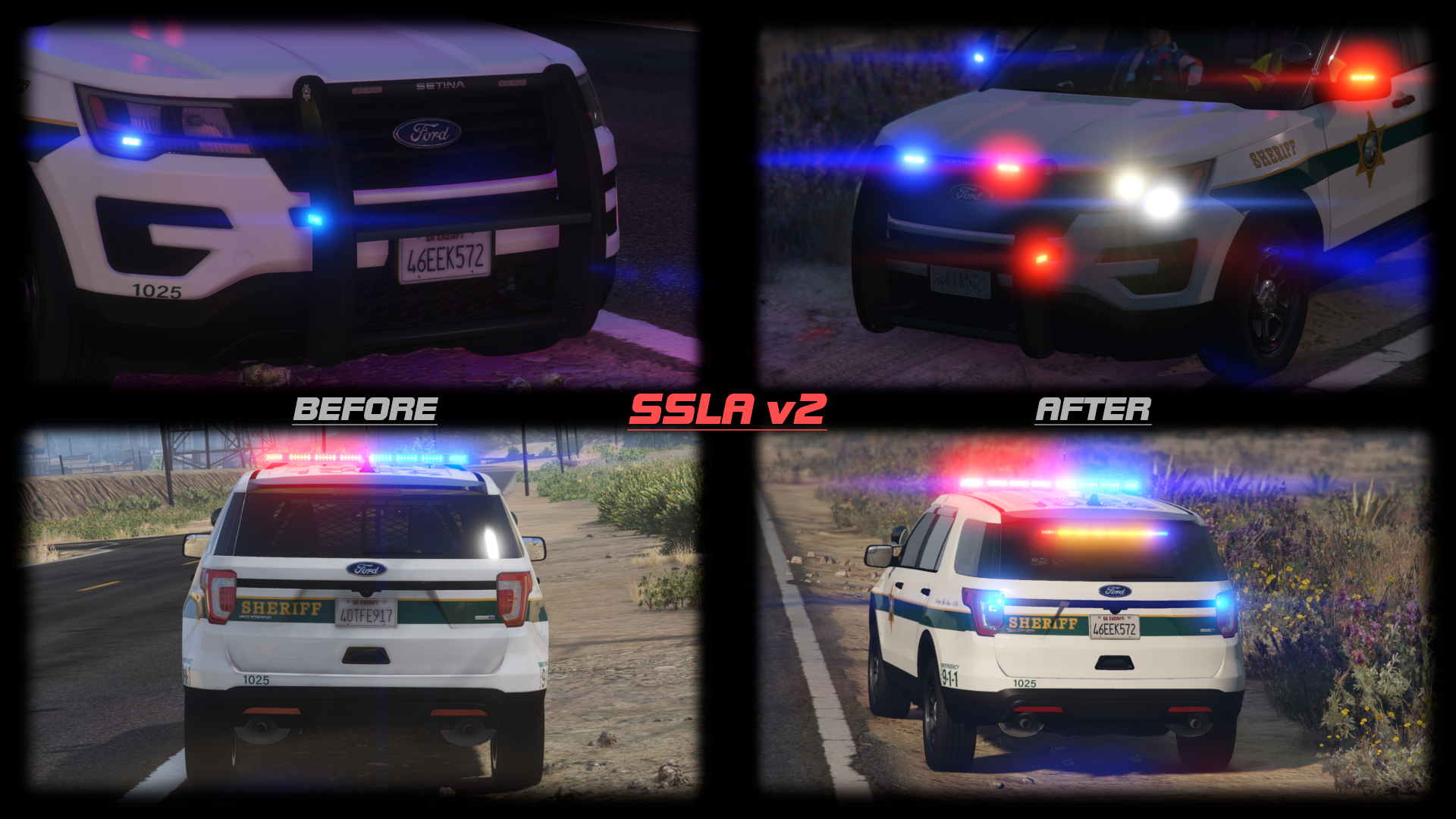
This mod raises various siren limits in GTA V.


The per-vehicle siren limit is raised from 20 to 32. Vehicles can now have siren1 through siren32, which are all fully functioning and independent. The siren_glass limit is also raised to 32. Note that the limit of 128 total bones on a vehicle still exists.


The maximum value of a siren setting ID in carcols is raised to 65535. In the base game, siren settings can conflict if one of them has a value over 255. Now, siren setting IDs can go up to 65535 without conflicting with each other.


This mod also expands the maximum number of unique siren settings you can have. If you have 400 cars, and they all have unique light patterns, that'll work.


Installation

Copy the included ASI to your game folder.


Usage

For additional lights, just use siren21 through siren32 and add extra entries to the siren settings in carcols.meta. Again, note that there is still a limit of 128 total bones on a single vehicle.


For the increased ID limit, just use a number bigger than "255" as the ID. The values 0, 255, and 65535 are reserved, so don't use those specific values. No additional configuration is required.


RPH Users

SSLA does not require RAGEPluginHook, but it is compatible with it. However, it is ONLY compatible with the latest version! RPH version 1.98 has a compatibility patch that will play nicely with SSLA v2. The latest RPH version can be found bundled with LSPDFR, or on the RAGEPluginHook Discord server.


If you had RAGEPluginHook and SSLA v1, you may have had a compatibility DLL in your Plugins folder. This DLL is no longer required and should be removed. RPH now talks directly to SSLA.


RPH plugins that deal with emergency lighting will continue to function, but may need to be updated to support lights 21 through 32.


FiveM Users

SSLA v2 is compatible with FiveM. The server owner must enable ASIs in server.cfg with sv_scripthookallowed true, and Each user must copy the ASI into the plugins folder in their FiveM Application Data. No changes are required to the server config.


RPH Developers

In RPH version 1.98 and up, the Lights member of an EmergencyLighting will be length EmergencyLighting.MaxLights (a static class property) instead of necessarily being length 20. They will still all have the same length, it's just that that length will be longer than 20 if SSLA is installed.


Logging

This ASI produces a SirenSettings.log file in your game directory. It records:

  • Every loaded SirenSetting, its name, its ID, and its internal index;
  • Every loaded vehicle, its name, its siren ID, and the index it was matched to;
  • Any conflicts, where two SirenSetting entries have the same ID.

License

Please link to an official upload instead of redistributing this yourself.

What's New in Version 2.0.3

Released

2.0.3: Fix compatibility with game build 3258.

2.0.2: Remembered to set the file version number properly.

2.0.1: Fixed some bugs.

2.0.0: Enabled the use of up to 32 sirens. Also reworked RPH compatibility and added FiveM support.

1.1.0: Removed compatibility with RPH build 1.78 (for GTA build 1868.1). Added compatibility with RPH build 1.81 (for GTA build 2060).


Short Description

For more and more varied sirens

User Feedback

Recommended Comments

WilliamH.

Members

Now my nightmares are over!! Thanks man!!


Good job on this one! A must have for those who love lore-friendly emergency vehicles!

pikoutx

Members

Great job on this mod! Do you plan on releasing it to GTA5-Mods.com? As most people in here use ELS and most lore-friendly packs are on gta5-mods.com.

Rammy17

Members

This is awesome. Thanks for creating and uploading this, it's something that will make carcol conflictions a thing of the past. I love this and love that you dedicated time into releasing and creating this, and I have a lot of respect for all the people who also helped this come to be.

Lapd Code 3

Members

so this works on any vehicle with custom siren settings ?

cp702

Friends of LSPDFR Author

1 hour ago, Lapd Code 3 said:

so this works on any vehicle with custom siren settings ?

Yes. Vehicles don't need any special configuration to take advantage of this.

James20001120

Members

Sorry,how to install the file? Only install one?

cp702

Friends of LSPDFR Author

2 minutes ago, James20001120 said:

Sorry,how to install the file? Only install one?

If you use RPH, you need to install both files. If you don't use RPH, you only need the ASI. (If you sometimes use RPH and sometimes don't, then install both.)

James20001120

Members

(edited)

17 minutes ago, cp702 said:

If you use RPH, you need to install both files. If you don't use RPH, you only need the ASI. (If you sometimes use RPH and sometimes don't, then install both.)

But after I install both files and load RPH,my game send me a error message.It say 

Siren Setting_Limit_Adjuster log creation failed with error: The program cannot access the file because the file is being used by another program

IMAG0025~2.jpg

I think I install correct.


IMAG0027~2.jpg

Edited by James20001120

James20001120

Members

15 minutes ago, James20001120 said:

But after I install both files and load RPH,my game send me a error message.It say 


Siren Setting_Limit_Adjuster log creation failed with error: The program cannot access the file because the file is being used by another program

IMAG0025~2.jpg

I think I install correct.


IMAG0027~2.jpg


IMAG0029~3.jpg

cp702

Friends of LSPDFR Author

25 minutes ago, James20001120 said:

But after I install both files and load RPH,my game send me a error message.It say 


Siren Setting_Limit_Adjuster log creation failed with error: The program cannot access the file because the file is being used by another program

IMAG0025~2.jpg

I don't speak Chinese; could you translate that message for me?


What happens if you delete SirenSettings.log?

James20001120

Members

6 minutes ago, cp702 said:

I don't speak Chinese; could you translate that message for me?


What happens if you delete SirenSettings.log?

It still send me the error message after I delet the log.

The SirenSettings.log will auto create when I start the game, then send me the error message after I load the RPH.

Lapd Code 3

Members

9 hours ago, cp702 said:

Yes. Vehicles don't need any special configuration to take advantage of this.

What about five m vehicles? used as add on vehicles will there's work too?

telinha

Members

💙

cp702

Friends of LSPDFR Author

4 hours ago, cooltheme said:

After reading the description I am unsure what this mod does. I try using it and my lights still the same? Did I miss something? I'm lost right now and need some guidance. 

Non-ELS vehicles do emergency lighting with an entry in carcols.ymt and a reference in carvariations.ymt. These entries are referred to using an ID number, so you might have a SAHP Buffalo say “I’m using siren setting number 87” and have a corresponding entry number 87 in carcols. If two mods use the same ID number, they’ll have the same emergency light setup. When they’re supposed to have different light setups, this will mess up one of the vehicles’ lights. By default, these numbers are effectively limited to a maximum of 255, which means it was reasonably likely for 2 different mods to end up with the same ID. This increases that limit to 65535, so it’s much easier to avoid those conflicts.

3 hours ago, Lapd Code 3 said:

What about five m vehicles? used as add on vehicles will there's work too?

I don’t know enough about FiveM to know if this will work with it. It should work with FiveM-ready vehicles in normal GTA single-player, but I don’t know if it would work in FiveM itself.

cooltheme

Members

1 hour ago, cp702 said:

Non-ELS vehicles do emergency lighting with an entry in carcols.ymt and a reference in carvariations.ymt. These entries are referred to using an ID number, so you might have a SAHP Buffalo say “I’m using siren setting number 87” and have a corresponding entry number 87 in carcols. If two mods use the same ID number, they’ll have the same emergency light setup. When they’re supposed to have different light setups, this will mess up one of the vehicles’ lights. By default, these numbers are effectively limited to a maximum of 255, which means it was reasonably likely for 2 different mods to end up with the same ID. This increases that limit to 65535, so it’s much easier to avoid those conflicts.


Thanks for the explanation.

Swed

Members

Absolute madman

viperwolf

Members

Ive asked so many people to help me with carcol ID problems, noone wants to. Ive tried finding videos for this with no luck. Now you come out with this, and makes want to try and understand again.  I know what it does and why it would work, but I have no idea what to look for or what to change. Anyone know of a vid tutorial dealing with this?

Swed

Members

12 hours ago, viperwolf said:

Ive asked so many people to help me with carcol ID problems, noone wants to. Ive tried finding videos for this with no luck. Now you come out with this, and makes want to try and understand again.  I know what it does and why it would work, but I have no idea what to look for or what to change. Anyone know of a vid tutorial dealing with this?

You will get a log called SirenSettings, open that, do ctrl + f and search for Conflict and any ida that are conflicting will show up

Officer K Slimm

Members

Nice Job Bud Question is it possible you could make a show case video for demonstration?

Enzo CHP

Members

Hello the current version doesn't seem to work anymore could you do something ?

detMaxPayne

Members

plugin very interesting    it'd better if you have showcase video   I read the explanation but still didn't get it  what it actually do 

Synthacrat

Members

I still get "error hooking" when loading up this plugin.

Swed

Members

On 9/4/2020 at 7:01 AM, detMaxPayne said:

plugin very interesting    it'd better if you have showcase video   I read the explanation but still didn't get it  what it actually do 

A video wouldn’t really show anything except lights working instead of conflicting though

Create an account or sign in to comment

Latest Mods

Account

Navigation

Search

Search

Configure browser push notifications

Chrome (Android)
  1. Tap the lock icon next to the address bar.
  2. Tap Permissions → Notifications.
  3. Adjust your preference.
Chrome (Desktop)
  1. Click the padlock icon in the address bar.
  2. Select Site settings.
  3. Find Notifications and adjust your preference.



