


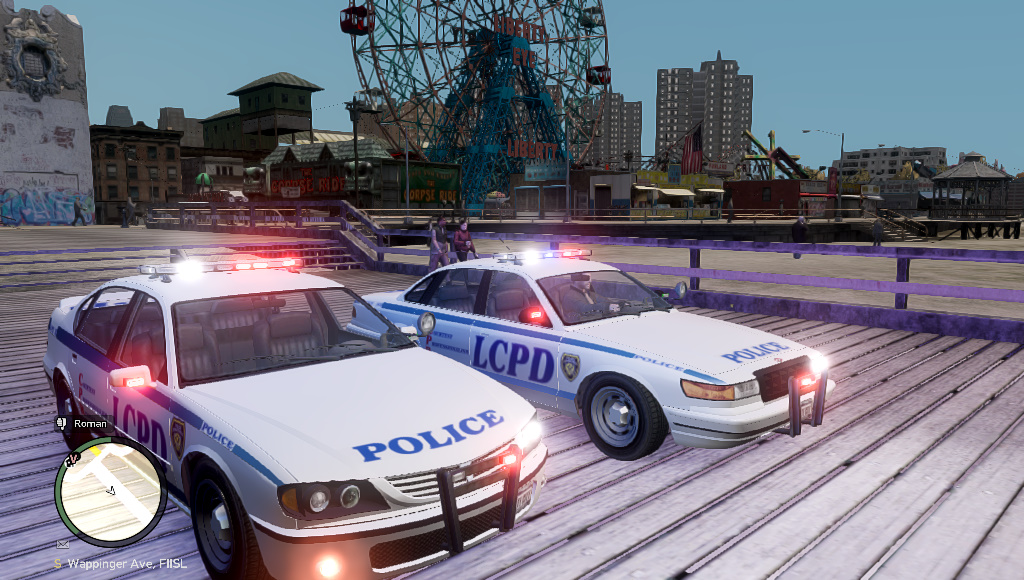

Vanilla ELS X-Project ELS Conversion
X-Project it’s based on stock police vehicles converted to ELS. Me (PedroskiPR), wanted to have the stock vehicles on ELS but unfortunately couldn’t find any. I’ve decided to learn basic modeling to create them myself and here I present you the first version. More will be made on the future.
------------------------
File Size Information
------------------------
police.wft - 592kb
police.wtd - 998kb
police2.wft - 656kb
police2.wtd - 1.029mb
What's New in Version 1.5
Released
- Version 1.5
- -Following lightning was removed:
- -Fog Lights (Police2)
- -Rambar (Police & Police2)
- -Trunk (Police & Police2)
- -Reverse Lights Wig-Wags
- -Added reverse lights els lightning.
- -Fixed bug when you shoot at the windows!!
- Version 1.0
- - Converted police.wft and police2.wtf to ELS
- - Known bugs:
- - Shooting at the windows will cause GTA to crash
- I'm trying to work hard to fix this.
Model: Created by GTA:IV Staff and converted to ELS by PedroskiPR<br />Lightbar: Wheelen Liberty created by PFCBarefoot.








![Hanse Modding HMS RTW Vohrführfahrzeug [Lore Friendly] [SKIN]](http://s3-screenshots.int-cdn.lcpdfrusercontent.com/resize/500/-/monthly_2026_05/HMS_RTW_Vohrfhrfahrzeug_01.thumb.png.0fe0f9214e4af6997f54aa7eeb8db863.png)
![Hanse Modding WAS RTW Vohrführfahrzeug [Lore Friendly] [SKIN]](http://s3-screenshots.int-cdn.lcpdfrusercontent.com/resize/500/-/monthly_2026_05/WAS_RTW_Vohrfhrfahrzeug_01.thumb.png.632108b63dd12eb502fbf5d7cfbc5198.png)


![[ELS-Hybrid | DLC/Addon ] Low-Profile z71 Tahoes](http://s3-screenshots.int-cdn.lcpdfrusercontent.com/monthly_2026_05/25_1(1).thumb.png.7bdf0066d86afe565fac5e2684baa3e8.png)



Recommended Comments
Create an account or sign in to comment