Pedro Rios
Members
-
Joined
-
Last visited
Files posted by Pedro Rios
-
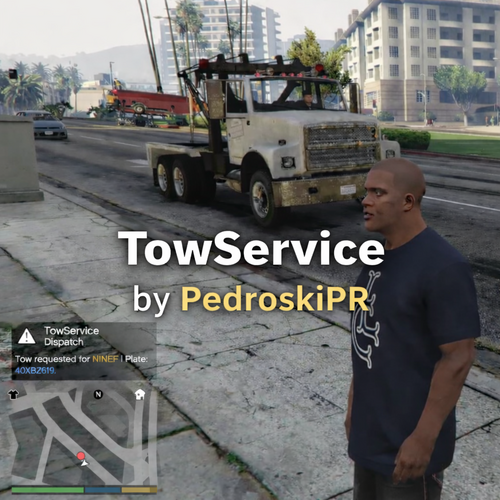
TowService adds a realistic and configurable tow truck system to LSPDFR.
Request a tow truck for any eligible vehicle near you and watch it arrive, secure the vehicle, and transport it away, "smoothly" and "professionally".
TowService uses a hybrid system:
AI drives toward the vehicle.
A replacement vehicle is safely attached to the tow truck.
The original vehicle is hidden.
Tow truck transports vehicle away (in the air)
Cleanup occurs after departure distance/time.
Built using RAGE Plugin Hook
Developed and tested on: RAGEPluginHook_1_107_1334_16527
Designed for seamless compatibility with the LSPDFR ecosystem.
Showcasing a working tow
Showcasing a time when the Tow Truck gets stuck or doesn't drive, it still gets cleaned.
Two times is the charm!
Features
Request tow truck with a configurable hotkey
Smart vehicle detection (radius + forward cone system)
Prevents towing unrealistic vehicles (planes, boats, military, industrial, etc.)
Optional prevention of towing occupied vehicles
Tow truck spawns dynamically behind player
Intelligent AI driving with:
Retasking logic
Hill detection & recovery
Backup maneuver if stuck (timeout recovery coded)
Hook delay simulation
Clean vehicle cleanup after transport
Fully configurable via INI file
Debug mode for logging and development
Vehicles That Cannot Be Towed
To maintain immersion, TowService automatically blocks:
Helicopters
Planes
Boats
Military vehicles
Industrial vehicles
Commercial vehicles
Cycles
Oversized vehicles are also automatically filtered.
Installation
Drop TowService.dll into:
Grand Theft Auto V\plugins\ Edit TowService.ini inside:
Grand Theft Auto V\plugins\ Launch the game via RagePluginHook.
Configuration (TowService.ini)
All major behavior is configurable:
Key Settings
RequestTowKey – Change hotkey
TowTruckModel – Choose towtruck or towtruck2
SpawnDistance – Distance tow truck spawns from player
ApproachDistance – Precision stop distance
HookDelayMs – Hook simulation time
Target Detection
TargetRadius
TargetConeDegrees
AllowTowOccupied
AI & Safety
TowTimeoutMs
RetaskEveryMs
Debug
DebugNotifications
No code editing required.- 1,816 Downloads
- 4 Comments
Updated -
Vanilla ELS X-Project ELS Conversion
X-Project it’s based on stock police vehicles converted to ELS. Me (PedroskiPR), wanted to have the stock vehicles on ELS but unfortunately couldn’t find any. I’ve decided to learn basic modeling to create them myself and here I present you the first version. More will be made on the future.
------------------------
File Size Information
------------------------
police.wft - 592kb
police.wtd - 998kb
police2.wft - 656kb
police2.wtd - 1.029mb
- 1,180 Downloads
- 27 Comments
Updated -
Hi, these skins were first developed on September 21, 2012.
I have never uploaded here, but did created a post with them available:
-------------------------------------------------------------------------------------------------------
Let me know what do you think about them, with the addition of new vehicles to the force,
it looks more complete, regardless of the department not using Tahoe and Impala for
Traffic Enforcement.
I created this skin as Jlo4661 asked for them on my YouTube Account on one of my videos
and because I see them everyday in the way to my job. Love them!
---------------------------------------------------------------------------------------------------------
- 32 Downloads
- 1 Comments
Updated