Skip to content
View in the app

A better way to browse. Learn more.

LCPDFR.com

A full-screen app on your home screen with push notifications, badges and more.

To install this app on iOS and iPadOS
  1. Tap the Share icon in Safari
  2. Scroll the menu and tap Add to Home Screen.
  3. Tap Add in the top-right corner.
To install this app on Android
  1. Tap the 3-dot menu (⋮) in the top-right corner of the browser.
  2. Tap Add to Home screen or Install app.
  3. Confirm by tapping Install.

Blaine County Sheriff Uniform Pack - EUP 8.0+ 1.0.1

(7 reviews)

24 Screenshots


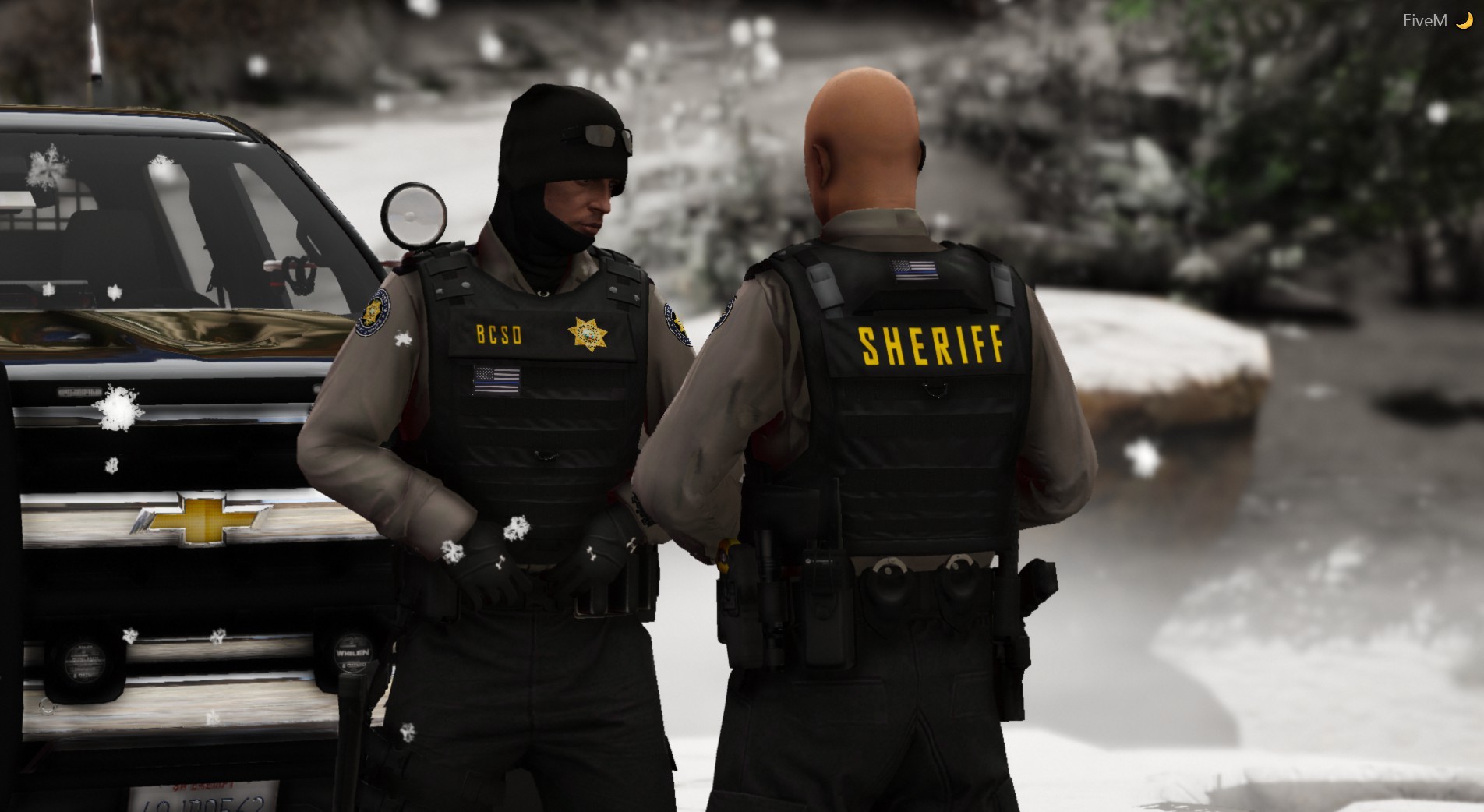
Blaine County Sheriff's Office Department Uniform Pack

Jordan R. -  working with Downrite Customs

Initial Date of Release - 6/6/2019 


=======================================================================================================================================================


CONTACT INFORMATION

DOWNRIGHT CUSTOMS DISCORD: https://discord.gg/3Ym447E

LCPDFR Profile: https://www.lcpdfr.com/profile/334613-officer-joe-kerr/My

Discord: Sheriff Woody#9582


======================================================================================================================================================= 


INFORMATION

Hello and thank you for checking out my work. I originally made this EUP set for my FiveM community and tried to include as many options as possible for clothing and standard uniforms. The pack was made to be used with our vehicle designs which were black and grey and the uniforms were perfect match! However after switching to a new department fleet and theme I have decided to release this set of uniforms and clothing to anyone who may want to use it for their single player OR their FiveM community! In addition to the textures I also threw in the custom badge and BCSO logo that was used for the department.  You can find installation paths inside the file. 


Disclaimer: There is one or two textures in this pack that are made for private models that can only be acquired through Discord such as the Fleece Hoodie. If you do not have that model the texture will not work for you. Do NOT ask me for the model as I will not take part in redistributing private assets. [If you see anything that belongs to you feel free to shoot me a message and I will get it removed immediately!]


-If you do not know how to replace textures in OpenIV or search through the EUP files to find where things go then you probably shouldn't download this pack. It doesn't include .ytd's, just .png's. 


If you have requests for any other vehicles I may take some so just leave any requests in the comments. If anybody likes my work and would like to request another project I'm open to doing textures for people so leave those requests in the comments or feel free to send me a message!


NOTE: If you are interested in the vehicle textures that go with the pack,  send me a message via this website or through discord for the file. It is free to use, however it was initially made for private models therefore I cannot release the skins on this website. However the vehicle skins include templates so they should fit most vehicles! 


=======================================================================================================================================================


QUESTIONS FOR DRC WITH ANSWERS


Q: Why aren't my lights bright?

A: You do not have light-enhancing mod (Visualsettings.dat.) Install a mod like RadianceV or something that will make your lights brighter. 


Q: What visual mod do you use?

A: I use Make Visuals Great Again but there are several visual mod options that will suit your preference. 


Q: Can I use this is my FiveM server?

A: Of course, just given credit where necessary and take plenty of screenshots!


Q: What is your next release?

A: Join the DRC Discord and you will see!


Q: Do you do custom orders?

A: Yes! Visit our Discord for more information!


Q: Will you be the developer for my FiveM server?

A: I will not be developing for any FiveM server unless I join a preferred community and they need development assistance.


 *Do Not Redistribute or Upload to any other sites.
 *Do not send these files to anyone.
 *Do not claim as your own.
 *You CAN modify the textures how you see fit however you can NOT reupload under any circumstances.  
 *I am not responsible for texture loss or issues to your game or FiveM server. Back up all files.

What's New in Version 1.0.1

Released

Just changed the name of the polo shirt files so they should fit properly now. 

User Feedback

Recommended Comments

SoarHawk

Members

13 hours ago, Officer Joe Kerr said:

Because it was done for a FiveM community and we replaced all sorts of stuff. Just rename things and replace what you want. 

And how are we supposed to know what to replace? Especially because this wasn't updated for EUP 8.1... makes it extremely difficult to install, going back to @Maximilian89's point. Really, there should be an OIV package given the sheer amount of textures... or at least have accurate paths and correct names corresponding to Sheriff uniforms. Such a nice pack, but just way too difficult to install. 

HeavyWolfPL

Members

Just now, SoarHawk said:

And how are we supposed to know what to replace? Especially because this wasn't updated for EUP 8.1... makes it extremely difficult to install, going back to @Maximilian89's point. Really, there should be an OIV package given the sheer amount of textures... or at least have accurate paths and correct names corresponding to Sheriff uniforms. Such a nice pack, but just way too difficult to install. 

Somehow I replaced 8.1 files. Everything is in the same place, just find the right texture with the same name but different letter.

SoarHawk

Members

2 minutes ago, HeavyWolfPL said:

Somehow I replaced 8.1 files. Everything is in the same place, just find the right texture with the same name but different letter.

Did you have to rename them all and replace BSCO or did you just leave it replacing SAHP?

HeavyWolfPL

Members

There is no need to rename, you only replace the texture using "Replace" button, you don't replace the actual file. You look for BCSO textures using the viewer with Edit mode on, then click the Replace button and replace files.

Antony

Members

Hey! I have uploaded your bulletproof vest and it works perfectly. I am having troubles with one of the shirts though, help would be much appreciated.
image.png.c9c7db30e6a91516827b006d5305adf1.png

Sheriff Woody

Members Author

On 7/11/2019 at 10:36 AM, SoarHawk said:

Did you have to rename them all and replace BSCO or did you just leave it replacing SAHP?

To follow up on what HeavyWolfPL said, each .ytd contains one texure. So you don't need to even rename anything like I misstated before. Just find the texture you want to replace, BCSO in this case and replace the image in the .ytd with the corresponding texture. Hope that helps. 

senators18

Members

(edited)

What vehicles/skins you got in the pictures? love them. 

Edited by senators18

Officer LarseN

Members

what skinpack is that?

MiGiNo

Members

Hello , Can you make a video , how to put this in FiveM? 

Ainsley

Members

(edited)

why are all the files png files,it would be so much easier without opening the files and replacing them that way

Edited by Ainsley

Sheriff Woody

Members Author

18 hours ago, Ainsley said:

why are all the files png files,it would be so much easier without opening the files and replacing them that way

Because I wanted them to be .png files. PNG's make it easier for people to replace whatever they want and see what the texture looks like without having to put it in OpenIV. 

Code 5 Studios

Members

whens the next pack coming?

Sheriff Woody

Members Author

1 hour ago, GalaxyXX said:

whens the next pack coming?

Not sure yet. Ideally by the end of September but I'm working on FiveM stuff so I'm not sure

S1id3L0ck

Members

This pack is awesome! Definitely a fan.

XxDestroyerxX

Members

(edited)

does this work for 8.1?

Edited by XxDestroyerxX

Sheriff Woody

Members Author

It should. 8.1 didn't change much to my knowledge. 

This appears to be bugged in EUP 8.1. I installed all of the textures, which I can see perfectly fine, however, I am unable to go on duty while wearing any of the BCSO uniforms. I've tried using the EUP menu to change into uniform before going on duty. I've also tried changing the uniform inside the sheriff station in case the EUP menu was bugged. Nothing has worked.

Sheriff Woody

Members Author

12 hours ago, kingjaffejoffer5 said:

This appears to be bugged in EUP 8.1. I installed all of the textures, which I can see perfectly fine, however, I am unable to go on duty while wearing any of the BCSO uniforms. I've tried using the EUP menu to change into uniform before going on duty. I've also tried changing the uniform inside the sheriff station in case the EUP menu was bugged. Nothing has worked.

Try SAHP uniforms. I may have named them to replace those, but they can be changed to whatever. 

Smoke5tack

Members

(edited)

So i tryed to put one of the badges in.  hand_diff_003 and put it in the ytd file of that name of coarse. First thing happened is that it shows up in the ytd and in open iv and all but not in game. I know where that badge is located in the trainer but i flip through where it should be and its just the same one. Secondly its in the wrong file anyway since 003 is the Highway Patrol badges that are used by AI. 002 is the template that should have been used. I tryed to change the name and copy to 002 but that doesn't work either. I realize i can just copy the ytd from the hp badge and rename but its just a silly thing to have to do since there is 10 BCSO badges that could have been drawn to in the first place. My main question would be why did one draw a BCSO badge on top of a highway patrol badge?

Edited by Smoke5tack

Sheriff Woody

Members Author

2 hours ago, Smoke5tack said:

So i tryed to put one of the badges in.  hand_diff_003 and put it in the ytd file of that name of coarse. First thing happened is that it shows up in the ytd and in open iv and all but not in game. I know where that badge is located in the trainer but i flip through where it should be and its just the same one. Secondly its in the wrong file anyway since 003 is the Highway Patrol badges that are used by AI. 002 is the template that should have been used. I tryed to change the name and copy to 002 but that doesn't work either. I realize i can just copy the ytd from the hp badge and rename but its just a silly thing to have to do since there is 10 BCSO badges that could have been drawn to in the first place. My main question would be why did one draw a BCSO badge on top of a highway patrol badge?

Like I just stated above, and it's been covered already in the comments, most stuff replaces SAHP stuff and probably some other stuff, too. Why? I don't know. That's what I chose to replace when I made the stuff. It's easy to change, that's why they're ALL in PNG format; so you guys can change whatever you like, and replace anything you want without having to open the .ytd and extract it. It's pretty simple to change from _003 to _002

Ocean25

Members

i cannot find where to put the hoodies, has any 1 found the location in Open Iv


agent rogers

Members

(edited)

On 9/15/2019 at 1:15 AM, Ocean25 said:

i cannot find where to put the hoodies, has any 1 found the location in Open Iv


jbib 005 the fleece idk

Edited by 115 adam

Patricktan112

Members

Hi there i was wonder what is the Hoodie's MP file is and because i can seem to find it when i put in the ID. Trying to install this for FiveM

XxKingJohnxX

Members

where can I find the matching car pack in the background of the photos?

ThatGuySens

Members

Why is it in picture form?


Create an account or sign in to comment

Latest Mods

Account

Navigation

Search

Search

Configure browser push notifications

Chrome (Android)
  1. Tap the lock icon next to the address bar.
  2. Tap Permissions → Notifications.
  3. Adjust your preference.
Chrome (Desktop)
  1. Click the padlock icon in the address bar.
  2. Select Site settings.
  3. Find Notifications and adjust your preference.
















