Skip to content
View in the app

A better way to browse. Learn more.

LCPDFR.com

A full-screen app on your home screen with push notifications, badges and more.

To install this app on iOS and iPadOS
  1. Tap the Share icon in Safari
  2. Scroll the menu and tap Add to Home Screen.
  3. Tap Add in the top-right corner.
To install this app on Android
  1. Tap the 3-dot menu (⋮) in the top-right corner of the browser.
  2. Tap Add to Home screen or Install app.
  3. Confirm by tapping Install.

San Andreas County Sheriff's Office 2026 FPIU 1.0.0

(0 reviews)

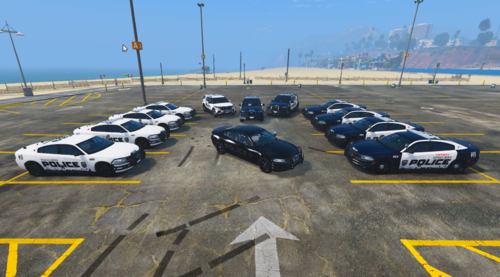
2 Screenshots

This is just a basic SACSO 2026 FPIU Livery.

I don't know yet if I'm going to make more liveries for this vehicle, maybe a supervisor livery.

Please do NOT claim/sell/redistribute files as yours!!

Vehicle Pack Used:


Short Description

San Andreas County Sheriff's Office 2026 FPIU

User Feedback

Recommended Comments

ShadowCustoms

Members Author

14 minutes ago, NotKornel said:

And Then He Clicked Post Spongebob GIF - And then he clicked post Spongebob  Meme - Discover & Share GIFs

Tbh you didn’t have to click on this post, thanks for the views tho

Saronyx78

Members

My opinion, this is a pretty solid livery, not too detailed but quite plain
It's a great effort though! Would love to see more liveries, likely with more detail and effort put in them! 😄

ShadowCustoms

Members Author

35 minutes ago, Saronyx78 said:

My opinion, this is a pretty solid livery, not too detailed but quite plain
It's a great effort though! Would love to see more liveries, likely with more detail and effort put in them! 😄

I've done others, mostly Indiana things, but I just got my LSPDFR working again and figured I'd start with a basic livery for my first time back in a month or so, just to get back in the hang of designing. Thank you for not hating on it too bad tho!

Saronyx78

Members

14 hours ago, ShadowCustoms said:

I've done others, mostly Indiana things, but I just got my LSPDFR working again and figured I'd start with a basic livery for my first time back in a month or so, just to get back in the hang of designing. Thank you for not hating on it too bad tho!

No worries! I like giving constructive criticism but I hope my message motivates you to make more liveries!

Create an account or sign in to comment

Account

Navigation

Search

Search

Configure browser push notifications

Chrome (Android)
  1. Tap the lock icon next to the address bar.
  2. Tap Permissions → Notifications.
  3. Adjust your preference.
Chrome (Desktop)
  1. Click the padlock icon in the address bar.
  2. Select Site settings.
  3. Find Notifications and adjust your preference.