Skip to content
View in the app

A better way to browse. Learn more.

LCPDFR.com

A full-screen app on your home screen with push notifications, badges and more.

To install this app on iOS and iPadOS
  1. Tap the Share icon in Safari
  2. Scroll the menu and tap Add to Home Screen.
  3. Tap Add in the top-right corner.
To install this app on Android
  1. Tap the 3-dot menu (⋮) in the top-right corner of the browser.
  2. Tap Add to Home screen or Install app.
  3. Confirm by tapping Install.

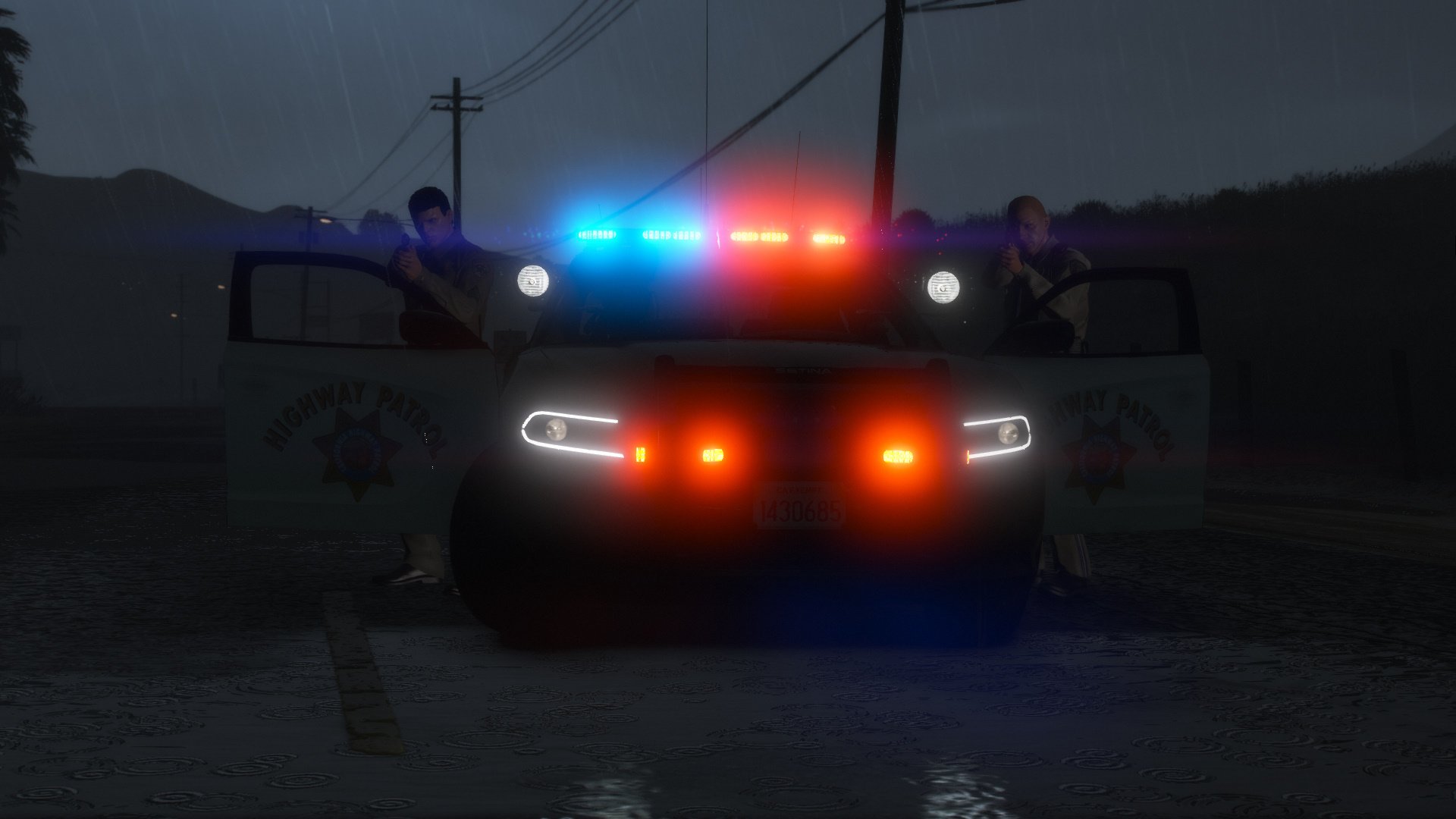
2019 Charger CHP Pack 1.1

(52 reviews)

10 Screenshots

Hey there!


The newest addition to the CHP fleet, now also available for GTA V. 


Features:

Accurate Lighting
Accurate Equipment
The front and rear of the lightbar can be controlled independently

Animated  antenna

Reflective Decals

And a whole bunch of small details most of you will never notice


That should be it.


Have fun!


These cars require an unedited carvariation.meta to work properly!!!

If you do not have it, the yelp pattern will be messed up.

What's New in Version 1.1

Released

- fixed dirt mapping

User Feedback

Recommended Comments

motive007

Members

yeah we know that  just the cvpi and explorers New chargers and tahoes got ride of side mirror led

OfficerJonathon

Members

Any way to remove the "Highway Patrol" on the trunk for the Polar bears since the Highway Patrol removed the logo from the back since they are no longer CVE "Commercial Vehicle Enforcement" vehicles they are now PCF "Primary Collision Factor" vehicles. If its possible that'd be great if not then its fine thank you sir!

Jcorrales13

Members

(edited)

I am a Peace Officer here in the State of California. I’m not an Officer with the CHP, but they were my number one choice. Life happened and I ended up getting on with another department in Northern California. Your CHP vehicles and light patterns are 100% accurate. Very good job on them. I know in a comment you said you weren’t a fan of the explorers. You also said you’d think about doing a Tahoe. If you can do a Tahoe or an Explorer (black and white or the PCF Polar bear) my level of respect and gratitude would go so much higher for you. You get the small details, light the blue/amber lighting in the trunk, the black microphone by the driver’s visor, the details of the MDT/bottom center console, and the “stage one” back and forth amber/blue pattern.  If not I understand, I just want you to know you did a great job on these. I have many family members in the CHP, I’ve been around the vehicles enough to know these are the best out there on LSPDFR. 

Edited by Jcorrales13

Sentinel55

Members Author

On 3/22/2020 at 7:42 AM, OfficerJonathon said:

Any way to remove the "Highway Patrol" on the trunk for the Polar bears since the Highway Patrol removed the logo from the back since they are no longer CVE "Commercial Vehicle Enforcement" vehicles they are now PCF "Primary Collision Factor" vehicles. If its possible that'd be great if not then its fine thank you sir!


You could remove it on the "chp_decal" texture. But that will also remove it on the black and white slicktops.


15 hours ago, Jcorrales13 said:

I am a Peace Officer here in the State of California. I’m not an Officer with the CHP, but they were my number one choice. Life happened and I ended up getting on with another department in Northern California. Your CHP vehicles and light patterns are 100% accurate. Very good job on them. I know in a comment you said you weren’t a fan of the explorers. You also said you’d think about doing a Tahoe. If you can do a Tahoe or an Explorer (black and white or the PCF Polar bear) my level of respect and gratitude would go so much higher for you. You get the small details, light the blue/amber lighting in the trunk, the black microphone by the driver’s visor, the details of the MDT/bottom center console, and the “stage one” back and forth amber/blue pattern.  If not I understand, I just want you to know you did a great job on these. I have many family members in the CHP, I’ve been around the vehicles enough to know these are the best out there on LSPDFR. 


I don't know if I'm done with the CHP stuff yet. A CHP FPIU pack is requested countless times, maybe I should just think about it again.

Anyway, thanks a lot man! It really helps to keep the motivation high. Stay safe out there!

tankguy67

Members

Are there any high quality SAHP skins for this?

Sentinel55

Members Author

7 hours ago, tankguy67 said:

Are there any high quality SAHP skins for this?


Yes.


Jcorrales13

Members

I just recently got back into LSPDFR with the purchase of a new PC. Is there anyway with getting the slick top PCF White Charger to have two textures? 
 

I’d like it to have both the black and white texture for me to chose from. I thought I knew how to do it but I was way off. I thought you just had to import the black and white texture with the same name as the white texture. 

motive007

Members

7 hours ago, Jcorrales13 said:

I just recently got back into LSPDFR with the purchase of a new PC. Is there anyway with getting the slick top PCF White Charger to have two textures? 
 

I’d like it to have both the black and white texture for me to chose from. I thought I knew how to do it but I was way off. I thought you just had to import the black and white texture with the same name as the white texture. 

you cant switch it to fbi or police4 keep it sheriff slot you will be fine

ViperX5

Members

Just a question is there anyway i can get the red spotlight to flash if i put it in one of the hurks chp mega pack charger slot, P.S Great pack your CVPI and Charger oack are one of the best CHP packs i have ever seen.

Sentinel55

Members Author

6 hours ago, ViperX5 said:

Just a question is there anyway i can get the red spotlight to flash


No.

Zachjohnson2

Members

Hey man I know it’s the normal but is there a way to make the steady burn when I get out of the car off?

Sentinel55

Members Author

16 hours ago, Zachjohnson2 said:

Hey man I know it’s the normal but is there a way to make the steady burn when I get out of the car off?


Just change this line:


<OutOfVeh Enabled="true"


You'll find it three times in a VCF file, just set it to false.

ViperX5

Members


@sentinel Will you be making anymore CHP vehicles?

Sentinel55

Members Author

1 hour ago, ViperX5 said:

@sentinel Will you be making anymore CHP vehicles?


No

DittoNeato

Members

(edited)

Is it possible for me to try and make an unmarked livery for the slicktop (plain white skin, then use a trainer to change the color of the car) for personal use?


I am aware of the fact that it may not look at all realistic with the spotlights and push bar
(If needed, I will may provide a link to the sources I know that have at least a recording of an unmarked unit in action) 

Edited by DittoNeato

Sentinel55

Members Author

4 hours ago, DittoNeato said:

Is it possible for me to try and make an unmarked livery for the slicktop (plain white skin, then use a trainer to change the color of the car) for personal use?


I am aware of the fact that it may not look at all realistic with the spotlights and push bar
(If needed, I will may provide a link to the sources I know that have at least a recording of an unmarked unit in action) 


Feel free to. Don't forget to replace the reflective texture with a transparent texture.

DittoNeato

Members

11 hours ago, Sentinel55 said:


Feel free to. Don't forget to replace the reflective texture with a transparent texture.

Are the reflective textures the livery sign or the highway patrol decals, or both?

Sentinel55

Members Author

3 minutes ago, DittoNeato said:

Are the reflective textures the livery sign or the highway patrol decals, or both?


The texture with the reflective parts is chp_decal.png

DittoNeato

Members

5 hours ago, Sentinel55 said:

The texture with the reflective parts is chp_decal.png

Ah perfect, even though now with the reflective part is transparent, I have the "panda" thing left to deal with. Thank you kindly!

flackolc

Members

Hello, someone else asked how to remove the "HIGHWAY PATROL" from the white polar and you said "You could remove it on the "chp_decal" texture. But that will also remove it on the black and white slicktops." Can you help me understand how to remove it from the actual chp_decal_? Im able to find it but im not seeing how to remove it.

Sentinel55

Members Author

1 minute ago, flackolc said:

Hello, someone else asked how to remove the "HIGHWAY PATROL" from the white polar and you said "You could remove it on the "chp_decal" texture. But that will also remove it on the black and white slicktops." Can you help me understand how to remove it from the actual chp_decal_? Im able to find it but im not seeing how to remove it.


You have to export the png and edit it with a photo editing software. Photoshop or paint.net or something. Then import it back into OpenIV

flackolc

Members

1 minute ago, Sentinel55 said:


You have to export the png and edit it with a photo editing software. Photoshop or paint.net or something. Then import it back into OpenIV

Ahhhhhh ok ok..thank you. I'll give that a shot rn. Once opened in one of those softwares I can simply delete the "HIGHWAY PATROL" or would I have to like paint it white or something??

Sentinel55

Members Author

5 minutes ago, flackolc said:

Ahhhhhh ok ok..thank you. I'll give that a shot rn. Once opened in one of those softwares I can simply delete the "HIGHWAY PATROL" or would I have to like paint it white or something??


The chp_decal.png is a partly transparent texture, you just have to delete the text you want to get rid of and you're done

flackolc

Members

Just used the delete brush to get rid of it, thank you!

Sentinel55

Members Author

21 minutes ago, flackolc said:

Just used the delete brush to get rid of it, thank you!


You're welcome

Create an account or sign in to comment

Account

Navigation

Search

Search

Configure browser push notifications

Chrome (Android)
  1. Tap the lock icon next to the address bar.
  2. Tap Permissions → Notifications.
  3. Adjust your preference.
Chrome (Desktop)
  1. Click the padlock icon in the address bar.
  2. Select Site settings.
  3. Find Notifications and adjust your preference.

















