




What XScanner4 Actually Does
XScanner4 rebuilds two things LSPDFR players deal with constantly: the dispatch voice that talks to you on duty, and the ambient radio chatter running in the background.
It also throws in an on-screen audio visualizer, mostly because once you've got real audio data flowing through the system, it'd be a waste not to draw something with it.
None of this is a "drop a few sound files in and hook up a trigger" mod, it's built like an actual audio engine, and it shows.
Dispatch (Police Scanner)
The dispatch side quietly takes over every call LSPDFR would normally send to its own built-in scanner. You don't have to configure anything per callout pack, if a mod talks to LSPDFR's dispatch, it's now talking through this instead, automatically.
A few things make the actual calls feel less canned. Dispatch knows roughly where things are happening and can call out the street, the area, or a nearby landmark instead of reading a generic line every time.
There's also a set of radio effects that add some grit to the transmission itself; a bit of static, some low-end thinning so it sounds like it's coming out of a speaker instead of your headphones, the occasional short warble or muffle, and every once in a while a whole line gets scrambled like it's on an encrypted channel. It's randomized so it doesn't repeat the same "glitch" every time, and you can turn the intensity up, down, or off entirely if you'd rather have it clean.
You can point the whole thing at your own voice pack, set custom intro and outro stingers, and there's a real 3D mode: instead of dispatch just narrating flatly over everything, it can actually come from you, your vehicle, or a nearby cruiser, with the usual volume/gain/effects controls layered on top. It'll also duck itself automatically if you're talking over voice chat, and if you're already running a different dispatch-voice mod, there's a mode that steps XScanner4 back to just handling the audio side without fighting for control. Other plugin authors can also register with it and push their own lines through the same system instead of building their own audio pipeline from scratch.
Background Scanner & Live Radio
This is the ambient stuff; the low chatter running under everything else while you're on patrol. You get two ways to run it: local clips from your own audio folder playing on a random timer, or actual internet radio.
The internet radio side is the part I'd point to first if someone doubted this was a "real" feature. You can browse popular feeds, newest feeds, officially verified ones, search by station name or county, or just paste in a direct stream link and it'll figure out what it is. Streams get checked in the background and reconnect on their own if they drop, buffering is tunable so switching stations doesn't stutter, and it'll keep quietly filling the buffer even while you're muted so there's no stutter the second you unmute. There's a small live readout too, so if something's choppy you can actually tell whether that's your connection or the station's.
On top of that: a radial "wheel" you can pop up with a keybind to flip between your saved stations without digging through a menu, rules for whether ambient chatter keeps playing through callouts or pursuits, an option to only play while you're actually in a vehicle, a squelch chirp on local clips if you want that classic key-up/key-down sound, and ducking against either the dispatch scanner or your own mic. Each scanner can also be routed to a different output device entirely, if for some reason you want dispatch in your headset and ambient chatter out of your speakers.
Vehicles Actually Sound Like Vehicles
This is the one I think is easy to miss but genuinely changes how it feels in practice: when the scanner's coming from a vehicle in 3D mode, how clearly you hear it depends on the state of the vehicle itself. Windows up, doors shut; it's muffled, like it actually would be. Roll a window down, and it opens up. Leave a door hanging open, and it bleeds out more from that side. It even accounts for damage; a busted window lets sound leak out that wouldn't otherwise, and a dented door that doesn't shut quite right does the same. It's not a huge, showy effect, but it's the kind of detail that makes a nearby cruiser's radio feel like it's actually there instead of just a sound effect glued to a car.
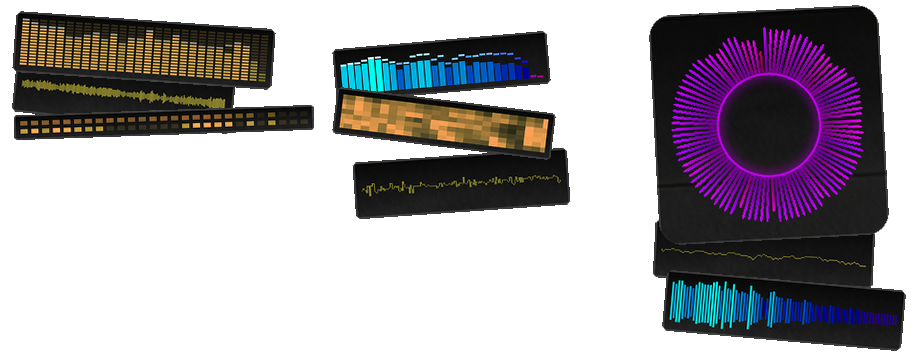
The Visualizer
An optional on-screen display that reacts live to whatever's playing; dispatch, ambient chatter, or your own mic. There are thirteen styles to pick from (plus off): a classic bar-graph equalizer, a mirrored "Winamp-style" version of the same, a circular ring of pulsing spikes, a VU-style needle bar, a straight-up waveform and a scrolling version of it, a connect-the-dots oscilloscope and its scrolling counterpart, a blocky segmented "hardware EQ" ladder, a scrolling spectrogram, an LED-grid readout, a set of rings that punch outward on hits, and a sweeping Knight Rider–style eye.
Whatever style you pick, you can color it as a flat color, a version that shifts subtly with the sound, or a full RGB cycle with its own range and speed. The card it sits in is fully customizable too; padding, an optional caption, background gradient, a scanline overlay if you want that retro CRT look, rotation, and you can just drag it around the screen with the mouse or set its position with sliders. It'll also fade itself out automatically if things go quiet, if the source is too far away to actually hear, or if you step out of your vehicle, so it's not just sitting there doing nothing on screen.
The Small Stuff That Adds Up
Every keybind is fully rebindable, keyboard or controller, with an on-screen volume bar when you nudge volume up or down. There are menu color themes if you want to reskin it. And there's a diagnostics screen tucked away for troubleshooting, in case something's ever misbehaving and you need to see what's actually going on under the hood.
Where This Sits Compared to the Usual NAudio Mod
Most sound-playing plugins in this space lean on general-purpose .NET audio libraries; NAudio is the common one; just to push a file out to your speakers. That's a fine way to build a "play this sound when that happens" mod, but it's a thin layer, and the limitations tend to show up in the same handful of places: audio that's basically flat with maybe some stereo panning standing in for "position," no real awareness of whether the game is paused or running in slow motion, a narrow set of supported file types, and if there's internet radio at all, it's usually fragile; one dropped connection and the stream just dies.
XScanner4 is built on a proper low-level audio engine instead, closer to what an actual game uses for its own sound than what a typical mod bolts on. That's what makes a lot of the above possible in the first place; sound that's actually positioned in 3D space rather than approximated, a scanner that slows down properly with the game instead of ignoring it, a visualizer reading real audio data instead of guessing at it after the fact, and a wide range of file formats plus real streaming protocols instead of just local file playback. It's less "a mod that plays sound files" and more a small audio system in its own right, which is really the only reason the 3D audio, the live radio, and the reactive visualizer can all run at once without stepping on each other.
⚠️ DISCLAIMER ⚠️
Not providing support in the comments anymore.
Support can be found on my Discord or on the ULSS Discord.
KNOWN ISSUES
29/09/2026 - currently investigating an issue where broadcastify streams return nothing but static
Keep quality plugins free by supporting
your favorite developers that actually still write code.
(favorite developer does not necessarily need to be me)

Edited by khorio
change description
What's New in Version 4.0.2461.3
Released
Complete rewrite
Short Description
AI disclosure
The author has disclosed that AI tools were used in creating the following aspects of this file:
- Description





.thumb.png.8037129bc2526a9a9c435f4295948c9e.png)


Recommended Comments
Create an account or sign in to comment