Skip to content
View in the app

A better way to browse. Learn more.

LCPDFR.com

A full-screen app on your home screen with push notifications, badges and more.

To install this app on iOS and iPadOS
  1. Tap the Share icon in Safari
  2. Scroll the menu and tap Add to Home Screen.
  3. Tap Add in the top-right corner.
To install this app on Android
  1. Tap the 3-dot menu (⋮) in the top-right corner of the browser.
  2. Tap Add to Home screen or Install app.
  3. Confirm by tapping Install.

Blaine County Sheriff Office Pack 1.0.3

(15 reviews)

13 Screenshots

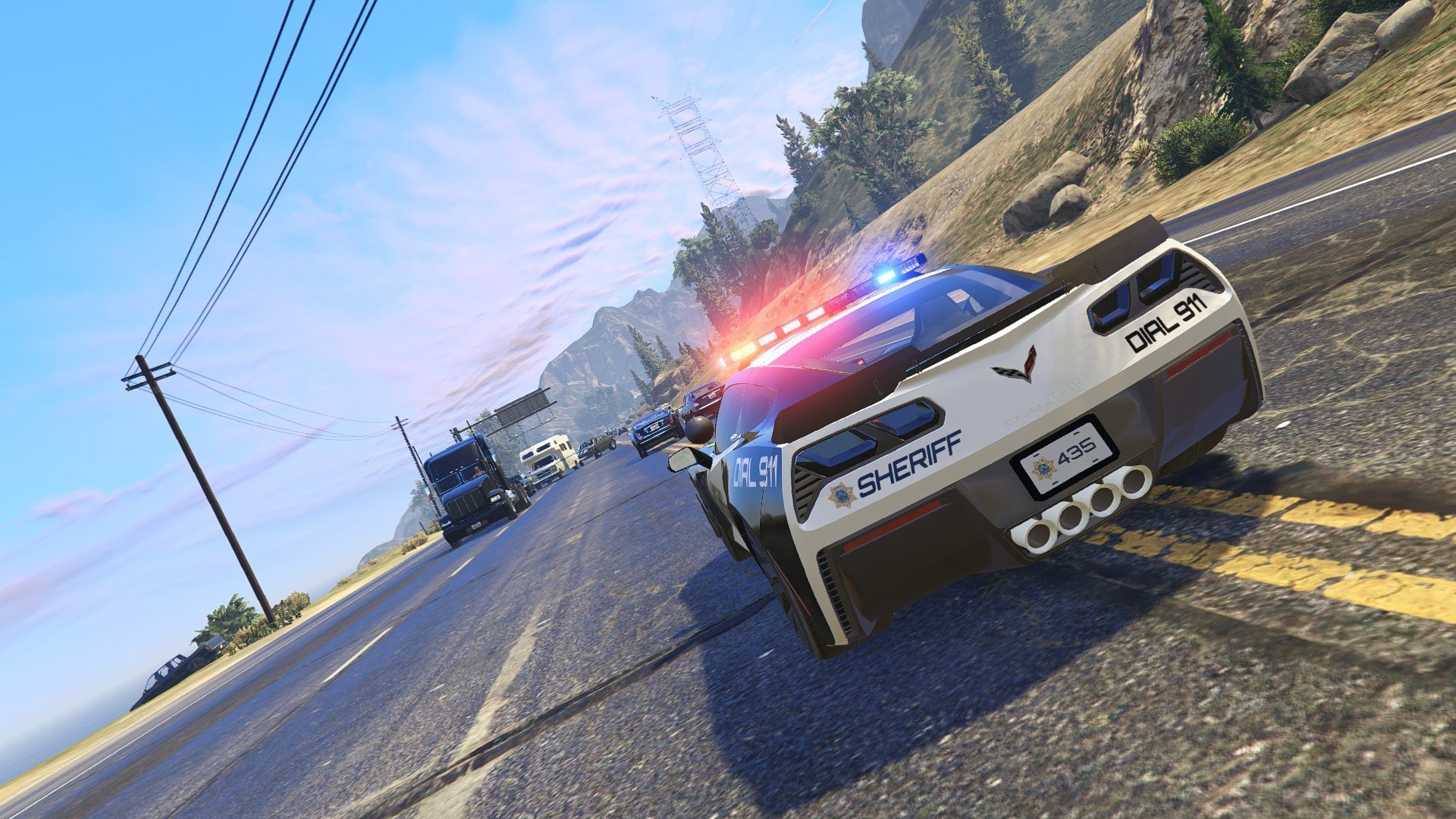
Blaine County Sheriff Pack by SCPDUnit23.


This is one of my first police pack for GTA V and my first modding experience ever. The pack is inspired by the Fortune Valley Police Department from NFS Payback. This pack will contain 5 vehicles, including:
-2011 Ford CrownVictoria Police Interceptor
-2012 Dodge Charger Pursuit
-2016 Ford Police Interceptor Utility
-2016 Chevrolet Tahoe PPV
-2016 Chevrolet Corvette C7 Z06


Templates has been provided if you want to create your own liveries. Note the Corvette template may be hard to skin with
as the templated I created isn't as great (baby steps :P). I would recommend to use Photoshop for the decals and Paint for the 
fillings of the skin but the preference is up to you.


Disclaimer:
Please do not redistribute and reupload this pack to any website or any other sources, including models,
screenshots, and liveries without explicit written permission. You are free to use this for FiveM or any other multiplayer servers
(except GTA Online).


Installation:
1. Use OpenIV and install the car mods to mods\update\x64\dlcpacks\patchday18ng\dlc.rpf\x64\levels\gta5\vehicles.rpf
2. Install the VCF ELS files under Grand Theft Auto V\ELS\pack_default
3. If the lightbar does not seem to be flashing, set the diffuse tint value to 
    <diffuseTint value="0x00FFFFFF" /> in whatever car slot you replaced in vehicles.meta file. 
4. The Ford Explorer and the Chevy Corvette have modified properties in vehicles.meta so the car handles correctly. 
See instructions in the car folders for installation. 


Known Bugs:
-Headlights and taillights sometimes screw up on the Corvette caused by dirt effects
-Door collision does not work properly on the Corvette. 


If bugs are found please report them as soon as possible 😉


Additional notes:

-If you want the pack to be all blue lights, download this file here (special thanks to @Giordano for making them all blue!)

https://www.lcpdfr.com/files/file/20386-gios-all-blue-lighting-emporium/

-As an easter egg, there is a skin hidden in one of the cars in this pack. It's based off of the cops in NFS No Limits.
You can use OpenIV to find this hidden skin or enable FLAG_HAS_LIVERY in vehicles.meta in one of the cars. Post a screenshot in the 
comments if you ever find this secret car. 😉


Credits (If I forgot anyone please PM me):


Thanks to 9 Lincoln 20, Giordano, and Royce for beta testing and taking screenshots!


2011 Ford CrownVictoria:
-Converted from Forza Horizon 3 by TheHurk and Lundy

2013 Dodge Charger Pursuit:
-Converted from Forza Horizon 
-Converted and textured by Thehurk
-Converted to PPV by Thehurk
-Templated by Thehurk
-Taillight textures by Five0


2016 Ford Explorer PI Utility:
-Ford explorer Base model purchased by Thehurk, GTAxB0SS, Requiem and Windows446
-Poly Crunched by Thehurk
-Textured and Converted by Thehurk
-Textures by Taylor Swift and Thehurk
-Rims by GTAxB0SS
-Interceptor Hood text by GTAxB0SS
-Interior purchased by TrentMU and FRGamer
-Ecoboost and Rear Police interceptor text by Jasonct203
-Converted to Police interceptor by Thehurk
-Templated by Thehurk


2016 Chevrolet Tahoe PPV:
-Orignal suburban Scratch modeled by Shadydk311 
-Converted and edited to V by BritishGamer88
-Converted to Tahoe by Thehurk & Allaboutk9
-MAJOR edits by Thehurk 
-Convert to PPV By Thehurk
-Rims purchased by Him1250
-Normals and wireframe fixed by Thehurk
-Textured by Thehurk


2016 Chevrolet Corvette C7 Z06:
-Original San Andreas mod created by: Hanan-SRB
-Converted to GTA V by: Motors Garage (Razor)
-Converted for LSPDFR use by Ryan Stough (HorsePlay)
-Template by SCPDUnit23


Skins:
-Based off of Fortune Valley Police Dept from NFS Payback
-Skinned by SCPDUnit23


Lights:
-Generic Lightpack by Raptor2000
-Whelen Patriot by tomcat8492 and CodingDev


Parts:
-Dell Latitude 6420/30 ATG 1.0.0 by OfficerUnderwood
-Laptop Stand by HDgamerzPC
-Watchguard 4RE HD Dashcam by HDgamerzPC
-Turtle Console by Twurtleee
-Setina PB-450L created by Turn 10 Studios. Converted to GTA IV by trewq34. Textures by trewq34 and Ridgerunner.
-Stalker Spectre Elite Radar Dectector scratched modeled, textured, and converted by HDgamerzPC
-Setina Proguard Cargo and Prisoner Partition by Vertex3D
-Decatur Genesis I scratch modeled, textured, and converted to GTA V by HDgamerzPC
-Decatur Genesis II Select scratch modeled, textured, and converted to GTA V by HDgamerzPC
-Decatur Dash Mounted Radar scratch modeled, textured, and converted to GTA V by HDgamerzPC
-Motorola Micro Radio by badass22
-Antennas by Raptor2000
-Garmin Navigation GPS by Thero

What's New in Version 1.0.3

Released

-Very very minor skin fix on the Corvette (it's barely noticeable but the text is a bit crooked on the doors).

-Fixed the CrownVic interior that seems to give chrome texture in some users. Thanks to @BetTD and Nolan8024 for pointing this out!

-Fixed the interiors of Tahoe and Explorer that also seems to give chrome texture in some users

User Feedback

Recommended Comments

BaconB

Members

1 hour ago, SCPDUnit23 said:

Thanks for letting me know. I'll push this fix soon. 

You need to access the vehicles.meta file under "Grand Theft Auto V\mods\update\update.rpf\common\data\levels\gta5" via OpenIV. Then find the car slot that you want to replace with and change the diffusetint value to <diffuseTint value="0x00FFFFFF" />


You can read more on this lightbar issue here if you need more clarification.


Let me know if you need some help. 

I really need help i cant figure it out i dont understand it


Pazzi

Members

if you check it closely, the tires of FPIU are floating a bit above the road.

or is it only me?

NoXiuS

Members

Hey men i rlly love this pack i have tested all the vehicles(except the vette) but i was wondering did you test the corvette have you modified the speed in handling.meta or switch the handlingid to a faster vehicle cuz i feel like its kinda slow

SCPDUnit23

Members Author

3 hours ago, NoXiuS said:

Hey men i rlly love this pack i have tested all the vehicles(except the vette) but i was wondering did you test the corvette have you modified the speed in handling.meta or switch the handlingid to a faster vehicle cuz i feel like its kinda slow

I switched the handling IDCoquette since its the closest thing to a Corvette (altho it has almost the same top speed as the sheriff cruiser by default which may explain why its a bit slow). 


You can change the handling ID in vehicles.meta to a faster car if you prefer like turismo or something. 

NoXiuS

Members

On 8/14/2018 at 4:36 AM, SCPDUnit23 said:

I switched the handling IDCoquette since its the closest thing to a Corvette (altho it has almost the same top speed as the sheriff cruiser by default which may explain why its a bit slow). 


You can change the handling ID in vehicles.meta to a faster car if you prefer like turismo or something. 

Alright im gonna try that ohh btw i cant find the handling.meta file for it it doesnt have one or im missing something?

SCPDUnit23

Members Author

16 hours ago, NoXiuS said:

Alright im gonna try that ohh btw i cant find the handling.meta file for it it doesnt have one or im missing something?

I only edit the vehicles.meta so I didnt provide the handling.meta

Uraraka

Members

(edited)

hi so i am new to this i download it and i follow the readme and i did not understand so i look it up how to download it i got no vids to show 

can someone help me out discord is !Euro Uraraka#3133

Edited by Uraraka

SCPDUnit23

Members Author

(edited)

4 hours ago, Uraraka said:

hi so i am new to this i download it and i follow the readme and i did not understand so i look it up how to download it i got no vids to show 

can someone help me out discord is !Euro Uraraka#3133

Welcome mate! I suggest try reading this guide here. It gives a detailed explanation on how to install car mods. 


Edited by SCPDUnit23

NoXiuS

Members

On 8/17/2018 at 5:55 PM, SCPDUnit23 said:

I only edit the vehicles.meta so I didnt provide the handling.meta

But the original mod has a handling.meta ?

SCPDUnit23

Members Author

18 minutes ago, NoXiuS said:

But the original mod has a handling.meta ?

The handling.meta was never there. Not all car mods will have vehicle.meta and handling.meta files in lspdfr. If you want to change the handling you r free to change the handling.meta. Be sure to backup your original handling.meta first!

cmeatball

Members

This Mod looks GREAT!!!! I have RagePluginHook tho, so is there a way to install this pack using that instead of OpenIV?????: PLS HELP!!!!! 

SCPDUnit23

Members Author

28 minutes ago, cmeatball said:

This Mod looks GREAT!!!! I have RagePluginHook tho, so is there a way to install this pack using that instead of OpenIV?????: PLS HELP!!!!! 

Don't think RPH should have an affect when installing via OpenIV tho...

cmeatball

Members

On 8/23/2018 at 11:48 AM, SCPDUnit23 said:

Don't think RPH should have an affect when installing via OpenIV tho...

What does this mean? RPH and OpenIV are two different programs. Is there a way to install This pack without using OpenIV at all? I'm not a very tech savvy guy and I really don't want to mess up my files. I have callout packs installed already into my game files with RPH and I'd rather not get set up any new programs, which could mess up my stuff. Is there a way to get this pack without OpenIV or could you show me to a similar pack where I wouldn't need Open IV? 

SCPDUnit23

Members Author

(edited)

7 minutes ago, cmeatball said:

What does this mean? RPH and OpenIV are two different programs. Is there a way to install This pack without using OpenIV at all? I'm not a very tech savvy guy and I really don't want to mess up my files. I have callout packs installed already into my game files with RPH and I'd rather not get set up any new programs, which could mess up my stuff. Is there a way to get this pack without OpenIV or could you show me to a similar pack where I wouldn't need Open IV? 

All car mods must be installed by OpenIV. This is why OpenIV requires creating a mods as a backup folder so it doesnt screw up the main files that stores the original car files.


You also mention something about Rage Plugin Hook and OpenIV has no affect on RPH. I suggest to look at youtube tutorials in installing car mods with OpenIV. As always tho make sure you backup your GTA V in case something does go wrong. 

Edited by SCPDUnit23

cmeatball

Members

2 minutes ago, SCPDUnit23 said:

All car mods must be installed by OpenIV. This is why OpenIV requires creating a mods as a backup folder so it doesnt screw up the main files that stores the original car files

ok. So theres no way to get extra car packs without OpenIV?


SCPDUnit23

Members Author

1 minute ago, cmeatball said:

ok. So theres no way to get extra car packs without OpenIV?


No. Must use OpenIV to install car mods. 

cmeatball

Members

14 minutes ago, SCPDUnit23 said:

No. Must use OpenIV to install car mods. 

ok

FGVN

Members

I really liked the way this mod worked but when i installed it on patchday18 like the instructions say they're not in game. When i go to openIV i can see the models and they have replaced the normal vehicles but they're still not there in normal game. What is wrong with it?


Gabe Kiger

Members

For some reason the left side and right side windows on the charger are completely black, this might possibly be because of a few shadow alterations i did to the files because im running lspdfr on a rgb potato. Video reference for the changes: 


SCPDUnit23

Members Author

On 9/8/2018 at 12:06 PM, FGVN said:

I really liked the way this mod worked but when i installed it on patchday18 like the instructions say they're not in game. When i go to openIV i can see the models and they have replaced the normal vehicles but they're still not there in normal game. What is wrong with it?


Sorry for late reply.


Make sure the installation is correct. Alternatively you can try other patchdays above patchday3 and see if that also works. 

stylez

Members

(edited)

is there a way you can add take down lights to these models like substituting the white lights in the front light bar?

Edited by stylez

Awselot

Members

has to be the best bcso pack ever. beats any other pack or even model that ive seen


Awselot

Members

could you please add a dodge challenger to this pack

Create an account or sign in to comment

Account

Navigation

Search

Search

Configure browser push notifications

Chrome (Android)
  1. Tap the lock icon next to the address bar.
  2. Tap Permissions → Notifications.
  3. Adjust your preference.
Chrome (Desktop)
  1. Click the padlock icon in the address bar.
  2. Select Site settings.
  3. Find Notifications and adjust your preference.