Skip to content
View in the app

A better way to browse. Learn more.

LCPDFR.com

A full-screen app on your home screen with push notifications, badges and more.

To install this app on iOS and iPadOS
  1. Tap the Share icon in Safari
  2. Scroll the menu and tap Add to Home Screen.
  3. Tap Add in the top-right corner.
To install this app on Android
  1. Tap the 3-dot menu (⋮) in the top-right corner of the browser.
  2. Tap Add to Home screen or Install app.
  3. Confirm by tapping Install.

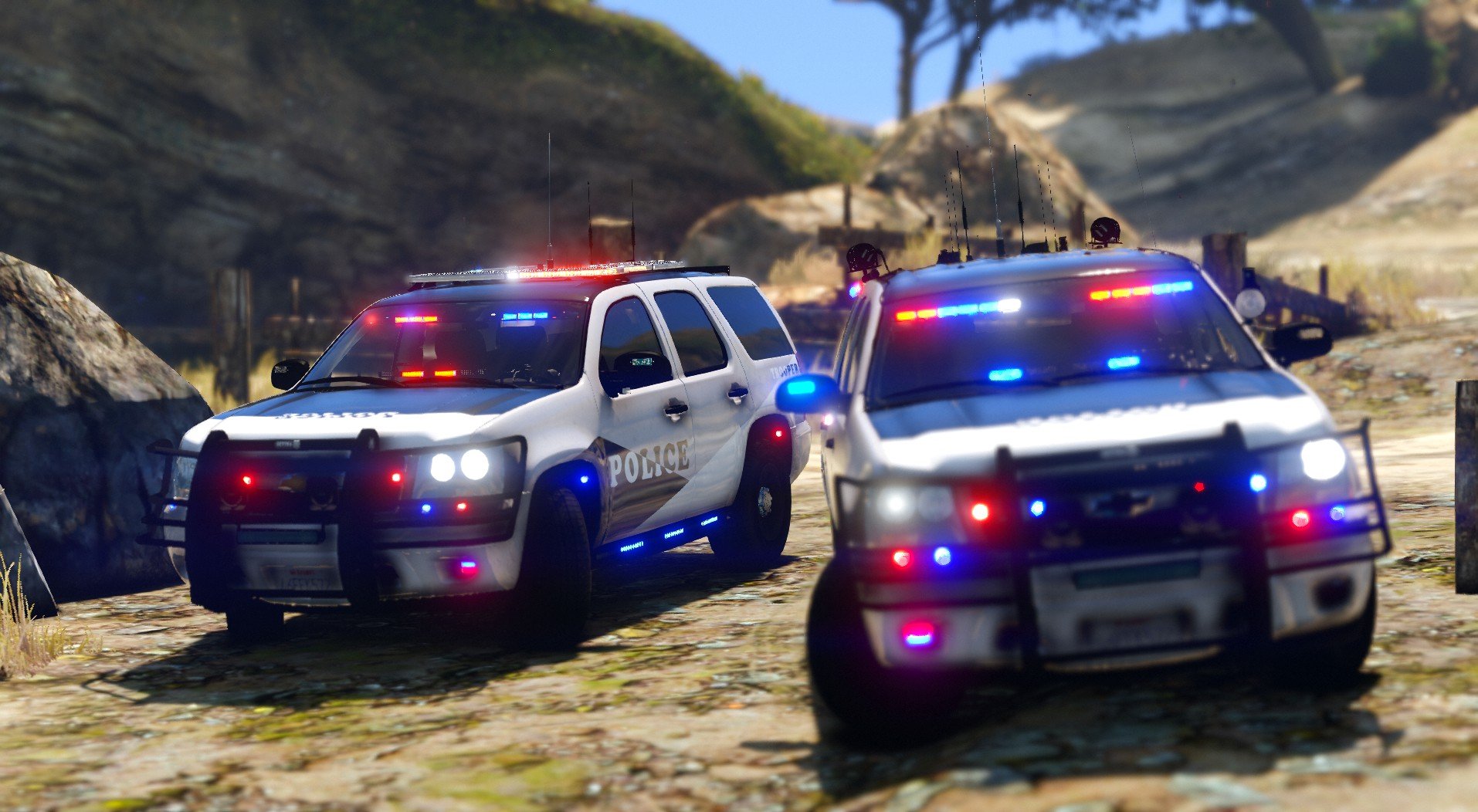
Christmas Tree 2013 Tahoe pack 1.0.0

(36 reviews)

9 Screenshots

I've had these in my game for a long time. This was an attempt at re-creating my christmas tree tahoe released on here before. I think this one looks way better, lol.


There are two variants, Lightbar and slicktop.

The slicktop variant has more lighting, where the lightbar'd variant has Three lightbars on it. It is christmas after all.


Both vehicle have extras

Lightbar:

Extra_ten : Rambar

Extra_12: set of Four Plate Readers

Slicktop

Extra_ten : Rambar

Extra_12: Single pair of Plate Readers


I will always be adding to these, so you may see updates in the future.

Enjoy.


Video, as always :


User Feedback

Recommended Comments

Trentfires

Members

is there a template or more skins for this?


frncloud

Members

Does anyone have the carvariations.meta and vehicles.meta entries that work for this model? I really like the model, but I'm having problems getting everything to work right.

bjv721

Members

LOVE this model but I noticed 1 small issue with the lights. When you put on the take downs, it appears as though they are shining backwards (emitting light from the rear of the vehicle back instead of the front of the vehicle forward). It also seems like all the red/blue light emissions are also shining from the rear of the vehicle back instead of either shining forward/all around. If anyone knows a fix for this, please post. Other than that, this vehicle and light setup is amazing! 20/10 !

bobopolice12

Members

where do i put the dang thang


ManamalReacts

Members

(edited)

So my common sense is telling me that I just need to rename the file to whatever vehicle I want to replace it with. Correct?

Edited by ManamalReacts

KnightHawkOne

Members

2 minutes ago, ManamalReacts said:

So my common sense is telling me that I just need to rename the file to whatever vehicle I want to replace it with. Correct?

So my common sense is telling me that I just need to rename the file to whatever vehicle I want to replace it with. Correct?

So my common sense is telling me that I just need to rename the file to whatever vehicle I want to replace it with. Correct?

Yes


destroyermega1

Members

Is the shadow glitch fixed

i really wanna use the car but dont want that glitch again

allofthelights

Members

the roof lightbars are really dim in comparison to the rest of the lights. any ideas?

On ‎2‎/‎13‎/‎2018 at 3:02 AM, ITheUnknownOneI said:

Keep posting issues. I’ll try to fix them later this morning.

How do you install


On ‎2‎/‎13‎/‎2018 at 3:02 AM, ITheUnknownOneI said:

Keep posting issues. I’ll try to fix them later this morning.

How do you install


On ‎2‎/‎13‎/‎2018 at 3:02 AM, ITheUnknownOneI said:

Keep posting issues. I’ll try to fix them later this morning.

How do you install


On ‎2‎/‎13‎/‎2018 at 3:02 AM, ITheUnknownOneI said:

Keep posting issues. I’ll try to fix them later this morning.

How do you install


Dtoro100

Members

Where do i install this at?


Flawda Man

Members

Hate to bother you on this, but has the shadows glitch/bug been fixed?

HP Deskjet

Members Author

6 hours ago, 95OBS said:

Hate to bother you on this, but has the shadows glitch/bug been fixed? 

It's not bother. But the shadow bug has not been fixed. I will look into it today, but I cannot promise anything as I cannot test models until I fix an issue with my GTA.

If you're looking to have it fixed, you can test it for me?

Flawda Man

Members

(edited)

31 minutes ago, ITheUnknownOneI said:

It's not bother. But the shadow bug has not been fixed. I will look into it today, but I cannot promise anything as I cannot test models until I fix an issue with my GTA.

If you're looking to have it fixed, you can test it for me?

Yes, I am willing to test it. And you don't have to do it today, just whenever you get everything you need to get done first. I just redownloaded it and Im not having the Shadow problem anymore.

Edited by 95OBS

Officer0.0

Members

can somebody help me how to onstall this nice car ? thank you

MetCam

Members

@HP DeskjetI'm having trouble getting the rambar. I'm using the trainer trying to get extra_10 to work, but it just won't appear. Sometimes it'll appear randomly when spawned, but quite often not... Maybe I should try a different trainer?

HP Deskjet

Members Author

2 hours ago, MetCam said:

@HP DeskjetI'm having trouble getting the rambar. I'm using the trainer trying to get extra_10 to work, but it just won't appear. Sometimes it'll appear randomly when spawned, but quite often not... Maybe I should try a different trainer?

Hmm. It shouldn’t matter the trainer. But which one are you using?

MetCam

Members

2 hours ago, HP Deskjet said:

Hmm. It shouldn’t matter the trainer. But which one are you using?

I'm using simple native trainer. I know it works fine for other things because I can get the ALPR cameras extra to work...

BPD 58

Members

(edited)

ive waited so long to see if this would be updated to fix the takedowns and the weird shadow thing but nothing yet. is there a chance these could be re-visited? they would be perfect if those two things were fixed.


Edited by BPD 58

sztukadzik

Members

As you need to install this car, I installed it as FBI2 and before the car door you can go please help

Anonymous7777

Members

Weird question but could i use this video for my loading screen for my server?

Anonymous7777

Members

i add these into my server and it just say cant find vehicle model? is there a special thing im missing

Mconrady

Members

Can someone help me install this?????

Zeevil

Members

the big antenna ruins it breh.

Create an account or sign in to comment

Account

Navigation

Search

Search

Configure browser push notifications

Chrome (Android)
  1. Tap the lock icon next to the address bar.
  2. Tap Permissions → Notifications.
  3. Adjust your preference.
Chrome (Desktop)
  1. Click the padlock icon in the address bar.
  2. Select Site settings.
  3. Find Notifications and adjust your preference.












