Skip to content
View in the app

A better way to browse. Learn more.

LCPDFR.com

A full-screen app on your home screen with push notifications, badges and more.

To install this app on iOS and iPadOS
  1. Tap the Share icon in Safari
  2. Scroll the menu and tap Add to Home Screen.
  3. Tap Add in the top-right corner.
To install this app on Android
  1. Tap the 3-dot menu (⋮) in the top-right corner of the browser.
  2. Tap Add to Home screen or Install app.
  3. Confirm by tapping Install.

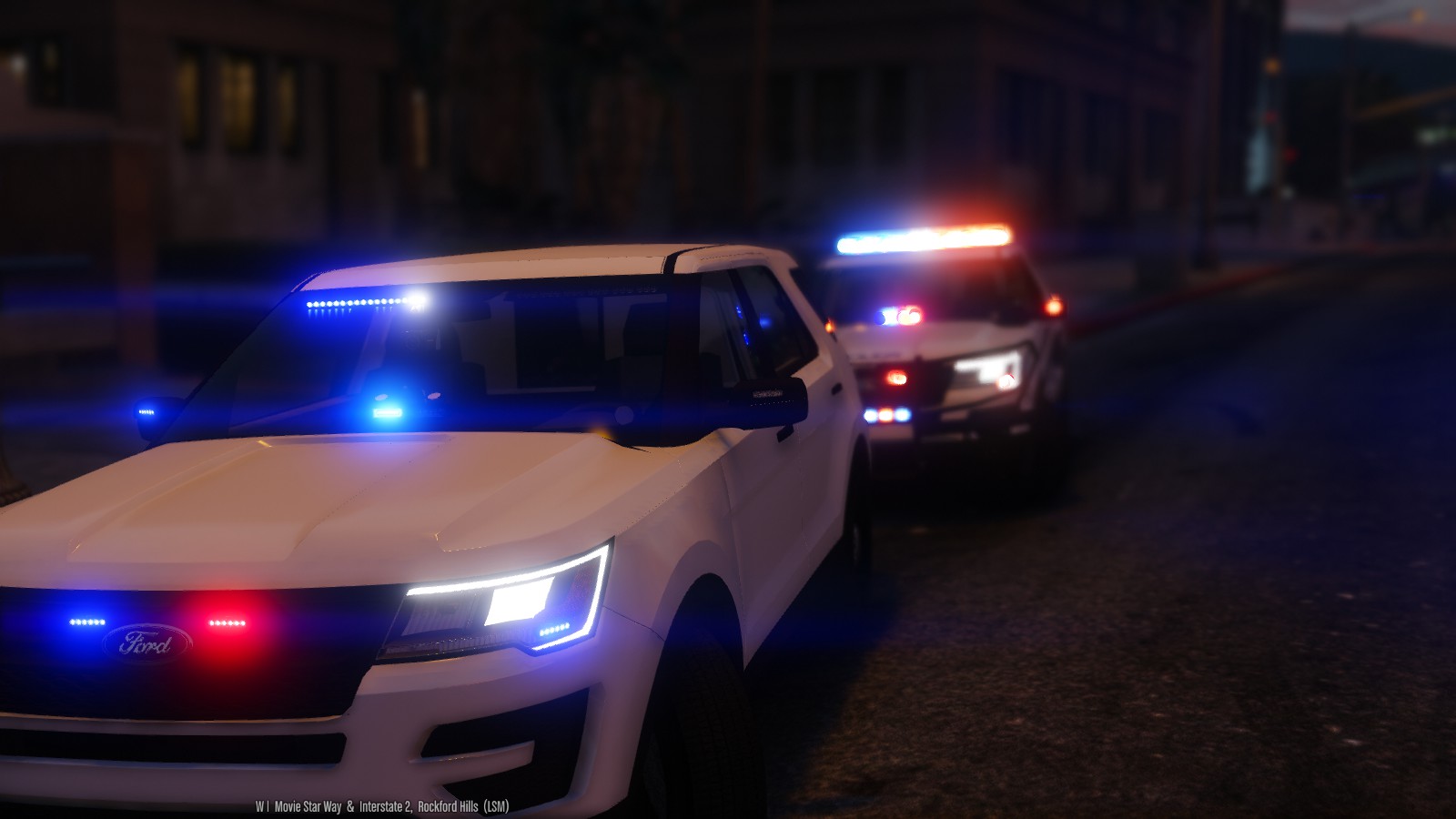
2016 LSPD FPIU 1.2.0

(67 reviews)

10 Screenshots


THIS MODEL IS NOW OUTDATED, AND I DO NOT RECCOMEND USING IT! I HAVE UPLOADED A BRAND NEW MODEL

OF THE 2016 UTILITY WITH A HQ INTERIOR, WITH GENERALLY THE SAME LIGHT SETUP. FIND IT HERE:


MODEL OVERVIEW
=================================
- NAME: 2016 LSPD FPIU
- VERSION: V1.0
- EXTRA PARTS: N/A
- OPTIMIZED FOR: ANY 

!!!!!IMPORTANT NOTE!!!!!!

iF YOU WISH TO HAVE THIS VEHICLE AS ANY OTHER SLOT YOU MUST INSTALL THE FILE 
NAMED: use this file to make any slot act like sheriff2

IF YOU DO NOT USE THIS FILE, THEN THE VEHICLE WILL NOT LIGHT UP PROPERLY

Instillation Instructions
=================================
To install this model, all you have to do is just put it in 
Mods>Update>x64>dlcpacks>patchday9>dlc.rpf>x64>levels>gta5>vehicles.rpf

To install the CarVariations line, all you have to do is go to:
mods\update\x64\dlcpacks\mpvalentines2\dlc.rpf\common\data

Add what i put in the carvar.txt to the end of your carvariations.

If you dont have patch day 9 in your mods folder, then just copy it from the base files

Extras List
=================================
Extra 1: Hood Interceptor Text
Extra 2: Whelen Inner Edge 
Extra 3: Whelen Legacy
Extra 4: Westin Rambar
Extra 5: Rambar Wrap Lower
Extra 6: Rambar Wrap Upper
Extra 7: Spotlight
Extra 8: Traffic Advisor 
Extra 9: Boot Whelen Ions

Model Notes
=================================
- "YA FUCKIN CUNTS" -Goose, The man who Flys

- YOU MUST HAVE RADIANCE V INSTALLED FOR THE LIGHTS TO HAVE BLOOM AND LOOK GOOD!!!!!!!

- This is probably one of the most customizable vehicles i have ever made, and it actually features
the use of every single siren available to GTA V.

- There has been over 30 hours to get this vehicle to be in its current state. There are a few small bugs,
but they aren't too noticable.

- The interior is nothing how I want it to be, which is unfortunate but I have nothing better to put in the 
vehicle.

- If there are any bugs with the model, please feel free to let me know.

- This model is very highpoly, around 220k pollys. The file size is also on the larger size, around 6.5mb,
I apologize for this.

- I have included Multiple skins that you can install with the model, or you can install them all if you want to. 
**To install the skins, you must name them explorer_sign_# (replace # with whatever number you want)**

- All skins are in 4k, so adding them all will increase file size

- The file size of this model is quite large, as is the poly count (220k). If you cant use the vehicle, i'm sorry
but i cant make it any lower for what i have on the vehicle.

- Please check the extras folder for anything you need with the model, including templates, extra files, etc...

- A huge thank you to everyone who made this vehicle possible to convert; Jasonct203, GTAxB0SS, and IronicRainbow

- Enjoy! And before you ask, yes i will be doing a 13-15 Utility with a lightbar.

Disclaimer
=================================
-You are not to attempt to modify or rip this model in any way shape or form.
-I (Thehurk) am not resposible for any damages done to your game. Please make a backup of any edited files!
-Do not attempt to make a profit off this model in any way shape or form.
-Do not upload this file to any other site, claiming it as your own. 
-Do not re-upload this file, make a link to it.
-If you want to use this file in a clan, PLEASE ask me before doing so. 


Enjoy!!

BEAUTIFUL video of the utility by MrOxPlay


visualsettings.dat

What's New in Version 1.2.0

Released

- Updated lights not being bright at a distance
- Updated headlights/running lights

User Feedback

Recommended Comments

LtRob

Members

Hi, so I'm not getting multiple liveries ingame, just the explorer_sign_1. How do you correct this? vehicles.meta flags?

fan750

Members

Maybe someone could help me.  I installed the model and carvariations where they needed to be, installed Radiance V, and when i went into the game, all LED lights that are supposed to be red and blue (besides the one on the dash) are white.  I tried reinstalling Radiance V (both times with bright) and no change.  Any ideas? (I don't use VisualV)

CharlieETF

Members

This is an amazing FPIU :) I only have one problem, for some reason all of the other lights work correctly but the inner edge doesn't light up for some reason??

lok899cz

Members

(edited)

1 hour ago, OfficerTdmfan750 said:

Maybe someone could help me.  I installed the model and carvariations where they needed to be, installed Radiance V, and when i went into the game, all LED lights that are supposed to be red and blue (besides the one on the dash) are white.  I tried reinstalling Radiance V (both times with bright) and no change.  Any ideas? (I don't use VisualV)

try in settings to put shader on high and postFX on high too

Edited by lok899cz

Forrestthompson

Members

tried to replace police3 I put carvariations and the vehicle files where you said, but it crashes my game.

Thehurk

Members Author

11 hours ago, AMSAGENT000 said:


The only thing that bothers me about the size is that the first person hands don't align with the steering wheel. 

This is going to be fixed once i have the HQ Utility interior for it.

5 hours ago, LtRob said:

Hi, so I'm not getting multiple liveries ingame, just the explorer_sign_1. How do you correct this? vehicles.meta flags?

Youre installing it for the sheriff2?


4 hours ago, CharlieETF said:

This is an amazing FPIU :) I only have one problem, for some reason all of the other lights work correctly but the inner edge doesn't light up for some reason??

You didn't install the carvariations for using it in a different slot.


2 hours ago, Forrestthompson said:

tried to replace police3 I put carvariations and the vehicle files where you said, but it crashes my game.

You must have incorrectly copied the lines, It is something on your end because i have exactly those lines in my game and i play for hours with no issues. 
The main thing you want to look for is at the beginning and the end of the files <item> and </item> 

LtRob

Members

1 hour ago, Thehurk said:

This is going to be fixed once i have the HQ Utility interior for it.

Youre installing it for the sheriff2?


You didn't install the carvariations for using it in a different slot.


You must have incorrectly copied the lines, It is something on your end because i have exactly those lines in my game and i play for hours with no issues. 
The main thing you want to look for is at the beginning and the end of the files <item> and </item> 

No for policeold2

Thehurk

Members Author

I don't know, i would guess you would have to have the correct flags.

AMSAGENT000

Members

So i'm not sure if this counts as a bug but I noticed that there is no gas cap cover/fuel door on the model. 

LtRob

Members

49 minutes ago, Thehurk said:

I don't know, i would guess you would have to have the correct flags.

I put it in pranger instead and now it works. But when I see the car in the distance I don't see any lights, only when I'm near the car the lights start shining. I got radiance V but reduced the car.indicator lights, is it a problem related to radiance V or the model's problem?

Thehurk

Members Author

35 minutes ago, AMSAGENT000 said:

So i'm not sure if this counts as a bug but I noticed that there is no gas cap cover/fuel door on the model. 

Eh, its a tiny thing that i neglected, i dont much care about that if im to be honest.


4 minutes ago, LtRob said:

I put it in pranger instead and now it works. But when I see the car in the distance I don't see any lights, only when I'm near the car the lights start shining. I got radiance V but reduced the car.indicator lights, is it a problem related to radiance V or the model's problem?

I believe i didnt turn up the LOD emssives up enough. I may go back and fix this but currently im working on making another vehicle.

PNWParksFan

Insiders

Could you make more of the lights extras? e.g. the rambar, the middle seat window lights, the lights inside the headlight assembly, and the dash light? I like how well designed all the lights are and want to use some of them in different combos, but it's too many lights to be realistic with all of them on. With the extras listed in the file description you can't turn all of them off. 

s0ner

Members

How do you edit carvariations.meta?  

Thehurk

Members Author

2 hours ago, PNWParksFan said:

Could you make more of the lights extras? e.g. the rambar, the middle seat window lights, the lights inside the headlight assembly, and the dash light? I like how well designed all the lights are and want to use some of them in different combos, but it's too many lights to be realistic with all of them on. With the extras listed in the file description you can't turn all of them off. 

This Is not possible. I've utilized all 20 siren slots and there is no way to go and add more then that. So the answer would be no, it isn't possible. I wont also go and remove any of the other lights because of how tasking removing just a single light will be. Its not like old ELS where you can just go in and delete all the parts you delete them. The rambar and all its wraparound parts are set up as removable extras. The headlight Ions are in there for Intersection lighting.

PNWParksFan

Insiders

4 minutes ago, Thehurk said:

This Is not possible. I've utilized all 20 siren slots and there is no way to go and add more then that. So the answer would be no, it isn't possible. I wont also go and remove any of the other lights because of how tasking removing just a single light will be. Its not like old ELS where you can just go in and delete all the parts you delete them. The rambar and all its wraparound parts are set up as removable extras. The headlight Ions are in there for Intersection lighting.

I'm not super familiar with modeling, but all I'm asking for is the ability to "turn off" some of the lights. If I understand correctly, what you're saying is that due to the limit on siren slots you can only make a few of them extras? I'm not suggesting to add any more lights, just to make it possible to turn some of them off. 

Thehurk

Members Author

5 minutes ago, PNWParksFan said:

I'm not super familiar with modeling, but all I'm asking for is the ability to "turn off" some of the lights. If I understand correctly, what you're saying is that due to the limit on siren slots you can only make a few of them extras? I'm not suggesting to add any more lights, just to make it possible to turn some of them off. 

To disable the lights would require them to be separate from the main portion of lights, meaning they need to be set to different sirens. Seeing as how i've used up all the siren slots, it wouldn't be possible

NeOnLaZeR

Members

13 hours ago, LtRob said:

Hi, so I'm not getting multiple liveries ingame, just the explorer_sign_1. How do you correct this? vehicles.meta flags?

Check to see if the vehicle.meta has VEHICLE_HAS_LIVERY on the flag line.

bingo16166

Members

12 hours ago, Forrestthompson said:

tried to replace police3 I put carvariations and the vehicle files where you said, but it crashes my game.

same here

keger

Members

22 hours ago, Thehurk said:

the model was scaled to the original Gresley. Because of all the collision issues and stuff i had with the base model when i converted it, i wont be scaling it up at all. It doesn't really bug me in the slightest because i don't notice it.

I don't want to beat a dead horse but i just want to make one more comment and maybe a request. I think you have put out a work of art, I really do but I will say that for me the immersion is lessened by the scale not being realistic. The point of the Interceptor Utility is the size and this is one of the reason officers love the vehicle. I driven it around now for a while and the size just feels like it should be a Ford Escape rather than the larger Explorer. So with authenticity in mind would it be possible to scale it up? I  know you said that you reduced the scale to avoid collisions. In order for this vehicle to be nearly perfect this is one area that I believe could be improved. I hoped I stated my case in a  constructive manner and I reiterate that it is a work of art and thanks for the long hours you put into it. 

CharlieETF

Members

23 hours ago, CharlieETF said:

This is an amazing FPIU :) I only have one problem, for some reason all of the other lights work correctly but the inner edge doesn't light up for some reason??

Thats why I'm confused though, because I did edit the car variations though

Thehurk

Members Author

11 hours ago, keger said:

I don't want to beat a dead horse but i just want to make one more comment and maybe a request. I think you have put out a work of art, I really do but I will say that for me the immersion is lessened by the scale not being realistic. The point of the Interceptor Utility is the size and this is one of the reason officers love the vehicle. I driven it around now for a while and the size just feels like it should be a Ford Escape rather than the larger Explorer. So with authenticity in mind would it be possible to scale it up? I  know you said that you reduced the scale to avoid collisions. In order for this vehicle to be nearly perfect this is one area that I believe could be improved. I hoped I stated my case in a  constructive manner and I reiterate that it is a work of art and thanks for the long hours you put into it. 

I really appreciate you putting the comment in such a constructive manner, and more of a suggestion then telling me to do it. A little insight why the model would be hard to scale up with all its lights on it, would be because all the dummies, the things that allow for the doors to open, windows to break, wheels to be centered where they are, and for the handling to work the way it does, would have to be remade or repositioned. 


When i was converting this base model, i ran into an issue where you would be able to walk through the center of the vehicle, and where you would shoot it and bullet impacts would show up, would be a DIRT texture instead of metal. Why this happened, i dont know. I had to remake all colisions and by that time i just decided it was going to stay the way it is. I'm currently going back and trying to drop the file size of the car, and maybe i will see about scaling the vehicle. 

2 hours ago, CharlieETF said:

Thats why I'm confused though, because I did edit the car variations though

All you need to take is the Siren settings which need to be 1, and put it for whatever slot you want to replace.

jordylad1690

Members

I replaced this with policeold1 but now I only have the one livery any body know how I could fix this

PC stewie

Members

Hey, awesome vehicle!!!

I have this in slot policet and I have updated the car variations but the 1st person view is too high and i have issues opening the rear doors to put someone in the back plus the vehicle sounds like the van. What files do i need to edit to correct this i.e make it work like sheriff2.

Thanks in advance

Thehurk

Members Author

1 hour ago, PC stewie said:

Hey, awesome vehicle!!!

I have this in slot policet and I have updated the car variations but the 1st person view is too high and i have issues opening the rear doors to put someone in the back plus the vehicle sounds like the van. What files do i need to edit to correct this i.e make it work like sheriff2.

Thanks in advance

Sitting too high is something i can fix and have with the base model. Dealing with replacing the policet i can't provide any support for that, my suggestion would be just copy one of the carvariations from a diff police slot.

Toxsor

Members

If you're having an issue with the carvar for other vehicles. the Use this to make any vehicle act like sheriff2.txt is missing a 

<

on line 8 of the text file. My issue was that..

Create an account or sign in to comment

Latest Mods

Account

Navigation

Search

Search

Configure browser push notifications

Chrome (Android)
  1. Tap the lock icon next to the address bar.
  2. Tap Permissions → Notifications.
  3. Adjust your preference.
Chrome (Desktop)
  1. Click the padlock icon in the address bar.
  2. Select Site settings.
  3. Find Notifications and adjust your preference.











