Skip to content
View in the app

A better way to browse. Learn more.

LCPDFR.com

A full-screen app on your home screen with push notifications, badges and more.

To install this app on iOS and iPadOS
  1. Tap the Share icon in Safari
  2. Scroll the menu and tap Add to Home Screen.
  3. Tap Add in the top-right corner.
To install this app on Android
  1. Tap the 3-dot menu (⋮) in the top-right corner of the browser.
  2. Tap Add to Home screen or Install app.
  3. Confirm by tapping Install.

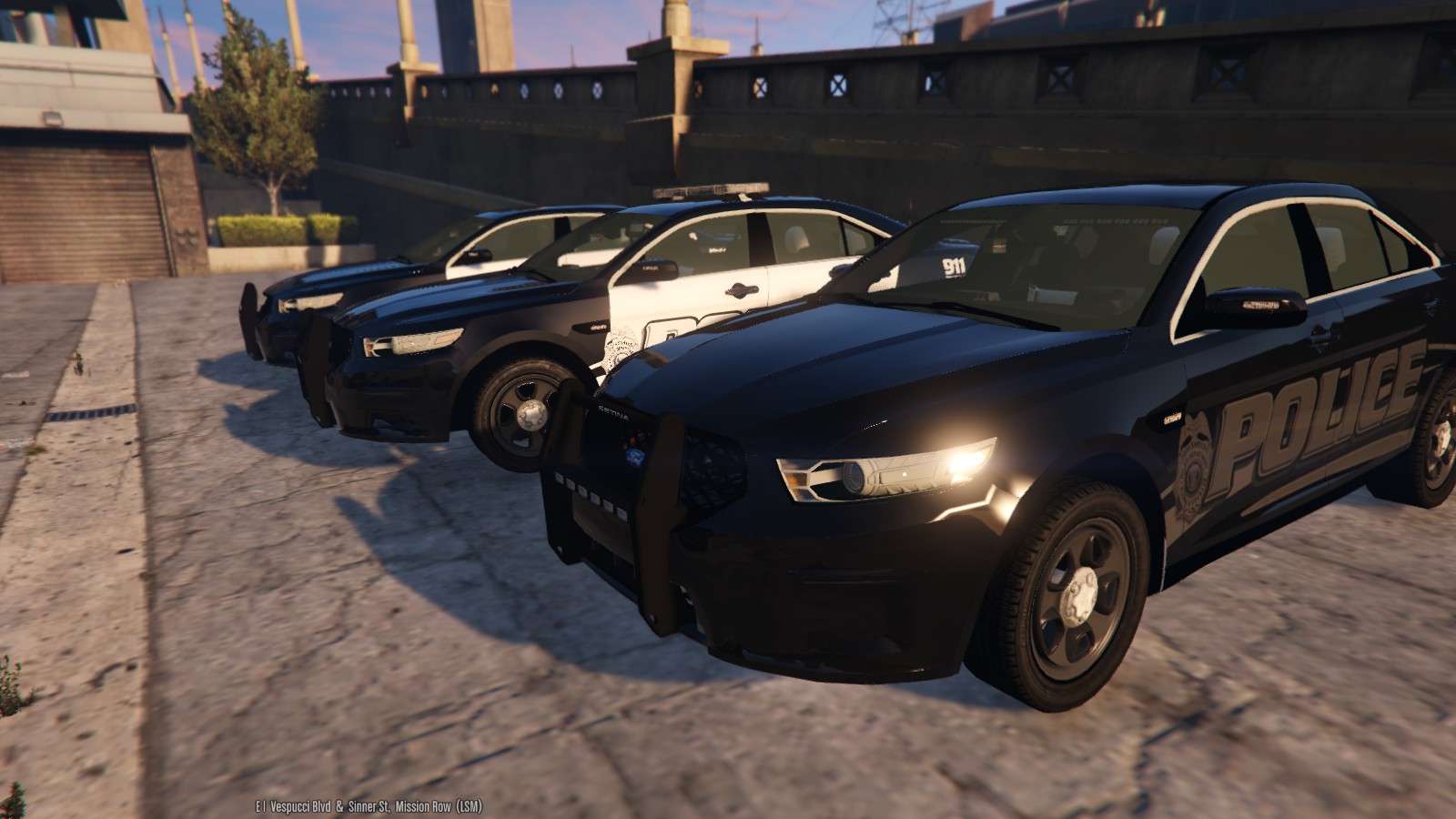
2013 Los Santos Police FPI 1.0.1

(36 reviews)

14 Screenshots

IF YOU HAVE PREVIOUSLY DOWNLOADED THIS FILE, I HAVE ADDED THE MISSING FILE FOR THE LIGHTS!!!!

Since some people are still having issues with getting this vehicle to work. I've uploaded my personal 

carvariations.meta HERE
 

Secondary link if the first one doesn't work: here


MODEL OVERVIEW
=================================
- NAME: 2013 Los Santos Police Department Ford Police Interceptor 
- VERSION: V1.0
- EXTRA PARTS: N/A
- OPTIMIZED FOR: ANY(acts like police3)

*********** IMPORTANT  ***********
==================================

I HAVE INCLUDED A FILE TO MAKE THE LIGHTS FROM THE DEFAULT POLICE3 TO ACT LIKE THE POLICE.
IF YOU DO NOT ADD THIS FILE TO YOUR GAME, T H E   C A R   W I L L    N O T   W O R K   AS 
I DESIGNED IT TO!!!!!!!!!
YOU HAVE BEEN WARNED.


NOTES
=================================
-This car features two or three setups, depending on how you like your cars. I have designed
it to work as a marked vehicle and also as a slicktop. To change the vehicle from a marked vehicle
to a slicktop/ghosted vehicle, all you have to do is go and toggle the extras 2 for the inner bar, 
and 3 for the outer lightbar. 

-It also features two skins, one fully marked, and one ghosted. If you want an unmarked, all you have 
to do is go into a photo editing program and delete everything off the skin, and add your own licence
plate. 

-There has been alot of work put into this model, from merging the interior to numerious 
bugs that we had during the creation of this model. There might be some small ones that 
have gone un noticed, if you notice any, please, feel free to tell me about them.

-The lights on the vehicle were designed to be used with Radiance V. I used the bright setting to take the screenshots shown

-There are some small errors with the interior but i didn't mind them.

-This model was designed for its handling to act like the Police3. 

-I have also included light textures to make the car Red & Blue or Blue and Blue, they are in
the extras folder.

-The model is a little on the higher poly side (130k+) but it shouldn't cause any issues.

-The templates are in the extras folder.

-This is the first vehicle I have released, and i'd like to give a huge shout out to all the people
who actually made this possible, from sitting up for hours with me helping my dumbass, to giving me
vehicles to fix because they are too lazy or just don't know how to fix it. You all know who you are,
so, Thank you.

-The file included in the extras folder to make the lights act differently is not made by me. I did not
get credits for whoever made the file and added the change to the vehicle.

DISCLAIMER
=================================
-You are not to attempt to modify or rip this model in any way shape or form.
-I (Thehurk) am not resposible for any damages done to your game. Please make a backup of any edited files!
-Do not attempt to make a profit off this model in any way shape or form.
-Do not re-upload this vehicle, please make a link
-Do not upload this file to any other site, claiming it as your own. 
-If you want to use this file in a clan, PLEASE ask me before doing so. 


Enjoy!!

What's New in Version 1.0.1

Released

IF YOU HAVE PREVIOUSLY DOWNLOADED THIS FILE, PLEASE DOWNLOAD IT AGAIN FOR THE MISSING LIGHTS FILE!!!!

User Feedback

Recommended Comments

Thehurk

Members Author

1 hour ago, Puwolskyy said:

Help me!

-snip-

I would guess you didn't add the extra files i put in there. What is happening is the car is acting like the default police3, messing with the rotations of the lights.

Puwolskyy

Members

Just now, Thehurk said:

I would guess you didn't add the extra files i put in there. What is happening is the car is acting like the default police3, messing with the rotations of the lights.

 how to rotations of the lights? you need add extra file  

Thehurk

Members Author

I'd encourage you to read the description of the file, i added everything you need to know in there.

Steele1925

Members

13 hours ago, 585ny14603 said:

@Steele1925 As long as the hierarchy lines up, it's fine. Other than that, I believe it just follows XML formatting which essentially means the spacing/tabbing of lines doesn't matter. Just make sure all of your lines are /> closed.

Thanks buddy. I got it fixed. I must've accidentally deleted the variations line lol. It's working now :smile:

Cy4n1d3

Members

22 hours ago, ringiskong said:

will it work as police2?

yes it will work as a police2, just rename the files and edit so the caravation data is for the police2

Thehurk

Members Author

2 hours ago, Cy4n1d3 said:

yes it will work as a police2, just rename the files and edit so the caravation data is for the police2

You dont even need to do that. You just have to simply rename the files. I tried to make it so it would work in any available police slot :smile:

can you just upload your car variation cause i dont know how to install the car variation

Cy4n1d3

Members

2 hours ago, Thehurk said:

You dont even need to do that. You just have to simply rename the files. I tried to make it so it would work in any available police slot :smile:

if you want the light to function as the author wants it then you need to do it, otherwise it is just to rename the model files as you said

Thehurk

Members Author

2 hours ago, officertakedown50 said:

can you just upload your car variation cause i dont know how to install the car variation

Just read the file that i included in the extras folder named: Use this to make police3 act like police

43 minutes ago, Thehurk said:

Just read the file that i included in the extras folder named: Use this to make police3 act like police

yeah okay thanks i got it working

skillsforilz

Members

is it just me or are the lights really dim?

Thehurk

Members Author

51 minutes ago, skillsforilz said:

is it just me or are the lights really dim?

To get the lights like i have them in the screenshots, you MUST install radiance V, have your post FX set to ultra and shader quality to high or above. 

skillsforilz

Members

5 minutes ago, Thehurk said:

To get the lights like i have them in the screenshots, you MUST install radiance V, have your post FX set to ultra and shader quality to high or above. 

I do have Radiance V.

Thehurk

Members Author

Do you have the other things i said?

8 minutes ago, skillsforilz said:

I do have Radiance V.


RoegonTV

Members

Holy shit babe, you do our car so much justice <3

Slacker89

Members

Alright, stupid question but one that I have not yet been able to figure out. What is the best editor to change the lights to red/blue. This is going to be my first attempt and I would really like to not F&($ it up. Thanks for the assist!

SerekgPL

Members

Back indicators are in wrong place.

dlemfer

Members

love the car but i just wish I could add it to mpchristmas2 instead of replacing it with other car that I already have installed. I don't know how vehicle.meta is created; nonetheless I already tried to use one from police3,...renaming it...etc...but I wasn't successful. Great mod by the way.

Rogertheapple

Members

It's a very nice vehicle but whenever I see an ai cop driving it, the car is invisible from a distant. Help!

RoegonTV

Members

2 hours ago, SerekgPL said:

Back indicators are in wrong place.

I do not believe they are. This car uses the outer brake lights as the turn signals, which is what every FPI I have ever seen uses. Only the civilian model uses one of the white lights on the boot as an indicator.

RINGISKONG

Members

will there be any lspd liveries? 

Arkthos

Members

Hi there, I love this model, my favorite car in this game. I was wondering, if I wanted to change some of the rear lights to orange (safety lights) maybe the ones in between bottom bar and lightbar or the bottom bar how would I do this? I know how to swap out textures but not change specific colors.

OrangeAgent

Members

Great car and lights but terrible LOD. The whole car disappears if you move away a few meters.

Arkthos

Members

54 minutes ago, OrangeAgent said:

Great car and lights but terrible LOD. The whole car disappears if you move away a few meters.

odd, doesn't do that to me, may be other settings of yours, I can be very far from mine and lights and model still show right

Continuum

Members

Okay... I'm having some issues here. I've been trying to install the vehicle, but I have no idea where the correct files are supposed to go because there are no installation instructions. I've installed vehicles before, but had to clear out my GTA to update. I placed the police3.ytd and .yft files in mpluxe, but the model didn't load. I then replaced the default police3 models in patchday4ng, x64.rpf, and also in patchday3ng. I was finally able to get the model to load by replacing the 4ng files. Then, as the light file says, I added the lines to the carvariations.meta related to mpluxe. However, when I open the game, the lighting bug is still present. Are there any ways you recommend to install, as I have had no problems installing before? 

Create an account or sign in to comment

Account

Navigation

Search

Search

Configure browser push notifications

Chrome (Android)
  1. Tap the lock icon next to the address bar.
  2. Tap Permissions → Notifications.
  3. Adjust your preference.
Chrome (Desktop)
  1. Click the padlock icon in the address bar.
  2. Select Site settings.
  3. Find Notifications and adjust your preference.













