Skip to content
View in the app

A better way to browse. Learn more.

LCPDFR.com

A full-screen app on your home screen with push notifications, badges and more.

To install this app on iOS and iPadOS
  1. Tap the Share icon in Safari
  2. Scroll the menu and tap Add to Home Screen.
  3. Tap Add in the top-right corner.
To install this app on Android
  1. Tap the 3-dot menu (⋮) in the top-right corner of the browser.
  2. Tap Add to Home screen or Install app.
  3. Confirm by tapping Install.

ClearTheWayV 1.0.0.55

(42 reviews)

8 Screenshots

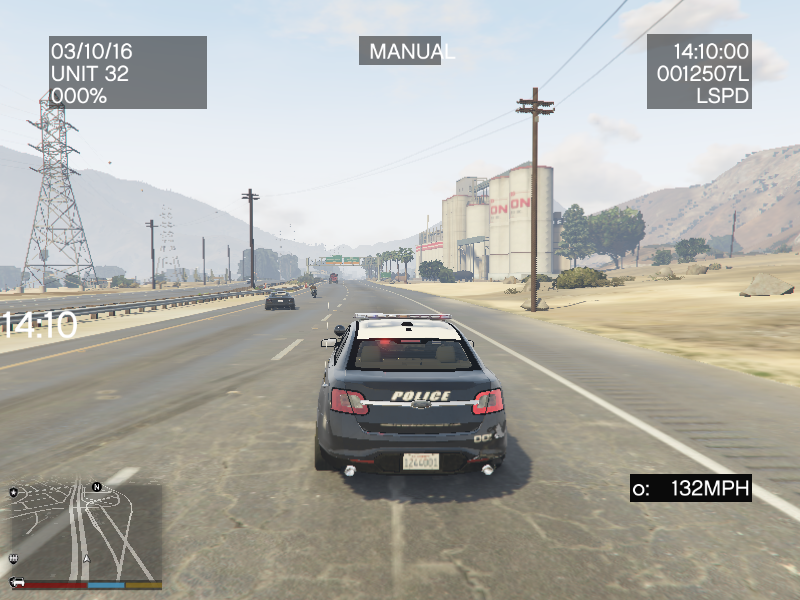
This is a simple script that is based on ragehook to make cars move over when only having your emergency lights running not your siren

no keys because it works as a standalone script what I basically mean is it doesn't need any user interaction it does everything by itself

I am trying to enhance the "default" without script behavior so the pullover behavior or "move over" behavior is improved because to be honest when I play the game every time I get to a crowded area in gta v I keep crashing into people because they don't move over correctly.

So I guess the gist of what I am trying to say is be respectful, don't say the obvious everyone knows this works without a script by default in gta v.

Also just wanted to say if you appreciate & like my work please consider giving me a donation as every bit helps considering how that makes me & my work feel appreciated and encourages me to continue making great scripts like this.

Please Follow community guidelines when posting, as in be respectful don't use rude language,etc.

Support - what to do if you encounter a bug or have problems:

  1. Please leave a comment (not a review). Include your RAGEPluginHook.log file, located in your Grand Theft Auto V folder in a spoiler so it doesn't make the page too long for people not interested on reading the log. Also, please provide an accurate description of what happened. This allows me to help you as fast as possible without having to ask you for this information I need to help you, as if I don't get this information I cannot help you because I will not know what is causing the problem and will result in delayed resolution of the problem due to asking you for the needed information before proceeding.... please as said above provide this information with your initial comment (not a review) to allow the most quick resolution of the problem as possible.

Leaving a review for support issues is against community guidelines, and will not even be answered at all, will be reported instantly instead

README/Install Instructions:

  • extract the dll file from the zip file using 7-zip or winrar or whatever
  • and then copy the dll file to your plugins folder
  • to here C:\Program Files (x86)\Steam\steamapps\general\Grand Theft Auto V\plugins
  • and that is where you place the dll file to make this script work
  • If you have your game on any other drive replace the C:\ part with your drive you have the game on.

User Submitted Videos:

FirstThirtyMinutes:

If any of you post a video review/or use my script in your video's please notify me about it and I will feature your videos here like I did for firstthirtyminutes.

Please do not re-upload, reverse engineer, modify, redistribute, or in any other way violate the copyright of this modification. DMCA Takedown Requests & actions will be taken if this is violated.

Do you have questions? Or do you need help with the script? Please make a comment, not a review for support and your question/support issue will be handled as soon as possible.


Important Notice regarding Obfuscation Used to Protect Copyright

Due to using Max Obfuscation Settings inside the .Net Framework Obfuscator that is used to protect copyrighted logic & such inside the software/plugin, it is likely a antivirus might see the obfuscation and several other obfuscation settings like anti-tamper/anti debug/etc that are used to further protect and prevent copyright infringement of the software/plugin as a False Positive.

To Date as of 8/23/2023 there has only been one lesser known antivirus named "Ikarus" that has even thought this plugin is a virus/trojan which it is not and is only due to the extreme protection settings set in the .Net Framework Obfuscator used to protect the software/plugin that causes this.

What's New in Version 1.0.0.55

Released

 Version: 1.0.0.37

  • Updates to make the AI now go around you instead of being stuck behind you and just honking clogging the road up.

  • Update System got a Rewrite.

      Version 1.0.0.38

  • Resolved Update System Issue when Update API Server down.

       Version 1.0.0.39

  • Removed Update System due to continued issues when Update API Server is down.

     Version 1.0.0.40

  • Update to Latest RagePluginHook SDK Version, no further changes done at the moment.

     Version 1.0.0.41

  • Update to Latest RagePluginHook SDK Version, fixed cars and big vehicles & such not going around, please let me know in the comments section please if this has been fixed.

     Version 1.0.0.43

  • Used Normal Obfuscator instead of new one to help with issues related to plugin not working.

     Version 1.0.0.44

  • Added Requested Traffic Break System(Still unknown if it might work in all areas of the map as intended - could not test beyond myself during Q&A testing to know if it would work in all areas of the map, only tested on Los Santos Fwy/city near MRPD).

  • Due to this being considered a "Beta" Version Feature the older version 1.0.0.43 was left uploaded in case there is a need to use it while fixes are made for this new Traffic Break Feature/System.

  • To Enable the new In Beta Traffic Break System change "false" to "true" inside the ini file that is automatically generated upon first run of the plugin

 Version 1.0.0.45

  • Updated INI Functions to automatically update INI on new releases.

 Version 1.0.0.46

  • Updated .Net Framework Build Requirements to .Net Framework 4.8 and Latest RPH Version.

  • Added FiveM Version that is free for use for FiveM Servers as I have no longer have any interest in FiveM anymore and thought other people might want this for their FiveM Servers.

Version 1.0.0.47

  • Updated .Net Framework Build Requirements to .Net Framework 4.8.1 and Latest RPH Version.

Version 1.0.0.48

  • Updated to Latest RPH Version in addition to attempting to requested features being added/fixed. (Q&A Testing proved mixed results so please let me know if the cars start pulling over correctly vs stopping in the middle of the road)

Version 1.0.0.49

  • Updated to Latest RPH Version.

Version 1.0.0.50

  • Updated to Latest RPH Version.

Version 1.0.0.51

  • Updated to Latest RPH Version.

  • Added Experimental Red Light Detection System that will read if your player vehicle is stopped at a red light and your sirens or lights are activated, will make traffic hopefully get out of your way better.

Version 1.0.0.52

  • Added Experimental Move Over Detections for Traffic Stops(Big Vehicles & Regular Vehicles) as requested in addition to fixing Experimental Red Light Detection System introduced in v1.0.0.51 that wasn't properly setup to run.(this has been patched and fixed)

Version 1.0.0.53

  • Fixed too much obfuscation causing the plugin to not load & such, this has been patched now.

Version 1.0.0.54

  • Updated to latest RPH Version and also tested for crashing, no crashing detected, as I pulled over a vehicle fine without issues.

Version 1.0.0.55

  • Removed Experimental Red Light Detection System for the time being as it shows to be the cause of crashing.


Short Description

Cars Clear The Way for you.

User Feedback

Recommended Comments

  • Community Team
2 hours ago, timnboys said:

I was planning on removing all older zip files technically just haven't gotten around to it yet.

The Old Zip files have been removed and only the latest have been left.

I'm pretty sure you included the incorrect dll version in the 1.0.0.40 zip, it has the exact same modified date and time as the previous one. 

timnboys

Members Author

(edited)

On 10/8/2023 at 10:55 AM, unitedOrange66 said:

I'm pretty sure you included the incorrect dll version in the 1.0.0.40 zip, it has the exact same modified date and time as the previous one. 

The Modified Date/Time doesn't really matter as much considering the fact that if you go into properties on the dll file & go to details tab, you will see the version part shows correctly, that is what you should watch instead.

Could contain: text, electronics, screenshot, display, software, computer icon, operating system, web page, number, website, office application software

As the modified date/time can vary based on when it was compiled & such, as sometimes I have done both dll versions(debug/testing & release/production versions be compiled at the same time) in my internal build system. The one constant that usually changes based on that is the DLL File/Product Version that is usually updated before either file is compiled in addition, I have made more functions inside the debug/testing version say "Dev Copy For Internal/Debug Use Only" in addition to the file/production version line when ran inside RPH F4 console. So as long as it does not say that and it shows the correct file/product version, it is most likely the correct dll version.

Edited by timnboys

Michael21107

Members

It would be nice if you add the entire path using folders like Grand Theft Auto V\plugins, this is how most mods are set up and would make installing for noobs more intuitive.

  • Community Team
12 hours ago, timnboys said:

The Modified Date/Time doesn't really matter as much considering the fact that if you go into properties on the dll file & go to details tab, you will see the version part shows correctly, that is what you should watch instead.

Could contain: text, electronics, screenshot, display, software, computer icon, operating system, web page, number, website, office application software

As the modified date/time can vary based on when it was compiled & such, as sometimes I have done both dll versions(debug/testing & release/production versions be compiled at the same time) in my internal build system. The one constant that usually changes based on that is the DLL File/Product Version that is usually updated before either file is compiled in addition, I have made more functions inside the debug/testing version say "Dev Copy For Internal/Debug Use Only" in addition to the file/production version line when ran inside RPH F4 console. So as long as it does not say that and it shows the correct file/product version, it is most likely the correct dll version.

Thank you, I didn't know this, I usually judge the file version by looking at the modified date. 😂

javier0911

Members

cars are  still gets stuck behind you when you  have your lights on, or when you do traffic stop... also big semi or big truck, and tow trucks  wont move of the way.. cant wait for your  next project. or update, but is getting better then before 🙃

(edited)

2 hours ago, javier0911 said:

cars are  still gets stuck behind you when you  have your lights on, or when you do traffic stop... also big semi or big truck, and tow trucks  wont move of the way.. cant wait for your  next project. or update, but is getting better then before 🙃

in the ELS.ini change "ELSTrafficCtrlOn = true" to "ELSTrafficCtrlOn = false" and see what happens

2 hours ago, javier0911 said:

cars are  still gets stuck behind you when you  have your lights on, or when you do traffic stop... also big semi or big truck, and tow trucks  wont move of the way.. cant wait for your  next project. or update, but is getting better then before 🙃

Also change "ElsActiveOnAi = true" to "ElsActiveOnAi = false"

Edited by OfficerMorrison

manu450

Members

HI. I don't know what I am doing wrong, but the vehicles are not going around me on traffic stops like the update states. I wonder if this works with ELS or not?


javier0911

Members

On 10/11/2023 at 5:31 PM, OfficerMorrison said:

in the ELS.ini change "ELSTrafficCtrlOn = true" to "ELSTrafficCtrlOn = false" and see what happens

Also change "ElsActiveOnAi = true" to "ElsActiveOnAi = false"

thanks 🙏  🙃 i did that but still  sometimes they still get stuck behind you

2 minutes ago, javier0911 said:

thanks 🙏  🙃 i did that but still  sometimes they still get stuck behind you

np and that's what we can do for now. 

beryllinthranox

Members

Unfortunate that it lost a few features, but it still moves regular cars out of the way without siren on

Krzeszny

Members

@timnboys The zip file only contains a dll file, and some mods are installed by placing a dll file in the root directory. However, this mod is installed by putting the file into Plugins and there's no README file. Could you add a folder named Plugins inside the zip file to make installation more intuitive for others?

timnboys

Members Author

On 10/25/2023 at 3:44 PM, Krzeszny said:

@timnboys The zip file only contains a dll file, and some mods are installed by placing a dll file in the root directory. However, this mod is installed by putting the file into Plugins and there's no README file. Could you add a folder named Plugins inside the zip file to make installation more intuitive for others?

That is already instructed to do that in the instructions above in the file description:

README/Install Instructions:

  • extract the dll file from the zip file using 7-zip or winrar or whatever
  • and then copy the dll file to your plugins folder
  • to here C:\Program Files (x86)\Steam\steamapps\general\Grand Theft Auto V\plugins
  • and that is where you place the dll file to make this script work
  • If you have your game on any other drive replace the C:\ part with your drive you have the game on.
On 10/24/2023 at 5:57 PM, beryllinthranox said:

Unfortunate that it lost a few features, but it still moves regular cars out of the way without siren on

This will be fixed soon however due to a extensive Q&A process to try to prevent this from happening, which due to me being the only one doing the testing, sometimes bugs slip through the cracks like this and will be fixed soon.

On 10/11/2023 at 6:18 PM, javier0911 said:

cars are  still gets stuck behind you when you  have your lights on, or when you do traffic stop... also big semi or big truck, and tow trucks  wont move of the way.. cant wait for your  next project. or update, but is getting better then before 🙃

The whole code is being rewritten at this time to try to assist with this issue and make more move out of your way but this takes time & research to make this happen.

Krzeszny

Members

On 10/28/2023 at 1:49 AM, timnboys said:

That is already instructed to do that in the instructions above in the file description:

That doesn't make the installation intuitive. It's your choice though.

timnboys

Members Author

On 10/24/2023 at 5:57 PM, beryllinthranox said:

Unfortunate that it lost a few features, but it still moves regular cars out of the way without siren on

This has hopefully been resolved in V1.0.0.41 please let me know if there is any further issues.

The file update far as I can tell is still pending approval at this time.

beryllinthranox

Members

After replacing the ClearTheWay.dll file in the plugins folder, RagePluginHook doesn't read ClearTheWay.dll as a plugin anymore.Could contain: text, screenshot, display, software, number

alrightdude

Members

(edited)

It doesn’t show up in Rage, but you can still load it in-game. Also, it definitely works better now

Edited by NeuerTypHier

Gelse16

Members

i'm using this plugin since it has been released first. over all these years nothing has ever changed - an absolute must have for me. simple and small plugin but massive effect during gameplay. i love it!

BOYDEAD02

Members

On 11/25/2023 at 5:03 PM, beryllinthranox said:

After replacing the ClearTheWay.dll file in the plugins folder, RagePluginHook doesn't read ClearTheWay.dll as a plugin anymore.Could contain: text, screenshot, display, software, number

i'm having the same problem as well i even tried to see it work in game but unfortunately it crashed on loading, and when delete the plugin (ClearTheWay) it work fine now. i will have to wait for the fix update. 🥺

timnboys

Members Author

(edited)

22 hours ago, BOYDEAD02 said:

i'm having the same problem as well i even tried to see it work in game but unfortunately it crashed on loading, and when delete the plugin (ClearTheWay) it work fine now. i will have to wait for the fix update. 🥺


On 11/25/2023 at 6:03 PM, beryllinthranox said:

After replacing the ClearTheWay.dll file in the plugins folder, RagePluginHook doesn't read ClearTheWay.dll as a plugin anymore.Could contain: text, screenshot, display, software, number

New Version pending approval that should fix this.

It was due to new obfuscator was used ConfuserEX that was seemed to be what other developers are using lately and might have been due to the strong obfuscation settings.

Edited by timnboys

Templipouet

Members

I'm not sure if the plugin already does that or if it's doable at all, but is it possible to make oncoming traffic not move over? Like when I'm code 3 on the highway, oncoming traffic on the other side doesn't move and crash? 

bondi9mm

Members

is this safe to download update as says anomaly detected ?

manu450

Members

Unfortunately, the cars are still not going around. I am using ELS by the way if you wondering. 

alrightdude

Members

3 hours ago, bondi9mm said:

is this safe to download update as says anomaly detected ?

Yes, you can dowload it

alrightdude

Members

1 hour ago, manu450 said:

Unfortunately, the cars are still not going around. I am using ELS by the way if you wondering. 

(Like OfficerMorrison said) make sure "ELSTrafficCtrlOn" is set to false in the els.ini. It definitely works on DLS (Non-ELS) cars. Might be something with ELS 🤷‍♂️

manu450

Members

22 hours ago, NeuerTypHier said:

(Like OfficerMorrison said) make sure "ELSTrafficCtrlOn" is set to false in the els.ini. It definitely works on DLS (Non-ELS) cars. Might be something with ELS 🤷‍♂️

I just don't think it works with ELS vehicles. I tried everything 


Create an account or sign in to comment

Account

Navigation

Search

Search

Configure browser push notifications

Chrome (Android)
  1. Tap the lock icon next to the address bar.
  2. Tap Permissions → Notifications.
  3. Adjust your preference.
Chrome (Desktop)
  1. Click the padlock icon in the address bar.
  2. Select Site settings.
  3. Find Notifications and adjust your preference.












