Skip to content
View in the app

A better way to browse. Learn more.

LCPDFR.com

A full-screen app on your home screen with push notifications, badges and more.

To install this app on iOS and iPadOS
  1. Tap the Share icon in Safari
  2. Scroll the menu and tap Add to Home Screen.
  3. Tap Add in the top-right corner.
To install this app on Android
  1. Tap the 3-dot menu (⋮) in the top-right corner of the browser.
  2. Tap Add to Home screen or Install app.
  3. Confirm by tapping Install.

RCMP Uniforms for sheriff Male 2.0.0

(0 reviews)

4 Screenshots

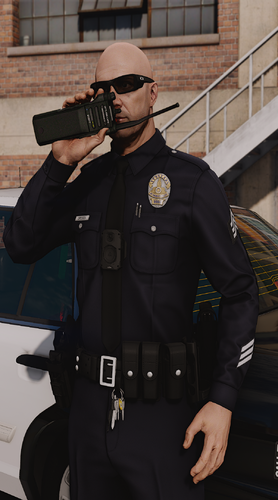
Here is an RCMP uniform to replace the default sheriff in game. 

There are 2 current variants:

Variant 1: Has RCMP-GRC on the back of the vest with a white shirt

Variant 2: Has POLICE on back of vest (more realistic) with a darker white shirt

Make sure to always backup your files

Enjoy!

What's New in Version 2.0.0

Released

Added a second uniform to choose from (more realistic)

User Feedback

Recommended Comments

Bradyg

Members

(edited)

The shirt is to white. Only commissioned officers where white. Try to make it a little more grey. Also the writing on the vests is a little off. Most of the vests I've seen in person and online have either small font "police" with a shoulder flash (patch) above it, or police in a bigger font across the chest. And for the back, they usually have the small font police in the middle. Other than that, good job.

Edited by Bradyg

Create an account or sign in to comment

Account

Navigation

Search

Search

Configure browser push notifications

Chrome (Android)
  1. Tap the lock icon next to the address bar.
  2. Tap Permissions → Notifications.
  3. Adjust your preference.
Chrome (Desktop)
  1. Click the padlock icon in the address bar.
  2. Select Site settings.
  3. Find Notifications and adjust your preference.