Skip to content
View in the app

A better way to browse. Learn more.

LCPDFR.com

A full-screen app on your home screen with push notifications, badges and more.

To install this app on iOS and iPadOS
  1. Tap the Share icon in Safari
  2. Scroll the menu and tap Add to Home Screen.
  3. Tap Add in the top-right corner.
To install this app on Android
  1. Tap the 3-dot menu (⋮) in the top-right corner of the browser.
  2. Tap Add to Home screen or Install app.
  3. Confirm by tapping Install.

Chicago fire Dept. firemen 1.0.0

(2 reviews)

4 Screenshots

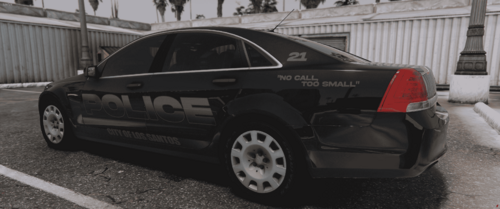
hi, i did a reskin of the lsfd to cfd

openiv : update/x64/dlcpacks/models/cdimages/patchday3ng.rpf  and replace the s_m_y_fireman_01

then go to  x64e.rpf/models/cdimages//pedprops.rpf and replace the s_m_y_fireman_01_p

don't forget to backup your files

don't upload to any other website without my permission

User Feedback

Recommended Comments

OfficerPicto

Members

(edited)

I love you XD

Edited by OfficerPicto

OfficerMcquade

Members Author

2 hours ago, OfficerPicto said:

I love you XD

if you like it rate it with 5 stars :D

LFCJames

Members

Really great job but the colour is too black, you should make it a little bit lighter.

Create an account or sign in to comment

Latest Mods

Account

Navigation

Search

Search

Configure browser push notifications

Chrome (Android)
  1. Tap the lock icon next to the address bar.
  2. Tap Permissions → Notifications.
  3. Adjust your preference.
Chrome (Desktop)
  1. Click the padlock icon in the address bar.
  2. Select Site settings.
  3. Find Notifications and adjust your preference.