
Skip to content
View in the app

A better way to browse. Learn more.

LCPDFR.com

A full-screen app on your home screen with push notifications, badges and more.

To install this app on iOS and iPadOS
  1. Tap the Share icon in Safari
  2. Scroll the menu and tap Add to Home Screen.
  3. Tap Add in the top-right corner.
To install this app on Android
  1. Tap the 3-dot menu (⋮) in the top-right corner of the browser.
  2. Tap Add to Home screen or Install app.
  3. Confirm by tapping Install.

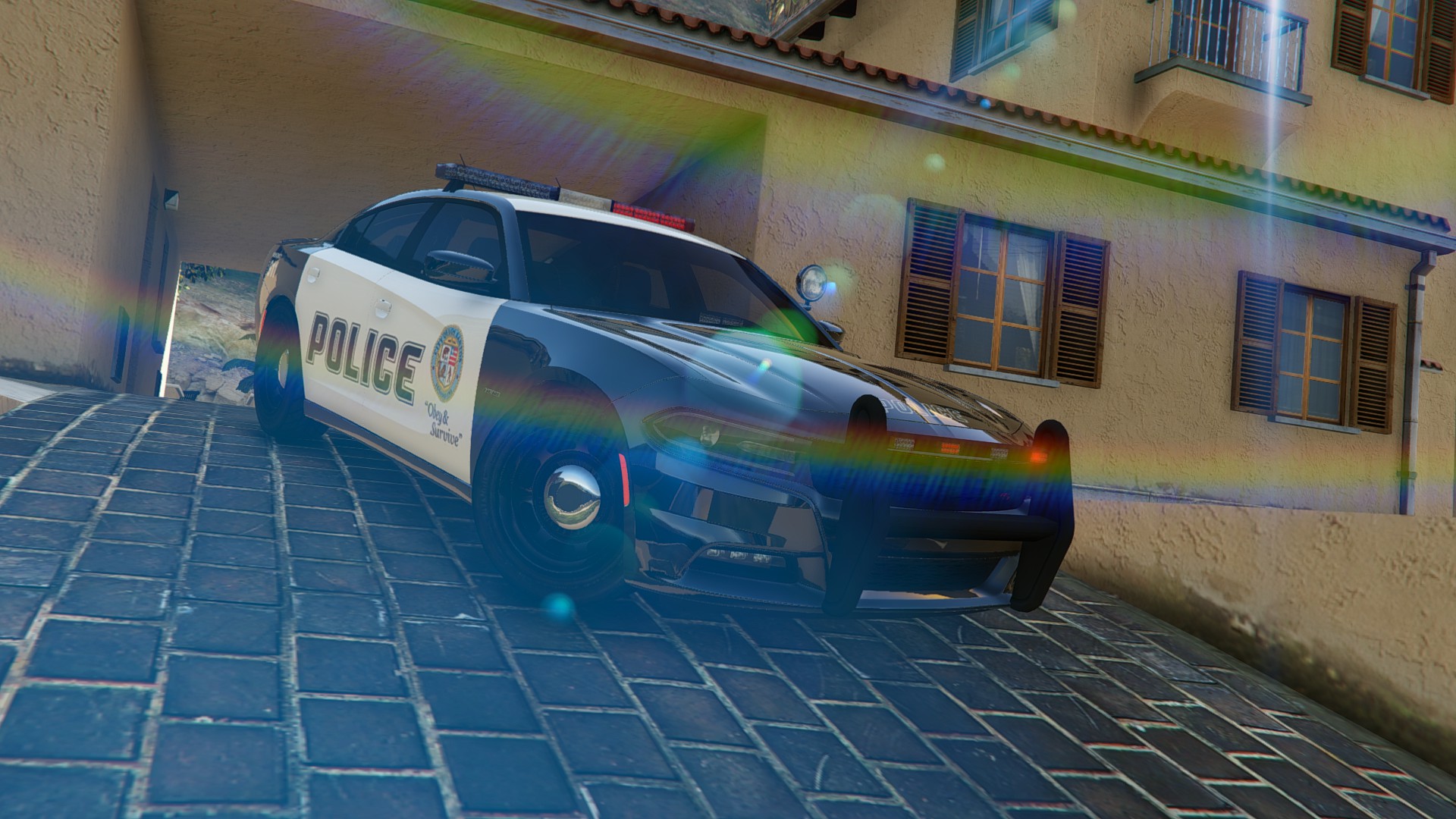
2015 Dodge Charger RT Police 2.0

(38 reviews)

9 Screenshots

2015 Dodge Charger RT Police
The original model from Forza Horizon 2 
Converted to GTA 5 By KAMELKFB 

Open readme.txt for installation 

Feel free to make custom skin


Bugs: Windows won't break ,No engine on it 

Attention DO NOT REUPLOAD THE FILE IN ANOTHER SITE or EDIT THE CAR

User Feedback

Recommended Comments

xAzDKr

Members

Sorry but I meant the issue referring to the one I posted earlier today


Oh shoot sorry about that, didn't read far enough. :P

I was referring to making sure that all of the files you want are there. For example, please ensure that the yft and ytd files are correct for the BMW if you are going to be using the bmw. It appears that you have the charger texture assigned to your bmw.

PopoHonnator

Members

Oh shoot sorry about that, didn't read far enough. :P

I was referring to making sure that all of the files you want are there. For example, please ensure that the yft and ytd files are correct for the BMW if you are going to be using the bmw. It appears that you have the charger texture assigned to your bmw.

Hrm, I just used the BMW model as an example to show how the textures get all messed up. The same skewed texture appears on the charger when I loaded that through OpenIV. I can try attach a picture of that as well if you like. It was just to give you an idea of how it looked like.

But as I said, all the yft and ytd files are correct in the openiv editor, I can see that the model is appears like it should (both the charger and the BMW, whichever I decide to load as they both replace the buffalo). Hope this makes sense.

Hi, is it possible for you to do an unmarked version with a push bumper? Thank you!

BogdanM

Members

Very nice car model, I got so used to it I can never go back to the old police buffalo. I hope all the little problems will be fixed eventually but I also have a request to make. Can you update the model to use multiple liveries?

Jinja

Members

Do you plan on adding police related equipment in the interior ie: Police Radio or Computer?

Do you plan on adding police related equipment in the interior ie: Police Radio or Computer?

KuroChi

Members

(edited)

Hey man,

So I've tried to install the Charger twice now, and both times I have replaced them (The button way, I'm unsure if that is different from just dragging and dropping) but when I have installed them, the car textures and model are working, but when I open my game, it does an update a 2GB one, and that update is usually overwriting the car files and replacing them with the default Buffalo in-game. Just wanted to see if you know how to fix it, I will try again with the drag and drop option, but if you can get back to me, would be obliged.

The whole 'mods' folder thing just crashes my game to, put it in the directory, I have x64e.rpf  and update.rpf inside it, but yet when I click 'Story Mode' on the main menu it crashes my game, as soon as it is removed, the game works fine. So either one I need assistance with.

Edited by KuroChi

Kilyin

Members

(edited)

Please fix the doors.

Edited by Kilyin

BogdanM

Members

Hey man,

So I've tried to install the Charger twice now, and both times I have replaced them (The button way, I'm unsure if that is different from just dragging and dropping) but when I have installed them, the car textures and model are working, but when I open my game, it does an update a 2GB one, and that update is usually overwriting the car files and replacing them with the default Buffalo in-game. Just wanted to see if you know how to fix it, I will try again with the drag and drop option, but if you can get back to me, would be obliged.

The whole 'mods' folder thing just crashes my game to, put it in the directory, I have x64e.rpf  and update.rpf inside it, but yet when I click 'Story Mode' on the main menu it crashes my game, as soon as it is removed, the game works fine. So either one I need assistance with.

Check out this comment on how to prevent GTAV from updating the game after installing mods. For the mods folder, did you put the update.rpf inside a folder called "update" (Grand Theft Auto V\mods\update\update.rpf)? You have to keep the exact same file location structure for it to work.

KuroChi

Members

(edited)

Check out this comment on how to prevent GTAV from updating the game after installing mods. For the mods folder, did you put the update.rpf inside a folder called "update" (Grand Theft Auto V\mods\update\update.rpf)? You have to keep the exact same file location structure for it to work.

Hey man, thanks for replying.

So for the mods folder I have put the 'update' folder inside along with the x64e.rpf one, but with the comment you linked me to, not entirely sure I get it, from what It seems, instead of putting them in x64e.rpf one, you put it in the update one, I'm guessing that is it. If not PM me and we shall try and discuss it.

(Edit1): So I saw another comment, some guy put x64 into the mods folder and it worked, so atm I'm trying that, will edit again if it works or not.

(Edit2): Alrighty, never mind about that, did not work.


Edited by KuroChi

Ethan Rubinacci

Members

(edited)

This mods gone dead it seems like, hasn't been updated since it was released. The model seems overall incomplete, no police computer, not radio, civilian interior.  I kinda wish someone would re-port this model on their own and make it a good model. One of the worst things about it is the terrible hit box in the front. I hit a curb and the front bumper of my car is banged up like I just ran into a guard rail.


Edit: Okay, maybe I was a tad harsh, but this model just needs improved on.

Edited by EthanRubinacci

Arxhive

Members

This mods gone dead it seems like, hasn't been updated since it was released. The model seems overall incomplete, no police computer, not radio, civilian interior.  I kinda wish someone would re-port this model on their own and make it a good model. One of the worst things about it is the terrible hit box in the front. I hit a curb and the front bumper of my car is banged up like I just ran into a guard rail.


Edit: Okay, maybe I was a tad harsh, but this model just needs improved on.

No it's true. It seems like an update is never coming for this. :\

Bando761

Members

I finally got to patrol with this car. I absolutely loved it. Great job designing it. Here's an Intro for the car. A patrol video will follow tomorrow.

Unit 350

Youtube @ Bando909

J T

Members

will this get updated with an arjent lightbar and a spawnable rambar?

Drewster327

Members

My taillights color don't match but before the patch they did, any ideas how to fix this?

fec_2y3pu0yhp6dQ9n6L4Q_0_0.jpg

BogdanM

Members

(edited)

My taillights color don't match but before the patch they did, any ideas how to fix this?


Maybe before you were using the edited tailights texture that came with the LSPD skin shown in the screenshot? Have you replace that texture again after installing the new version of the car mod? 

Or you are talking about the slightly lighter red of the trunk lights?

Edited by BogdanM

Drewster327

Members

The LSPD skin was just the car skin, shouldn't effect the taillights, same car file from the 1st installation. but ya, the lighter red of the trunk lights, it's annoying as heck LOL

Jinja

Members

We need an update! :-D

More policing tools inside and a real world light bar would be great (if you have the time) :-D

John23

Members

The car mod is amazing, but with the new updates, it causes the game to crash. 

TheZui

Members

Is there a way to turn of the lights? I don´t know if I like it when they are turned on all the time

Teebo51

Members

For some reason my cars is missing wheels and looks all weird. door floating on the out side, no light bar. etc... Any solutions?

Create an account or sign in to comment

Latest Mods

Account

Navigation

Search

Search

Configure browser push notifications

Chrome (Android)
  1. Tap the lock icon next to the address bar.
  2. Tap Permissions → Notifications.
  3. Adjust your preference.
Chrome (Desktop)
  1. Click the padlock icon in the address bar.
  2. Select Site settings.
  3. Find Notifications and adjust your preference.









