


Hi!
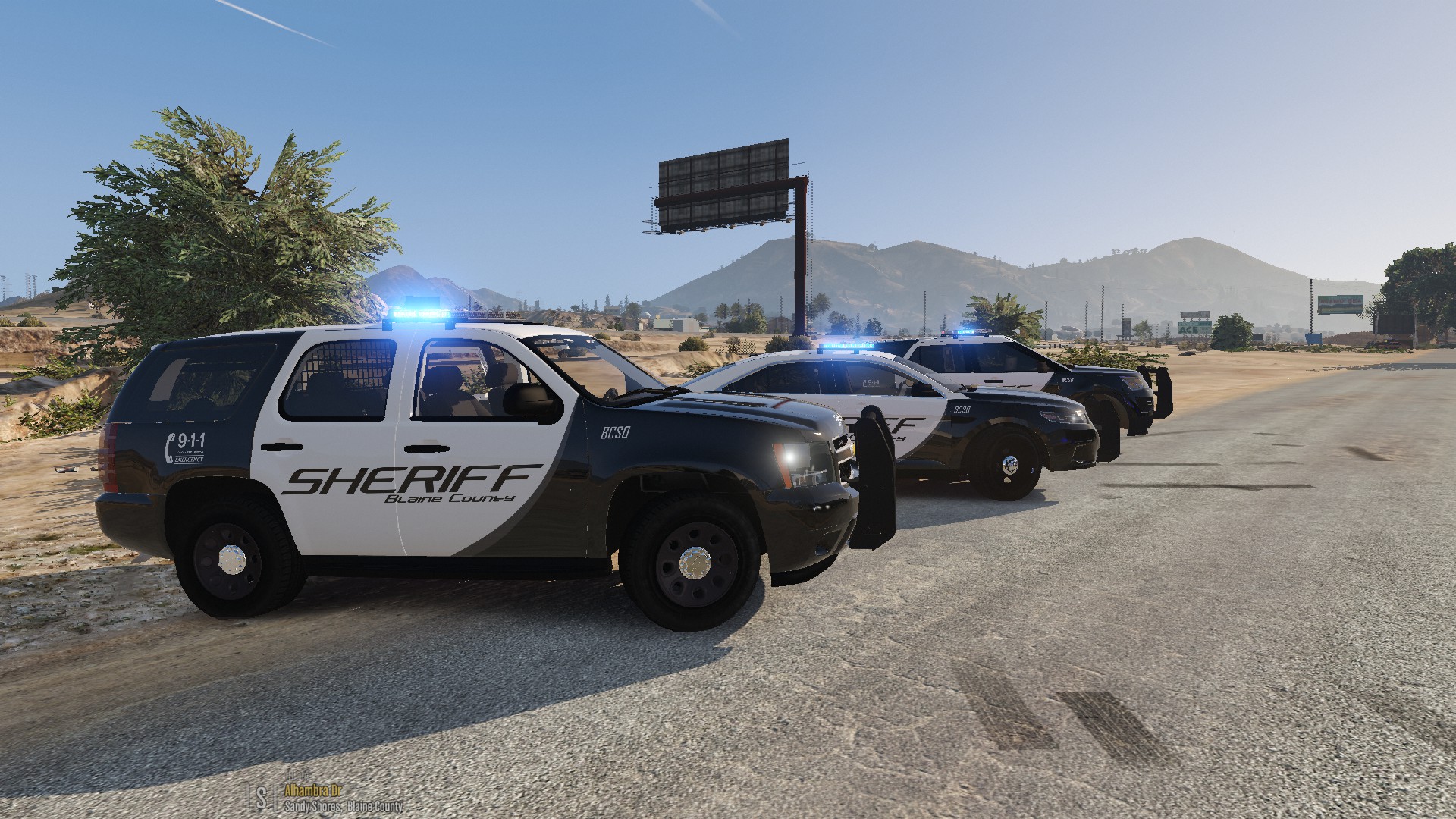
I'm proud to present to you, a BCSO Pack. This pack contains 7 vehicles . I have also included an all blue setup in a separate download. If you spot any bugs, please let me know. I will do my best to fix them. In the meantime, I hope you enjoy.
Thanks to Epic Gaming for the screenshots!
Pack includes:
2015 Dodge Charger
2015 Chevrolet Tahoe
2011 CVPI
2016 Dodge Challenger
2016 FPIU
2016 FPIS
2013 Chevrolet Tahoe
Make sure you have ELS installed.
Link for ELS:
MAKE A BACKUP!!!
I'M NOT RESPONSIBLE FOR ANY DAMAGE TO YOUR GAME!!!
DO NOT UPLOAD TO OTHER WEBSITES WITHOUT MY CONSENT!!!
Instructions:
1. Choose which light setup you want, all blue or red and blue.
2. Launce OpenIV. Enable Editing Mode.
3. Navigate to: (root folder)update/x64/dlcpacks.
4. Place bcsopack in the directory. If OpenIV imports only dlc.rpf, please create a folder named bcsopack
and place it into the directory. Place the dlc.rpf into bcsopack.
5. Navigate to: (root folder)update/update.rpf/common/data and export dlclist.xml to your desktop.
6. Open the xml file with Notepad.
7. Add this line:
<Item>dlcpacks:\bcsopack\</Item>
8. Save and close.
9. Replace the old dlclist with the new dlclist.
10. Navigate to: (root folder)/ELS/pack_default.
11. Add the VCF Files.
12. Close OpenIV then launch GTA V and enjoy!
If windows/lightbar is tinted black:
1. Launch OpenIV.
2. Navigate to: update/update.rpf/common/data/levels/gta5.
3. Open vehicles.meta
4. Go to the police4 line.
5. Replace the diffuseTint value to : <diffuseTint value="0x00FFFFFF" />
6. Close and save.
Credits: If I have forgotten someone, please let me know!
Model:
2015 Dodge Charger
- 2015 Dodge Charger R/T by Turn 10 Studios
- Modifed into 2015 PPV and converted to GTA V by OfficerUnderwood
- Seats by SimRaceway, Radio by OfficerUnderwood
2015 Chevrolet Tahoe
- Orignal suburban Scratch modeled by Shadydk311
- Converted and edited to V by BritishGamer88
- Converted to Tahoe by Thehurk & Allaboutk9
- MAJOR edits by Thehurk
- Convert to PPV By Thehurk
- Rims purchased by Him1250
- Normals and wireframe fixed by Thehurk
- Textured by Thehurk
2011 Crown Victoria Police Interceptor
- CVPI Model from Driver SF, converted to IV by F5544, modified by KevinDV, CJ24, and OfficerUnderwood
- CVPI Wheels from NFS:MW, converted yb trewq34, textures by GreenAid
- CVPI Interior parts by Ubisoft, modified by OfficerUnderwood
-CVPI door handles by Lundy
- CVPI Hubcaps by Bueno
2016 Dodge Charger SRT Hellcat
- Model ripped by dmn
- Converted to gta iv by MrPotato
- Converted to gta v and textured by MrPotato
- Interior by Turn 10 Studios
- Engine from CSR2
- Templated by MrPotato
2016 Ford Police Interceptor Utility
- 2016 Ford Explorer model from humpster3d Converted to a 2016 Ford Police Interceptor by JasonCT203, Converted to GTA IV by JasonCT203 and to GTA V by JasonCT203
- 2016-Current Ford Police Interceptor Wheel modeled by VooDoo, Centercap by Jasonct203 converted to GTA V by JasonCT203
- 2013 ford explorer interior from thunderchickens explorer interior textures by voodoo
2016 Ford Police Interceptor Sedan
- 2010 Ford Taurus SHO by Turn 10 Studios, modified into 2016 Ford Taurus Police Interceptor by OfficerUnderwood
- Rear bumper, headlamps, & dash by be fast, modified by OfficerUnderwood & Carper
- Front bumper by Ridgerunner, Grill by Vertex3D, modified by OfficerUnderwood
- Chassis parts by Ubisoft, Reverse lights by OfficerUnderwood
- Rims by BxBugs123, Centercap by Carper
Lights:
Federal Signal Valor
- Federal Signal Valor Modeled and textured by RoegonTV.
- Mounts modeled by RoegonTV.
Whelen Inner Edge XLP
- Whelen Inner Edge XLP scratch modeled by Five0
- Converted to GTA 5 by Five0
Federal Signal Latitude Signalmaster
- FS Latitude Signalmaster by DannyBoy1909
- Converted to IV by Him1250
- Textures by Him1250
Code 3 XT4 and XT6
- Made by Macgregor
Soundoff Fascia
- Made by Sgt. Goetz or Zach Plays or Officer Goetz
Equipment:
Generic Rambar
- Made by Black Jesus
Dell Latitude 6430/20 ATG
- Made by OfficerUnderwood
Partition
- ???
Console
- Made by SheriffVan DyckSkin:
Screenshots:
Screenshots by Epic Gaming
Skin:
- Blaine County Sheriff's OfficeCounty Sheriff's Office by Kafloopy888
What's New in Version 1.2.0
Released
- Added the Blue ELS VCF Files.
2015 Dodge Charger
- 2015 Dodge Charger R/T by Turn 10 Studios
- Modifed into 2015 PPV and converted to GTA V by OfficerUnderwood
- Seats by SimRaceway, Radio by OfficerUnderwood
2015 Chevrolet Tahoe
- Orignal suburban Scratch modeled by Shadydk311
- Converted and edited to V by BritishGamer88
- Converted to Tahoe by Thehurk & Allaboutk9
- MAJOR edits by Thehurk
- Convert to PPV By Thehurk
- Rims purchased by Him1250
- Normals and wireframe fixed by Thehurk
- Textured by Thehurk
2011 Crown Victoria Police Interceptor
- CVPI Model from Driver SF, converted to IV by F5544, modified by KevinDV, CJ24, and OfficerUnderwood
- CVPI Wheels from NFS:MW, converted yb trewq34, textures by GreenAid
- CVPI Interior parts by Ubisoft, modified by OfficerUnderwood
-CVPI door handles by Lundy
- CVPI Hubcaps by Bueno
2016 Dodge Charger SRT Hellcat
- Model ripped by dmn
- Converted to gta iv by MrPotato
- Converted to gta v and textured by MrPotato
- Interior by Turn 10 Studios
- Engine from CSR2
- Templated by MrPotato
2016 Ford Police Interceptor Utility
- 2016 Ford Explorer model from humpster3d Converted to a 2016 Ford Police Interceptor by JasonCT203, Converted to GTA IV by JasonCT203 and to GTA V by JasonCT203
- 2016-Current Ford Police Interceptor Wheel modeled by VooDoo, Centercap by Jasonct203 converted to GTA V by JasonCT203
- 2013 ford explorer interior from thunderchickens explorer interior textures by voodoo
2016 Ford Police Interceptor Sedan
- 2010 Ford Taurus SHO by Turn 10 Studios, modified into 2016 Ford Taurus Police Interceptor by OfficerUnderwood
- Rear bumper, headlamps, & dash by be fast, modified by OfficerUnderwood & Carper
- Front bumper by Ridgerunner, Grill by Vertex3D, modified by OfficerUnderwood
- Chassis parts by Ubisoft, Reverse lights by OfficerUnderwood
- Rims by BxBugs123, Centercap by Carper
Lights:
Federal Signal Valor
- Federal Signal Valor Modeled and textured by RoegonTV.
- Mounts modeled by RoegonTV.
Whelen Inner Edge XLP
- Whelen Inner Edge XLP scratch modeled by Five0
- Converted to GTA 5 by Five0
Federal Signal Latitude Signalmaster
- FS Latitude Signalmaster by DannyBoy1909
- Converted to IV by Him1250
- Textures by Him1250
Code 3 XT4 and XT6
- Made by Macgregor
Soundoff Fascia
- Made by Sgt. Goetz or Zach Plays or Officer Goetz
Equipment:
Generic Rambar
- Made by Black Jesus
Dell Latitude 6430/20 ATG
- Made by OfficerUnderwood
Partition
- ???
Console
- Made by SheriffVan DyckSkin:
- Blaine
County Sheriff's Office by Kafloopy888









![Los Santos County Sheriff Livery Pack [Berkeley County-based]](http://s3-screenshots.int-cdn.lcpdfrusercontent.com/resize/500/-/monthly_2026_04/20260415155948_1.thumb.jpg.4cd04373ce1cf72df8e99a993cf4a145.jpg)



![Clayton County Sheriff's Office [4K]](http://s3-screenshots.int-cdn.lcpdfrusercontent.com/monthly_2026_04/Screenshot_2511.thumb.png.e79613aafaa7abfbd34da660fe32acd3.png)

.thumb.jpg.96a3b82b9866eade5618dbec8b4f2fae.jpg)

![[NON-ELS] Unmarked 2018 Ford Taurus - FiveM Ready](http://s3-screenshots.int-cdn.lcpdfrusercontent.com/monthly_2026_04/Screenshot_5040.thumb.png.b1168547b80673783144294d18805701.png)
Recommended Comments
Create an account or sign in to comment