



.png.e842bed7a8ccca06e99903069560eb90.png)
.png.1adf8b6719e9659d6c363a4cc1a34511.png)
.png.fbfbc696caeff601a306a41449a6d437.png)
.png.32511dd547113038886a065f64509b62.png)
.png.0ce54bb4052ed1caf4d086fe345d0576.png)
.png.0da017135fee26aac53b7a17990cd8c0.png)
.png.5b53f0ac6f1410d5aa6ad32d5c6e8e00.png)
.png.2dff28111140c6623689a11b77fb9420.png)
.png.cd89c84d962a1572e11dda8b40779645.png)
.png.409fcda8489f95a4501fce1cb427ae03.png)
.png.dc013a5f3f8c70bed3b8d029570f6306.png)
.png.982b94e919cffb58d15f5567542559d8.png)
Los Santos County Sheriffs Office Pack. This pack includes a Crown Victoria and Tahoe, with working spotlights, takedowns/scene lights and cruise lights.
Includes full interior equipment.


If you dont install the vehicles.meta line then the lightbar glass on the Tahoe will be dark.
If you are using RDE download the rde version, if not download the non-rde version
Known bugs:
to make the spotlights work i had to move the dummy on top of the driver seats, therefore when at a distance looking into the car you may see something like this
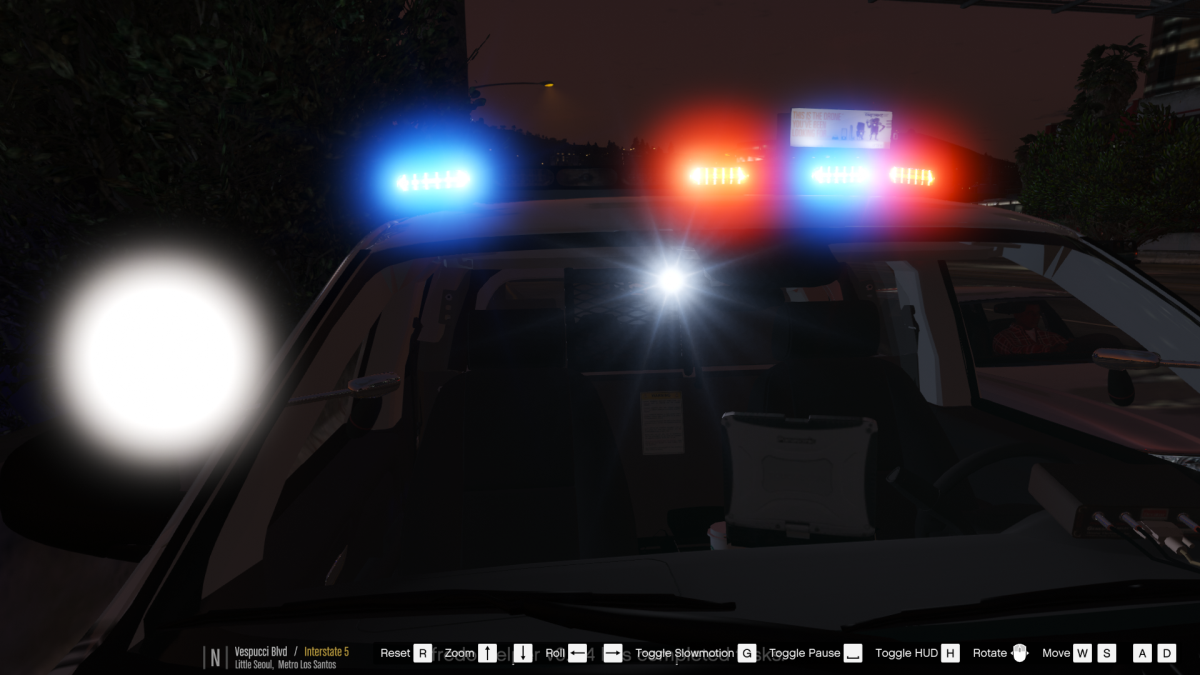
If you find any bugs or problems dont leave it in a review let me know in the comments.
thanks to thehurk for letting me know how to get the spotlights working.
Screenshots by @Problematic @steinberg4145 and @thegreathah
Planned Features:
add in gunracks into both cars.
Read the readme for installation instructions
Credits
CVPI
Steinberg4145- assembled 2006 version
Murphy -developed 2011 , part modifications, custom modeled components, testing, UV mapping, features & fixes
Original Light - CVPI expertise, modeling contributions
Lundy - Door handles, CVPI expertise, CVPI parts from his models, mod tester
Yard1 - modding techniques
Netman
Cj24 - Publisher of the original model for IV & template, including headlight modifications & misc changes from F5544's release
KevinDV - Work on the original model & grille
Ubisoft - Driver: San Francisco Ford Crown Victoria parts, including base model & first person interior
BxBugs123 - Headlight textures & expertise
OfficerUnderwood - CVPI parts from his DEV resource
F5544 - Initial GTA IV conversion
Schaefft - Some interior components and initial seat model
Rekram- Vehicle edits and bug fixes
skins by Illusionyary
Tahoe
2007 Tahoe by Unknown (Can't remember)
Modifed into 2013 and converted to GTA V by OfficerUnderwood
Certain parts by Orex429/Shady
Interior parts by Ubisoft, edited by OfficerUnderwood
Wheels by GTAxBOSS
skins by Illusionyary
Lighting
Whelen Liberty by EVI Texture modified by Five0
Whelen Tam85 scratch modeled by Five0
Whelen Lin3 scratch modeled by Five0
Unity Spotlight scratch modeled by Five0
Fedsig Brake light by Five0
Equipment
Decatur Genesis I scratch modeled by Five0
Decatur Genesis II scratch modeled by Five0
Setina partition scratch modeled by Five0
Antennas scratch modeled by Five0
Coffee cup scratch modeled by Five0
Motorola mic scratch modeled by Five0
Motorola xtl5000 radio scratch modeled by Five0
Motorola speaker scratch modeled by Five0
Whelen Cencom Sapphire scratch modeled by Five0
Panasonic CF19 scratch modeled by Five0
Havis console scratch modeled by Five0
GoRhino 2013 Tahoe Wraparound by Carper, Textures by Carper
GoRhino CVPI Wraparound by Carper, Textures by Carper

What's New in Version 1.0.0
Released
added new installation path for the latest RDE version
added all blue lights option
Steinberg4145- assembled 2006 version
Murphy -developed 2011 , part modifications, custom modeled components, testing, UV mapping, features & fixes
Original Light - CVPI expertise, modeling contributions
Lundy - Door handles, CVPI expertise, CVPI parts from his models, mod tester
Yard1 - modding techniques
Netman
Cj24 - Publisher of the original model for IV & template, including headlight modifications & misc changes from F5544's release
KevinDV - Work on the original model & grille
Ubisoft - Driver: San Francisco Ford Crown Victoria parts, including base model & first person interior
BxBugs123 - Headlight textures & expertise
OfficerUnderwood - CVPI parts from his DEV resource
F5544 - Initial GTA IV conversion
Schaefft - Some interior components and initial seat model
Rekram- Vehicle edits and bug fixes
skins by Illusionyary
Tahoe
2007 Tahoe by Unknown (Can't remember)
Modifed into 2013 and converted to GTA V by OfficerUnderwood
Certain parts by Orex429/Shady
Interior parts by Ubisoft, edited by OfficerUnderwood
Wheels by GTAxBOSS
skins by Illusionyary
Lighting
Whelen Liberty by EVI Texture modified by Five0
Whelen Tam85 scratch modeled by Five0
Whelen Lin3 scratch modeled by Five0
Unity Spotlight scratch modeled by Five0
Fedsig Brake light by Five0
Equipment
Decatur Genesis I scratch modeled by Five0
Decatur Genesis II scratch modeled by Five0
Setina partition scratch modeled by Five0
Antennas scratch modeled by Five0
Coffee cup scratch modeled by Five0
motorolla mic scratch modeled by Five0
motorolla xtl5000 radio scratch modeled by Five0
motorolla speaker scratch modeled by Five0
Whelen Cencom Sapphire scratch modeled by Five0
Panasonic CF19 scratch modeled by Five0
Havis console scratch modeled by Five0
GoRhino 2013 Tahoe Wraparound by Carper, Textures by Carper
GoRhino CVPI Wraparound by Carper, Textures by Carper













![Arkansas State Police [4K]](http://s3-screenshots.int-cdn.lcpdfrusercontent.com/resize/500/-/monthly_2026_05/Screenshot_2716.thumb.png.206c8db8b3e9230c2692e6b5b347b435.png)


![Slovenia Emergency Service Pack - 10 Vehicle - [REPLACE] [ELS] [REFLECTIVE]](http://s3-screenshots.int-cdn.lcpdfrusercontent.com/resize/500/-/monthly_2026_05/profilbild.thumb.png.38515307375bb5cf424e5e284a989253.png)


Recommended Comments
Create an account or sign in to comment