
Skip to content
View in the app

A better way to browse. Learn more.

LCPDFR.com

A full-screen app on your home screen with push notifications, badges and more.

To install this app on iOS and iPadOS
  1. Tap the Share icon in Safari
  2. Scroll the menu and tap Add to Home Screen.
  3. Tap Add in the top-right corner.
To install this app on Android
  1. Tap the 3-dot menu (⋮) in the top-right corner of the browser.
  2. Tap Add to Home screen or Install app.
  3. Confirm by tapping Install.

Traffic Control 1.1.1

(46 reviews)

4 Screenshots

Traffic Control for GTA V
Copyright (C) 2018 Stealth22. All rights reserved.

Any unauthorized modification, reverse engineering, or distribution (including re-uploading of any kind) is strictly prohibited.


Requirements
You must have version 0.63 (or newer) of RAGE Plugin Hook. You must have a fully legal, non-pirated version of GTA V.


Automatic Installation
- Extract the ZIP archive; ensure that setup.exe and Traffic Control.msi are both in the same folder
- DON'T run Traffic Control.msi unless you know what you're doing
- Run setup.exe, and ensure that the installation directory detected matches the main/root folder of your GTA V install directory
- If setup.exe is unable to detect your GTA V directory, or fails in some other fashion, start Traffic Control.msi, AND SELECT YOUR GTA V PATH AS THE INSTALL DIRECTORY


Manual Installation
- Copy the TrafficControl.dll and TrafficControl.ini files into the Plugins folder of your GTA V directory.
- Copy the Stealth.Common.dll and RAGENativeUI.dll files into your main/root GTA V directory.


Features
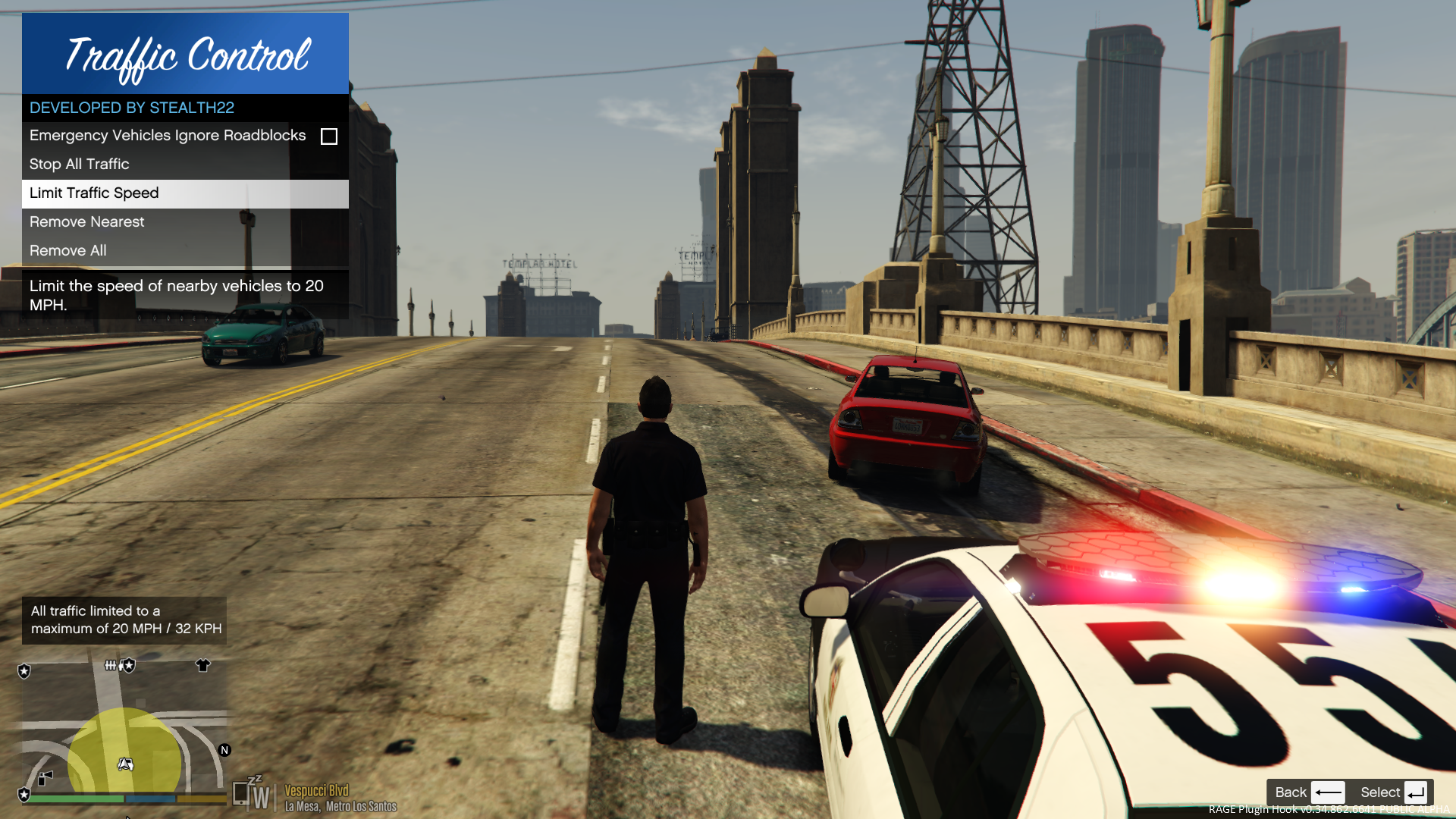
- Stop or slow down all traffic within a certain radius of the player, in order to close a road for investigative purposes, or for safety reasons during a traffic stop
- Multiple "roadblocks" or "speed zones" can be placed
- Roadblocks will remain in place until removed by the player
- A (beta) setting to allow any emergency vehicles to drive through "roadblocks"/"stop zones" can be enabled in the INI file ("Stop Traffic" orders only; speed restrictions are not affected)
- The above setting can also be changed on-demand through the new in-game menu
[NEW!] - Traffic Control now includes a new in-game menu, powered by RAGENativeUI!
[NEW!] - Keyboard shortcuts can now be changed in the INI file!
[NEW!] - Keyboard shortcuts can be disabled, if desired (to use the in-game menu exclusively)

[NEW!] - Integration with Police SmartRadio!


Usage
- Press the menu keybind (CTRL + F10 by default) to open the Traffic Control menu; use the menu options to place/remove roadblocks
- Alternatively, you can use the shortcut keys (see the INI file) to place/remove roadblocks
- Keyboard shortcuts can be disabled through the INI file, if you wish to only use the in-game menu


Forum Thread

http://www.lcpdfr.com/forums/topic/51961-rel-traffic-control-beta-close-off-the-road-while-you-investigate-and-clear-a-scene/ 

What's New in Version 1.1.1

Released

VERSION 1.1.1

  • Added missing Police SmartRadio files; fixed directory structure
  • Had some issues building the auto installer; this version will be manual drag and drop only
     

VERSION 1.1.0

  • This version requires RPH 0.62+, as well as RAGENativeUI v.1.6.3.0
  • This version also requires Stealth.Common v2.0+ (included; older versions will not work)
  • Brought this plugin into the 21st century, and best of all...
  • Integration with Police SmartRadio, built by our very own @Albo1125!!

User Feedback

Recommended Comments

Markadaliah

Members

@Stealth22 It is fine now, someone elses mod must have been bugging it out because after I updated one of my mods, it works flawlessly.

Deactivated Member

Deactivated

I cant open the mod... I only changed menu button to F9, but after pressing nothing happens...

Kal74

Members

9 minutes ago, MusicMixer99 said:

I cant open the mod... I only changed menu button to F9, but after pressing nothing happens...

What about the modifier key? Default is ControlKey

Deactivated Member

Deactivated

I did not changed the modifier, but if I press Control + F9 nothing happens...

Kal74

Members

36 minutes ago, MusicMixer99 said:

I did not changed the modifier, but if I press Control + F9 nothing happens...

Can you post your Traffic Control.ini  file into a spoiler tag.

Deactivated Member

Deactivated


// TRAFFIC CONTROL PLUG-IN FOR GTA V
// VERSION: 1.0.0
// COPYRIGHT (C) 2015 STEALTH22. ALL RIGHTS RESERVED.
// ANY UNAUTHORIZED MODIFICATION, RE-ENGINEERING, OR DISTRIBUTION (INCLUDING RE-UPLOADING TO ANY SITE) IS STRICTLY PROHIBITED


// Valid key values can be found here:
// https://msdn.microsoft.com/en-us/library/system.windows.forms.keys%28v=vs.110%29.aspx

// To disable a key, set it's value to "None" (without quotes!)

// The default modifier key for all key settings is "ControlKey".
// Values I have tested with are "ControlKey", "ShiftKey", and "Menu" ("Menu" = the ALT key, if desired), although I suggest you stick with either ControlKey or ShiftKey.
// Modifier keys can be set to "None", but this is not recommended, unless using a key which is not used by GTA V or any other plugins

// To disable all shortcuts and use only the in-game menu, 


[Settings]
// RestrictedSpeed = The speed of traffic (in miles per hour) when the "SlowTrafficDown" key is pressed
// Must be an integer greater than zero
// Default value is 20
RestrictedSpeed=20

// SpeedZoneRadius = The radius (in meters) of the restricted speed zones
// Must be an integer greater than zero
// Default value is 60
SpeedZoneRadius=60

// ShortcutKeysEnabled = Whether or not to enable the use of the hotkeys in the "Keys" section below
// This setting DOES NOT AFFECT the MenuKey and MenuModifierKey settings, as the in-game menu is enabled by default
// Set this value to "false" (without quotes) to disable all of the "shortcut keys", and exclusively use the in-game menu
ShortcutKeysEnabled=true


// BETA FEATURE
// Changing this setting to "true" (without quotes!) will allow any emergency vehicle (police, fire, ambulance, coroner, tow trucks) to IGNORE a "Stop Traffic" order
// However, this feature is disabled by default, as it is still in a beta stage
// This feature is fairly stable, but it doesn't work as fluidly as simply forcing all emergency vehicles to stop as well
// This setting can also be changed on demand via the in-game menu
PoliceIgnoreRoadblocks=false


[Keys]
// Key to show/hide the new in-game menu, built with RAGENativeUI!
// Default = ControlKey + F10
// THIS KEY CANNOT BE DISABLED WITH THE "ShortcutKeysEnabled" SETTING
// If you wish to disable the in-game menu, set the MenuKey and MenuModifierKey values to None
MenuKey=F9
MenuModifierKey=ControlKey


// Key to stop all vehicles within <SpeedZoneRadius> (default 60 meters)
// Default = ControlKey + U
StopTraffic=U
StopTrafficModKey=ControlKey

// Key to limit all vehicles within <SpeedZoneRadius> (default 60 meters) to <RestrictedSpeed> (default 20 MPH)
// Default = ControlKey + I
SlowTrafficDown=I
SlowTrafficDownModKey=ControlKey

// Key to remove nearest roadblock/speed zone
// Default = ControlKey + O
RemoveNearest=O
RemoveNearestModKey=ControlKey

// Key to remove ALL roadblocks/speed zones
// Default = ControlKey + H
RemoveAll=H
RemoveAllModKey=ControlKey 

Just now, MusicMixer99 said:


  Reveal hidden contents


// TRAFFIC CONTROL PLUG-IN FOR GTA V
// VERSION: 1.0.0
// COPYRIGHT (C) 2015 STEALTH22. ALL RIGHTS RESERVED.
// ANY UNAUTHORIZED MODIFICATION, RE-ENGINEERING, OR DISTRIBUTION (INCLUDING RE-UPLOADING TO ANY SITE) IS STRICTLY PROHIBITED


// Valid key values can be found here:
// https://msdn.microsoft.com/en-us/library/system.windows.forms.keys%28v=vs.110%29.aspx

// To disable a key, set it's value to "None" (without quotes!)

// The default modifier key for all key settings is "ControlKey".
// Values I have tested with are "ControlKey", "ShiftKey", and "Menu" ("Menu" = the ALT key, if desired), although I suggest you stick with either ControlKey or ShiftKey.
// Modifier keys can be set to "None", but this is not recommended, unless using a key which is not used by GTA V or any other plugins

// To disable all shortcuts and use only the in-game menu, 


[Settings]
// RestrictedSpeed = The speed of traffic (in miles per hour) when the "SlowTrafficDown" key is pressed
// Must be an integer greater than zero
// Default value is 20
RestrictedSpeed=20

// SpeedZoneRadius = The radius (in meters) of the restricted speed zones
// Must be an integer greater than zero
// Default value is 60
SpeedZoneRadius=60

// ShortcutKeysEnabled = Whether or not to enable the use of the hotkeys in the "Keys" section below
// This setting DOES NOT AFFECT the MenuKey and MenuModifierKey settings, as the in-game menu is enabled by default
// Set this value to "false" (without quotes) to disable all of the "shortcut keys", and exclusively use the in-game menu
ShortcutKeysEnabled=true


// BETA FEATURE
// Changing this setting to "true" (without quotes!) will allow any emergency vehicle (police, fire, ambulance, coroner, tow trucks) to IGNORE a "Stop Traffic" order
// However, this feature is disabled by default, as it is still in a beta stage
// This feature is fairly stable, but it doesn't work as fluidly as simply forcing all emergency vehicles to stop as well
// This setting can also be changed on demand via the in-game menu
PoliceIgnoreRoadblocks=false


[Keys]
// Key to show/hide the new in-game menu, built with RAGENativeUI!
// Default = ControlKey + F10
// THIS KEY CANNOT BE DISABLED WITH THE "ShortcutKeysEnabled" SETTING
// If you wish to disable the in-game menu, set the MenuKey and MenuModifierKey values to None
MenuKey=F9
MenuModifierKey=ControlKey


// Key to stop all vehicles within <SpeedZoneRadius> (default 60 meters)
// Default = ControlKey + U
StopTraffic=U
StopTrafficModKey=ControlKey

// Key to limit all vehicles within <SpeedZoneRadius> (default 60 meters) to <RestrictedSpeed> (default 20 MPH)
// Default = ControlKey + I
SlowTrafficDown=I
SlowTrafficDownModKey=ControlKey

// Key to remove nearest roadblock/speed zone
// Default = ControlKey + O
RemoveNearest=O
RemoveNearestModKey=ControlKey

// Key to remove ALL roadblocks/speed zones
// Default = ControlKey + H
RemoveAll=H
RemoveAllModKey=ControlKey 


I I just notice that the .ini file says the version is 1.0.0 and not 1.0.1 ... but i downloaded the 1.0.1 - version, and the main file is called 1.0.1   ...

Kal74

Members

4 minutes ago, MusicMixer99 said:

I I just notice that the .ini file says the version is 1.0.0 and not 1.0.1 ... but i downloaded the 1.0.1 - version, and the main file is called 1.0.1   ...

I wouldn't worry about that because mine says the same thing.. What versions are your RAGENativeUI.dll and Stealth.Common.dll  and TrafficControl.dll files?

Not trying to assume you're dumb, just trying to eliminate the file versions..

Also, do the keybinds work without using the menu?

I'm going to just bring my .ini up and make comparisons in the meantime.

ControlKey + F9 isn't bound to something else, right?

Deactivated Member

Deactivated

3 minutes ago, Kal74 said:

I wouldn't worry about that because mine says the same thing.. What versions are your RAGENativeUI.dll and Stealth.Common.dll  and TrafficControl.dll files?

Not trying to assume you're dumb, just trying to eliminate the file versions..

Also, do the keybinds work without using the menu?

I'm going to just bring my .ini up and make comparisons in the meantime.

could you tell me how can i find out the versions of these files (I have that files infront of me, but i dont see a versionnumber...)

so now i have found out from the readme   that my ragehook is 0.38 ... stealth.common is 1.5.0.1


the other one I dont know the version... but its the one which was provided within the mod-download   

Deactivated Member

Deactivated

24 minutes ago, Kal74 said:

I wouldn't worry about that because mine says the same thing.. What versions are your RAGENativeUI.dll and Stealth.Common.dll  and TrafficControl.dll files?

Not trying to assume you're dumb, just trying to eliminate the file versions..

Also, do the keybinds work without using the menu?

I'm going to just bring my .ini up and make comparisons in the meantime.

ControlKey + F9 isn't bound to something else, right?

tried out the shortcuts, but there is no reaction...seems like the whole mod is not loaded/not active...

Kal74

Members

If you go to your RAGENativeUI.dll Icon and right click it and select properties and go to the details tab, just look at the file version. It should be 1.3.1.0

Deactivated Member

Deactivated

yes, it is 1.3.1.0...   stealth common is 1.5.0.1

Kal74

Members

5 minutes ago, MusicMixer99 said:

yes, it is 1.3.1.0...   stealth common is 1.5.0.1

yeah those are fine, you're on the correct versions.. Also is Traffic Control loading at all when you go on duty? Can you post your RagePluginHook log file into a spoiler.

Kal74

Members

(edited)

23 minutes ago, Kal74 said:

yeah those are fine, you're on the correct versions.. Also is Traffic Control loading at all when you go on duty? Can you post your RagePluginHook log file into a spoiler.

My apologies I think I am wrong.. my Stealth.Common.dll version is 1.6.0.1 ..but  that's what Code 3 Callouts is using and I have that installed as well.

Edited by Kal74

Deactivated Member

Deactivated

(edited)

[spoiler] 
[09.05.2016 14:31:08.138] Started new log on 09.05.2016 14:31:08.138
[09.05.2016 14:31:08.140] ====================================================================================================
[09.05.2016 14:31:08.067] Log path: D:\Programme\GTA V\RagePluginHook.log
[09.05.2016 14:31:08.141] Log verbosity: Verbose
[09.05.2016 14:31:08.143] Initializing input system
[09.05.2016 14:31:08.146] Initializing game console
[09.05.2016 14:31:08.153] Console key has been set to F4 (key code: 115)
[09.05.2016 14:31:08.213] Initializing console variable "SkipGameIntro".
[09.05.2016 14:31:08.213] Type: System.Boolean, Reading section: "Miscellaneous", key: SkipGameIntro
[09.05.2016 14:31:08.218] Read value: <null>
[09.05.2016 14:31:08.218] Initializing console variable "DisableRenderVersionText".
[09.05.2016 14:31:08.218] Type: System.Boolean, Reading section: "Miscellaneous", key: DisableRenderVersionText
[09.05.2016 14:31:08.225] Read value: False
[09.05.2016 14:31:08.225] Setting value of console variable "DisableRenderVersionText" to stored value.
[09.05.2016 14:31:08.225] Initializing console variable "ConsoleKey".
[09.05.2016 14:31:08.225] Type: System.Windows.Forms.Keys, Reading section: "Miscellaneous", key: ConsoleKey
[09.05.2016 14:31:08.226] Read value: F10
[09.05.2016 14:31:08.226] Setting value of console variable "ConsoleKey" to stored value.
[09.05.2016 14:31:08.227] Console key has been set to F10 (key code: 121)
[09.05.2016 14:31:08.227] Initializing console variable "PluginTimeoutThreshold".
[09.05.2016 14:31:08.227] Type: System.Int32, Reading section: "Miscellaneous", key: PluginTimeoutThreshold
[09.05.2016 14:31:08.228] Read value: 10000
[09.05.2016 14:31:08.228] Setting value of console variable "PluginTimeoutThreshold" to stored value.
[09.05.2016 14:31:08.229] Initializing console variable "AlwaysShowConsoleOutput".
[09.05.2016 14:31:08.229] Type: System.Boolean, Reading section: "Miscellaneous", key: AlwaysShowConsoleOutput
[09.05.2016 14:31:08.230] Read value: <null>
[09.05.2016 14:31:08.230] Initializing console variable "StartWithDeveloperModeEnabledId".
[09.05.2016 14:31:08.230] Type: System.String, Reading section: "Miscellaneous", key: StartWithDeveloperModeEnabledId
[09.05.2016 14:31:08.231] Read value: <null>
[09.05.2016 14:31:08.231] Initializing console variable "ShowConsoleCommandInfoOnPluginLoad".
[09.05.2016 14:31:08.232] Type: System.Boolean, Reading section: "Miscellaneous", key: ShowConsoleCommandInfoOnPluginLoad
[09.05.2016 14:31:08.232] Read value: <null>
[09.05.2016 14:31:08.233] Initializing console variable "ShowOnScreenWarnings".
[09.05.2016 14:31:08.233] Type: System.Boolean, Reading section: "Miscellaneous", key: ShowOnScreenWarnings
[09.05.2016 14:31:08.233] Read value: <null>
[09.05.2016 14:31:08.234] Console initialized
[09.05.2016 14:31:08.234] Initializing forms manager
[09.05.2016 14:31:08.237] Version: RAGE Plugin Hook v0.38.886.6940 PUBLIC ALPHA for Grand Theft Auto V
[09.05.2016 14:31:08.247] ================ RAGE Plugin Hook ================
[09.05.2016 14:31:08.255] Checking game support
[09.05.2016 14:31:08.717] Product name: Grand Theft Auto V
[09.05.2016 14:31:08.718] Product version: 1.0.678.1
[09.05.2016 14:31:08.718] Is steam version: False
[09.05.2016 14:31:08.720] Initializing DirectX
[09.05.2016 14:31:08.722] Initializing Direct3D
[09.05.2016 14:31:08.722] Loading C:\WINDOWS\system32\d3d11.dll
[09.05.2016 14:31:08.723] Loaded at 0x7FFF62850000
[09.05.2016 14:31:08.723] D3D11CreateDeviceAndSwapChain at 0x7FFF6286A190
[09.05.2016 14:31:08.723] Creating Direct3D 11 device and swap chain
[09.05.2016 14:31:08.737] Swap Chain created: 0x1F9DD702ED0
[09.05.2016 14:31:08.738] Swap Chain VTable: 0x1F9DD702ED0
[09.05.2016 14:31:08.738] Swap Chain VTable_2: 0x7FFF30FF85D8
[09.05.2016 14:31:08.739] 0xC74850EC83485641;0x48FFFFFFFE202444;0x246C894860245C89
[09.05.2016 14:31:08.739] D3D11Present: 0x7FFF30EE9410
[09.05.2016 14:31:08.739] D3D11ResizeBuffers: 0x7FFF30EE9650
[09.05.2016 14:31:08.740] D3D11ResizeTarget: 0x7FFF30EE9CA0
[09.05.2016 14:31:08.740] D3D11SetFullscreenState: 0x7FFF30EE94E0
[09.05.2016 14:31:08.743] Direct3D initialized
[09.05.2016 14:31:08.743] Initialized DirectX
[09.05.2016 14:31:08.746] Direct3D watcher thread spawned
[09.05.2016 14:31:09.379] Getting device
[09.05.2016 14:31:09.380] Retrieved device
[09.05.2016 14:31:09.380] Creating wrapper
[09.05.2016 14:31:09.462] Wrapper created
[09.05.2016 14:31:09.471] Effect created
[09.05.2016 14:31:09.471] Creating buffer
[09.05.2016 14:31:09.471] Created buffer
[09.05.2016 14:31:09.472] Creating blend state
[09.05.2016 14:31:09.472] Created blend state
[09.05.2016 14:31:09.473] Done with creation
[09.05.2016 14:31:09.547] Initializing texture system.
[09.05.2016 14:31:09.548] Initializing texture system; phase 1
[09.05.2016 14:31:09.548] Initializing texture system; phase 2
[09.05.2016 14:31:09.557] Initializing texture system; phase 3
[09.05.2016 14:31:09.558] Initializing texture system; phase 4
[09.05.2016 14:31:09.574] Initializing texture system; phase 5
[09.05.2016 14:31:09.584] Initializing texture system; phase 6
[09.05.2016 14:31:09.585] Initializing texture system; phase 7
[09.05.2016 14:31:09.588] Initializing texture system; phase 8
[09.05.2016 14:31:09.589] Initializing texture system; phase 9
[09.05.2016 14:31:09.591] Initializing texture system; phase 10
[09.05.2016 14:31:09.594] Initializing texture system; phase 11
[09.05.2016 14:31:09.595] Initializing texture system; phase 12
[09.05.2016 14:31:09.598] Initializing texture system; phase 13
[09.05.2016 14:31:09.598] Initializing texture system; phase 14
[09.05.2016 14:31:13.747] Direct3D watcher thread ended
[09.05.2016 14:31:56.890] Initializing game support
[09.05.2016 14:31:57.681] Compatibility level: 0
[09.05.2016 14:31:57.681] Supported version detected
[09.05.2016 14:31:57.681] ==================================================
[09.05.2016 14:31:57.932] Patched IsDebuggerPresent
[09.05.2016 14:31:58.183] Waiting for game initialization
[09.05.2016 14:31:58.534] Initializing hook
[09.05.2016 14:31:58.784] Completing interoperability 
 [/spoiler]

Edited by MusicMixer99

Kal74

Members

My Stealth.Common.dll version is 1.6.0.1 ..but  that's what Code 3 Callouts is using.. Are you using Code 3 Callouts?

Deactivated Member

Deactivated

(edited)

no, I am not using this...  mybe I should try it out (and get the right version on this way)... is it good?


so as it seems the mod needs an update because the readme says that the stealth.common is the same as used in code 3 callouts...

Edited by MusicMixer99

Kal74

Members

Just now, MusicMixer99 said:

no, I am not using this...  mybe I should try it out (and get the right version on this way)... is it good?


so as it seems the mod needs an update because the readme says that the stealth.common is the same as used in code 3 callouts...

I love Code 3 Callouts..

Deactivated Member

Deactivated

I will give it a try and answer you back :)

Kal74

Members

(edited)

10 minutes ago, MusicMixer99 said:

I will give it a try and answer you back :)

Now I'm not sure if you will have better luck than me, but what I've had an issue with is it wouldn't remove all roadblocks when I tried. I ended up going into my RagePluginHook Config Console and went to the Plugins Tab and unchecked the box next to Traffic Control to not allow it to load automatically.. Then after I go on duty I load the Plugin manually Via the F4 Console..Then remove all roadblocks seemed to work. You might have better luck than me just letting it automatically load.. So let the Plugin auto-load for now.. If you have issues removing all of the roadblocks then try the method I use...

Edited by Kal74

Deactivated Member

Deactivated

1 hour ago, Kal74 said:

Now I'm not sure if you will have better luck than me, but what I've had an issue with is it wouldn't remove all roadblocks when I tried. I ended up going into my RagePluginHook Config Console and went to the Plugins Tab and unchecked the box next to Traffic Control to not allow it to load automatically.. Then after I go on duty I load the Plugin manually Via the F4 Console..Then remove all roadblocks seemed to work. You might have better luck than me just letting it automatically load.. So let the Plugin auto-load for now.. If you have issues removing all of the roadblocks then try the method I use...

unfortunately the problem is still there, plugin is not loading and I cannot use it ( Code 3 Callouts are working perfectly...)

Kal74

Members

(edited)

20 minutes ago, MusicMixer99 said:

unfortunately the problem is still there, plugin is not loading and I cannot use it ( Code 3 Callouts are working perfectly...)

Is it set in your RagePluginHook config console to auto-load on startup? Under the Plugins Tab

Edited by Kal74

Deactivated Member

Deactivated

23 minutes ago, Kal74 said:

Is it set in your RagePluginHook config console to auto-load on startup? Under the Plugins Tab

seems that  this was the this was the issue... the plugin was unchecked in the settings...

never had the idea to look there because all the other plugins loaded automatically...

thank you man - you were a big help, very nice, quick and patient! Thanks again!

Kal74

Members

(edited)

8 minutes ago, MusicMixer99 said:

seems that  this was the this was the issue... the plugin was unchecked in the settings...

never had the idea to look there because all the other plugins loaded automatically...

thank you man - you were a big help, very nice, quick and patient! Thanks again!

No problem at all. Yeah the RPH Config Console is where you go to check which plugins you want loaded at startup. Some you may want to load manually if you choose to.. Only the Plugins in the Plugins Folder will show up, nothing in the LSPDFR Folder in that Plugins will show up because those are loaded automatically when you go on duty.

EDIT: Just wanted to clear it up that the RPH Config Console has many different uses. I was just focusing on the Plugins Tab itself..

Edited by Kal74

Deactivated Member

Deactivated

I have one more little question to you -  in the console the is also a deactivated plugin called law enforcement jurisdiction script... should I activate it? What is this for? 

Kal74

Members

(edited)

31 minutes ago, MusicMixer99 said:

I have one more little question to you -  in the console the is also a deactivated plugin called law enforcement jurisdiction script... should I activate it? What is this for? 

You must of downloaded it and forgot about it, but it's from

If you intend on using it, then yes activate it, or leave it deactivated in case you want to use later on, but having it activated won't hurt anything even if you don't plan to use it. Look in your Plugins Folder to see if you have some files in there called Law Enforcement Jurisdiction Script. If you don't want to use it, just delete those files with that name in it.

Edited by Kal74

Create an account or sign in to comment

Account

Navigation

Search

Search

Configure browser push notifications

Chrome (Android)
  1. Tap the lock icon next to the address bar.
  2. Tap Permissions → Notifications.
  3. Adjust your preference.
Chrome (Desktop)
  1. Click the padlock icon in the address bar.
  2. Select Site settings.
  3. Find Notifications and adjust your preference.


