


ApxRadio UI is a functional Motorola APX7000 style radio UI for LSPDFR. It includes a handheld and in-car radio for a nice visual display for dispatch plugins like, GrammarPolice, NexusDispatch, etc. It CAN be used with any dispatch plugin.
v1.3.3
Features include:
Interactive handheld and in-car radio controls
Up to 16 customizable zones with 16 channels per zone
Resize, reposition, and save both radios independently
Wi-Fi Smart Connect, Bluetooth, and GPS controls
GPS based Nearest Location display
Zone, channel, clock, profile, information, and TMS menus
Time synchronized day and night displays
Animated signal, connection, and transmission indicators
Tunnel signal loss and water radio failure
Customizable callsign, keybinds, sounds, and voice prompts
Partial controller support
Extensive configuration through
apxconfig.inior the in-game menu.
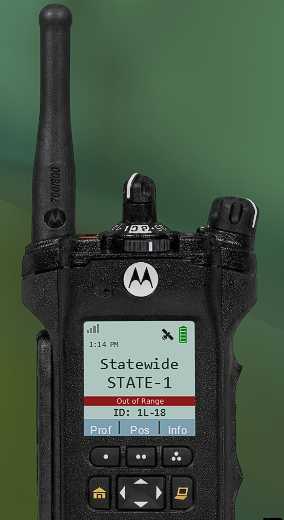
out-of-range photo example
Press "F8" to open the in-game configuration menu. Keybinds can optionally be changed in the INI.
ApxRadio is a visual and immersion-focused plugin and does not replace your existing dispatch plugin.
Tutorial & YouTube Preview
(The last video is a tutorial. The other one is an example of the radio in action!)
Check the Instructions.txt file for more information on setting this plugin up. After installation, you MUST match ApxRadio’s transmit keybind to the transmit keybind used by your primary dispatch plugin if you want the "transmitting" text to appear on your radio.
Requirements:
GTA V Legacy
RAGE Plugin Hook
LSPDFR
I'm trying to make it as "spec" as possible. I do intend to give the in-car radio better realism, as right now it's only partial. Though if anyone has suggestions to improving, please leave them in the comments.
If you need further assistance or find a bug, just shoot me a message; I'll see what I can do to help.
Edited by OwenAb
v1.3.3 update
What's New in Version 1.3.3
Released
This update was mainly focused on fixing a few outstanding bugs, with the added benefit of a few QoL improvements. Controller players who use this plugin should absolutely download this update, as the necessary fixes have been made.
What's new in V1.3.3?
Improved the startup process. A connection to "155.475 MHz" appears on initial startup.
Improved controller support with expanded button mapping options. Controller support can now be enabled or disabled directly from the in-game menu. (Off by default)
Previous Version - v1.3.2
In-game menu added, w/ Improved UI movement handling. Keybinds can be changed in the ini.
Day and night profiles now remain active and don't change, with a daylight cycle mode enabled by default.
Signal/Range logic revamped. Less sensitive.
Option added to automatically power the radio on start and to disable the out of range setting.
Radio now starts disconnected, requiring an initial connection to a zone.
Improved startup sequence.
Fixed other minor bugs.
Short Description
AI disclosure
The author has disclosed that AI tools were used in creating the following aspects of this file:
- Mod and Mod Content (Moderate)
Fixing broken code/debugging.








![OCRP Postal Map - Fixed Duplicate Postals and Atlas Style [FiveM]](http://s3-screenshots.int-cdn.lcpdfrusercontent.com/resize/500/-/monthly_2026_07/624688352-f61f6a95-cab2-4dbf-8e15-eac238807cc7.thumb.jpg.f9356ce9ac807f74bb9d897e93a8242d.jpg)


Recommended Comments
Create an account or sign in to comment