


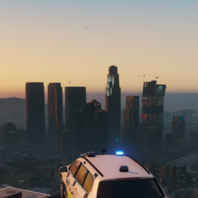


.png.799b2c487e765140520bdf8a4ea2f823.png)
SBS - Suspicious Behavior System
SBS (Suspicious Behavior System) enhances routine patrol gameplay by introducing subtle suspicious behaviors among nearby pedestrians and vehicles.
Unlike traditional callout plugins, SBS does not spawn crimes, shootouts, or scripted events. Instead, it creates organic moments that encourage investigation and officer discretion during normal patrols.
A nervous driver suddenly accelerates. A vehicle appears to avoid police presence. A pedestrian changes direction when spotting an officer. These behaviors may indicate criminal activity or they may be completely innocent. The choice to investigate is yours.
Features
Suspicious Vehicle Behavior
Optional suspicious pedestrian behavior
Area-based suspicion multipliers
Dynamic map blips for suspicious entities
Customizable settings through SBS.ini
Configurable keybinds
Lightweight and performance-friendly
Designed for routine patrol gameplay
Compatible with LSPDFR and RagePluginHook
Examples of Suspicious Behavior
Drivers speeding up unexpectedly
Vehicles attempting to avoid police presence
Pedestrians acting nervously or fleeing
Increased suspicious activity in high-crime areas
Configuration
SBS includes a customizable configuration file allowing you to adjust:
Debug keybind
Vehicle and pedestrian behavior
Scan intervals
Notification cooldowns
Blip durations
Area suspicion multipliers
Maximum suspicious entities per scan
Requirements
RagePluginHook
LSPDFR (recommended)
Installation
Place SBS.dll into your GTA V\Plugins folder
Place SBS.ini into your GTA V\Plugins folder
Known Limitations:
SBS creates suspicious behavior, not crimes.
Some flagged vehicles or pedestrians may be completely innocent.
Intended to encourage investigation rather than guarantee criminal activity.
Made by Truthless.
Edited by SuperPyroManiac
Short Description
AI disclosure
The author has disclosed that AI tools were used in creating the following aspects of this file:
- Description
- Mod and Mod Content (Substantial)
Mod appears to be entirely made with AI.




![國道警車 National Highway Police Car(BMW 530d)[Add-on|ELS|Rotating Lightbar]](http://s3-screenshots.int-cdn.lcpdfrusercontent.com/resize/500/-/monthly_2026_07/271590_20260622024235_1.thumb.png.3ff86895855bc073f6be361549132cb7.png)


.thumb.jpg.cb5fcdd6a7d10f66d85d6727191e5632.jpg)





Recommended Comments
Create an account or sign in to comment