


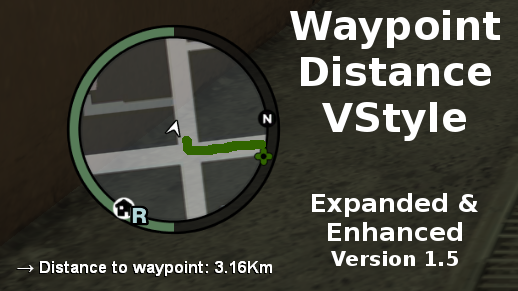


Waypoint Distance VStyle
This mod will show you the distance from your position, to the waypoint you set.
It also shows an arrow always in the direction of your waypoint. Like in GTA V.
Waypoint Distance VStyle also on
Notes
- If you want to use this mod, you will need ScriptHookDotNet.
- If you want to use the GTA V Style Radar, you need the ZolikaMenu and GTA IV Version 1.0.0.0 - 1.0.8.0 (ZolikaMenu does not work with the 2020 Complete Edition. Waypoint Distance VStyle does work with the 2020 CE).
Recommendations
If you have any recommendations or something, just write a comment!
Version History / Changelog
- Version 1.5
- The text is now more flat.
- You can decide if you want the text to have a shadow behind it. And you can set the size of the shadow too.
- You can decide if the text should be bold.
- "UseAutoPosition" added. This option automatically adapts the text to the current screen resolution so you dont have to type in the values manually if you dont have a 1920x1080 monitor. You can use those 2 values: TextPosX and TextPosY as an offset for the text (Only works if you set "UseAutoPosition" to true.). If you set "UseAutoPosition" to false, those 2 values become the position of the text. UseAutoPosition is set to true by default.
- Added support for Zolika's Menu V Radar(s)!
- "AutoEnableWhenZMenuIsInstalled" added. This option will check if you have the ZolikaMenu installed. If you have it installed, the text will change its position to fit the V Radar.
- "EnableDisableKey" added. This will let you change from V Radar text style to default text style. Default key: F8
- "RadarStyle" added. In the ZolikaMenu you have 3 options for the V Radar: Beta, LG and NG. If you want to use "LG", then you need to set the value of this option to "LG", this also applies for the 2 other styles. Default value: NG
- Version 1.2
- You can now choose a custom font for the text.
- You can now choose the font size for the text.
- You can enable "UseEpisodeTextColor" to enable the current episode color for the text. (See images for an example)
- The position of the text can now be changed.
- Version 1.1
- The text will now hide if the hud is disabled in the options.
- Version 1.0
- Release
Short Description
GTA V's Waypoint Distance Style For GTA IV
Creator: ItsClonkAndre




![[DLS / NON - ELS] [ADD ON] San Andreas State Parks Mini-Pack (CA Based)](http://s3-screenshots.int-cdn.lcpdfrusercontent.com/resize/500/-/monthly_2026_10/Screenshot2026-10-1520-48-47.thumb.png.437eaab0f61e0850250fe0c2a5bf8a37.png)





Recommended Comments
Create an account or sign in to comment