




ineseri
Friends of LSPDFR
-
Joined
Everything posted by ineseri
-
Just as a little reminder, the LCPDFR Team constist of Sam, , LMS, Sniper296 and of course, The Community Team
-
Well, there is the mysterious ratman.... Always lurking. Always watching. Somewhere down there in the deep, deep pitch-black darkness....
-
This has happened to me once when I had been playing for several hours, but that was because of memory leaks and that the system couldn't keep up.
-
MODERATOR NOTICE Do not thread-hijack means just what said. Create your own topic.
-
Welcome to LCPDFR.com :)
-
MODERATOR NOTICE Please do not thread-hijack or bump old threads. Do not do it again. Nothing to see here! This topic has been closed by LCPDFR.com staff. If you feel that this topic has been closed in error, please report this post.
-
Have you bought the game?
-
MODERATOR NOTICE Moving to Suggestions & Requests. Please make sure to post in the correct section in the future.
-
You will need to press 'e' I think. The controls should be in the readme.
-
Dsound is the file that loads the mods, sir. If you delete it, you will need to use Xlive.dll instead.
-
Then you need to find the mods that crash the game and remove those.
-
But it works without mods?
-
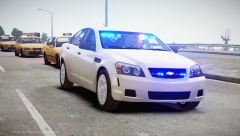 Fair amount of Taxis to police :P
 -
Have you bought the game?
-
MODERATOR NOTICE Moving from LCPDFR Discussion to Computers and Technology. Please make sure to post in the correct section in the future You are better off backing up the links of mods and re-downloading them, rather than actually saving them. If this isn't an option for you, you can save these files on a USB stick, or Dropbox (or similar). It's also recommended to re-downloaded any software you used (you cannot copy the actualy program, as it won't work on the target computer). If you do not want to re-mod your GTA IV, you will have to copy the files you have modifed. Do keep in mind that these files are generally extremely large and not suited for placement on a USB memory. Licenses and such: You'll have to deactivate GTA IV to be sure you can use your key again. Hope this helped.
-
That's not up to you. Also, there already is a topic about this. Was this one really neccesary?
-
Can you try that please? :)
-
Hm, I thought it was some other font. Didin't recognize it at first. My bad :P
-
No, LCPDFR isn't using this font.
-
Do you have a legal copy of the game? Did you update it to the latest patch? Also, keep in mind that mods aren't officially supported.
-
Have you used the search-button? There is a ton of these topics in place already, where your question has been answered and as to which mod might suit you.
-
Have you tried using other cars?
-
To quote one of my other posts on this matter:
-
MODERATOR NOTICE Moving from GTA IV Support Requests to GTA IV Modding Tutorials & Questions. Please make sure to post in the correct section in the future.
-
MODERATOR NOTICE Any further off-topic posts will result in sanctions from the Community Team. They are now hidden. Please read the manual before asking for support


