




Pavy
Members
-
Joined
Everything posted by Pavy
-
Can you be more specific? Are you referring to the the preset outfits available in the eup menu, Law & Order>Departments? Which do you want, EUP default or the LSPD(Nypd lore) preset?
-
Did you edit your duty inventory? Grand Theft Auto V\lspdfr\data inventory.xml Reset it by getting the same file in the manual lspdfr install and replacing it If its something with defaultregions.xml then reset it the same way. Get a copy from the ultimatebackup installation. See if you crash afterwards.
-
If you may, mark my comment as the solution so others can resort to that method if they have the same issue, thanks.
-
You need to upload your ragepluginhook.log located in the main gtav directory to diagnose
-
Try updating your ragenativeui https://github.com/alexguirre/RAGENativeUI/releases Also, for the future, need the full log not the bottom portion, let me know if its resolved.
-
That's the point to test to see if the game continues working normally without mods, if it does then you did something incorrectly in your mods folder. Either missing files required or installed something incorrectly.
-
1 moment It's typical callouts, remove that, idk why the names were similar in the logs
-
Crash reason is: Exception message: Type 'SlimDX.Result' in Assembly 'SlimDX, Version=4.0.13.43, Culture=neutral, PublicKeyToken=b1b0c32fd1ffe4f9' is not marked as serializable. From what I've found online, try these solutions as there is no specific solution Reinstall GPU drivers Check for windows update and install all required updates Restart of the PC. A complete sfc /scannow in the cmd Antivirus exceptions Reinstallation of the .NET packages for Windows. Cleaning the GTA V folder to make it vanilla and starting over.
-
Try removing "First Callouts" plugin, send log if it crashes again
-
There's no crash indication in the file. It's crash to desktop yeah? Try renaming mods to mods_ and try to play.
-
You ignored my question, is the english language pack installed on windows? Also, download this and put it in main gtav directory https://github.com/alexguirre/RAGENativeUI/releases/tag/1.9.2
-
.thumb.png.985469555362d02c542d202409af4013.png) This is a very well made vehicle, I'll definitely use this as my default firetruck (few are out there), but has some incorrect/missing things. In the bio you say "The FDNY does have Seagrave maruders but not as Squad, so don't flame me cuz it's not 100%" Bug: The front headlights have a green border The "61" number is missing from the grill The eagle on the right side of the truck is supposed to be flipped. "Never Forget" Is missing on both sides, you forgot Missing the "Squad61" NYC License plate The water pump chrome part on both sides is too dark and looks out of place The 2 blue lights on the rear are supposed to be red/amber The hubcaps are supposed to be red not chrome Incorrect roof lightbar Missing American flag above right side middle window And you mentioned for the template people must join your discord server to download, that's not nice Response to author: Yes it's clearly not 100% but its not even close to it, more like 40%. Some of the stuff I mentioned can be easily fixed if you properly did your research. If you want it fdny "styled" like you said, then title it fdny lore inspired. But it's not, because you tried to make it real life. Fix the obvious problems, it's a disservice to the FDNY. There are els fdny trucks out there that exist with much better accurate lightning but the textures on some are very low quality, which is why I'll use this truck.
This is a very well made vehicle, I'll definitely use this as my default firetruck (few are out there), but has some incorrect/missing things. In the bio you say "The FDNY does have Seagrave maruders but not as Squad, so don't flame me cuz it's not 100%" Bug: The front headlights have a green border The "61" number is missing from the grill The eagle on the right side of the truck is supposed to be flipped. "Never Forget" Is missing on both sides, you forgot Missing the "Squad61" NYC License plate The water pump chrome part on both sides is too dark and looks out of place The 2 blue lights on the rear are supposed to be red/amber The hubcaps are supposed to be red not chrome Incorrect roof lightbar Missing American flag above right side middle window And you mentioned for the template people must join your discord server to download, that's not nice Response to author: Yes it's clearly not 100% but its not even close to it, more like 40%. Some of the stuff I mentioned can be easily fixed if you properly did your research. If you want it fdny "styled" like you said, then title it fdny lore inspired. But it's not, because you tried to make it real life. Fix the obvious problems, it's a disservice to the FDNY. There are els fdny trucks out there that exist with much better accurate lightning but the textures on some are very low quality, which is why I'll use this truck. -
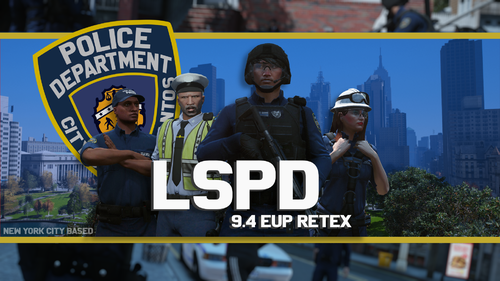 Can you create an actual NYPD EUP Pack? This is really good work.
 -
Can you explain how you installed the pack step by step? Make sure you have these 3 files installed please. https://www.gta5-mods.com/misc/gta-5-gameconfig-300-cars https://www.gta5-mods.com/tools/heapadjuster https://www.gta5-mods.com/tools/packfile-limit-adjuster
-
[FATAL] Failed to load backup data: System.IO.FileNotFoundException: Failed to find file:lspdfr/data/agency.xml It crashed because it cannot locate the required files. Lspdfr wasn't installed correctly, please reinstall it
-
It's very simple, this video here covers it well. You just go to the .ytd file of the vehicle, look for the template(if it has one, not all will have one), rename it as the next numerical increment of the sign file. So if the vehicle you have has a sign file called chrg_sign_1 and nothing else, that means there is only 1 livery. Create a new livery from the template and name it as chrg_sign_2 and add that to the .ytd file then you will see 2 liveries ingame.
-
You are running version 1.64 of what? Highest version of Lspdfr is only 0.4.9 My first guess would be maybe your windows doesn't have the english language pack installed, I've not seen an issue like this. Can you please upload your ragepluginhook log file located in the main gtav directory
-
There's no plugin crash indication so its likely the cars you added messed something up. You can rename your mods folder to mods_ and see if the game works, if it does then that means its something within that folder installed incorrectly or missing files etc.
-
-
Rename your "mods" folder to "mods_" and see if that works. If it does, then there is an issue with that folder. Such as incorrectly installed mods or missing files etc. Make sure you also have this in the main directory http://www.dev-c.com/gtav/scripthookv/
-
Hello, you need to upload your RPH log file located in the main gtav directory.
-
I can see ocspray being the reason for the crash in your latest rph log but calloutinterfaceapi shouldn't have been removed as its unrelated. The crash message was " Cannot load an invalid weapon asset." So you probably had the oc spray apart of your lspdfr loadout or inventory and it couldn't properly load.
-
Exception message: Cannot load invalid model with hash 0x8a63c7b9. You have a corrupt or incorrectly installed model
-
Started today, I'm getting a lot of errors trying to access any part of the website. Have to refresh multiple times for it to resolve itself. Not using any Vpn.
-
Oh I didn't see the Christmas pants part, that sounds like an Eup configuration issue or model clothing mod issue

.thumb.png.985469555362d02c542d202409af4013.png)


