


Creators: Due to background reprocessing of files, approvals and file security checks may be delayed. Thanks for your patience.

DLer
Members
-
Joined
-
Last visited
Everything posted by DLer
-
Had to dig this one back up as I've been working on this issue for some time with no fix. I have tried every filetype, in all folders. LCPDFR's install guide suggests running the game in administrator to run with less hiccups. I've attempted to place the .mp3 files in all of the corresponding administrator>documents and settings folders as well with no luck. Anyone got a fix for those running admin as instructed and also got their music working? I'm on XP.
-
This is why I keep the game as close to original as possible. Simply put, less crashes, less headaches. I only use original cars, lightly modified, and NO ELS but use scripts like the strobe mod that add realism, as well as liveries that do the same. I've played LCPDFR for 3 straight hours, minor hiccups, but no crashes or restarting on EFLC which tends to have even more issues. Now, I can finally give back to the community with my own works, and advice like you can.
-
I have mentioned in other threads, but try starting a new game. Sometimes this works in solving texture issues. Also, consider low-poly/low-size mods, cars, and such. I have a very old system so I only keep original cars, non-els, and a few very tiny mods to keep the game running right
-
I've noticed that when I'm far into the games storyline, and am continually adding mods, this happens. Starting a new game seems to cause this to go away. Try starting a new game and see what happens.
-
-
-
-
-
Didn't even realize you'd updated this to work with A.I, great job! I love this mod!
- 54 comments
- 39 reviews
-
Kind of surprised no one mentioned the strobes mod available here to add realism without using ELS: Which was updated so A.I. cars now use it too! No crashes, no headaches. Get it!
-
-
I'm unsure of what exactly you're asking for, but within each ReadMe file in the pack is a link to the models above. All of the models contain templates, except for the Annihilator, which I used the original skin file and adjusted it. I should also mention the Enforcer template is a bit skewed when working on it in Photoshop, but it is included in the models original folder when you download it. You can see the difference with my texture I made for it. What template are you looking for?? EDIT: Looks like Yard1 beat me to it. Thanks!
-
Hi everyone, thought I'd introduce myself, and post my works in a thread of my own instead of derailing others :P As you all know, I keep my liveries within the GTA universe, with original vehicles and original logos, etc...which I say all the time. Rarely I take commissions to do real-world liveries. This thread shows my works as a whole, but an emphasis on standard GTA cars that have been modded that look like they could have been there from the start, and added realism to match. I also focus on NON-ELS mods, which I use in conjunction with the strobe mod that gives a more realistic effect like ELS, without the bugs. I do not work in Zmodeler, but only with Photoshop to create skins and liveries, nothing further at this time. Here are my Released Works: INTERCEPTOR LIVERY PACK INTERCEPTOR UNDERCOVER LIVERY PACK ALDERNEY STATE TROOPER SWIFT LIVERY NOOSE LIVERY PACK LCPD BUFFALO LIVERY PACK LANDSTALKER LIVERY PACK BOXVILLE LIVERY PACK ALBANY WASHINGTON EXECUTIVE TAXI BIFF FLATBED TOW TRUCK LIVERIES - COLLABORATION WITH BOVRILWARES Available here: '?do=embed' frameborder='0' data-embedContent>> LCPD ANNIS PINNACLE - UPDATED MODEL NO FULL RELEASE, LIVERY AVAILABLE HERE: http://www.mediafire.com/view/?iz2zg1uxj5ym13j LIBERTY ELECTRIC SPEEDO - ABRAXAS' CORONER/METT LIVERY NO FULL RELEASE, LIVERY AVAILABLE HERE: http://www.mediafire.com/view/?3tpulcvskqs8aua ALDERNEY CITY FIRE DEPARTMENT LIVERY NO FULL RELEASE, LIVERY AVAILABLE HERE: http://www.mediafire.com/view/myfiles/#q4ljw8ss4fq89or LCPD BENEFACTOR SCHAFTER NO FULL RELEASE, LIVERY AVAILABLE HERE: http://www.mediafire.com/view/myfiles/#bwei59w7cm3rda8 UNDERCOVER BRAVADO BANSHEE - ABANDONED PROJECT PENDING ACQUISITION OF UNLOCKED MODEL, LIVERY AVAILABLE UPON REQUEST CURRENT PROJECTS: - Skin in return for request fulfilled for cj24 ABANDONED PROJECTS: - Collaboration with BOVRILwares on the Vapid Contender 4-Door - New Alderney State Trooper skins for ALL standard GTA IV police cars - COMPLETED by Abraxas REQUESTS. ANY FULFILLED WILL RECEIVE ONE LIVERY OF THEIR CHOICE: POLICE - Mapped Albany Stinger with an RX2700 NON-ELS or similar lightbar CIVILIAN (More info and references here: ) -Karin Sultan 4 door hatchback/wagon version -Original stripes placed back onto Thundersmacker's civilian Tampa, and add stripes continuing onto the hard top roof -Vinyl top added on already created two-tone Admiral -Stratum 4 door "base model" style and 2 DOOR "GT-R" style PM ME should you want to fulfill a request.
-
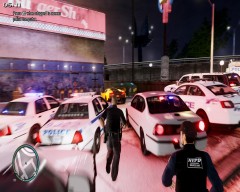 I can't help but notice that "Emergancy" is spelled wrong on that jacket though. Awesome details though
 -
Did you adjust the .ini file to state "CustomDensity=1"? I noticed it would not work until I did that. Just checking. I have tried many others and this was the only one that worked. I also had to add in that extra .dll file to get it working as well.
-
Also consider the TrafficLoad mod: www.gta4-mods.com/script/trafficload-f9780 I know that Traffic Flow v5r2 works as well, but the one above will give you a randomized set of cars, rather than 20 predetermined ones.
-
-
NOOSE Federal Protective Service Livery Pack INCLUDES: -Annihilator -Stockade -Landstalker -Cruiser -Buffalo All mods are separated for easy pick-and-choose. Links to all model downloads are also included in each ReadMe within each separated folder. These are made for models that are mostly non-ELS enabled. Some models do have ELS counterparts as well. BLURB: These cars and their skins were made to coincide with Lt. Caine's excellent POLC v3.6 & POLP v3.5 and their LCPD skins to match their real-life counterparts. Like these models, I work with stock models, that are suited for added realism, without breaking away from the GTA universe, and are optimized for low-end machines that want quality and realism without performance suffering. Many hours were taken to get these skins just right with Photoshop, OpenIV, and of course the game itself. These skins are based on the Department of Homeland Security's Federal Proctective Services cars. Continuing that realism that Lt. Caine did to the existing cars, I decided to add onto that, and make great skins for exsisting cars, while adding a touch of GTA-style humor. This couldn't have been done without the talented and hardworking modders mentioned. ENJOY!!!
- 4 comments
- 3 reviews
-
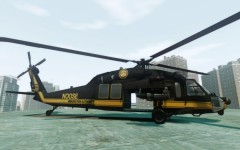 version 1, v2 to be released soon.
 -
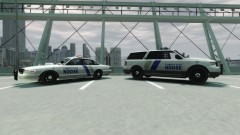 Not sure what EVI is. I will be uploading this pack shortly. I should mention, the car left is TheThinBlueLine's Vapid no longer included in the pack, as it is ELS enabled.
 -
-
-
-
-




