


NickieB
Members
-
Joined
-
Last visited
Everything posted by NickieB
-
2.2.1 won't offer you what you need, you need to have at least version 2.2.4
-
-
-
Thanks, try one of these. I use these. Credits to SgtKanyo for these handling lines:
- 20 comments
- 13 reviews
-
-
I think though that he is stating that he wants to release the vehicle himself. Which would be crazy to ask someone to make you a car and then ask to release it yourself but that's how myself and GTAIVCode 3 took it. I could be wrong, we'll see when he replies
-
-
people are usually more willing to make skins than they are car models since models take a long time. He wasn't saying he himself will make it, he was just saying someone might. And you want someone to make you a car so you can release it? Is that what that meant?
-
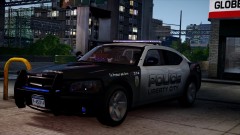 cool!
cool! -
-
yeah, you probably don't care though, they are close enough
-
The wheels you show in the picture are not the same as the ones on GPM. The ones on GPM are steelies with the hubcap over top. The ones in the picture above are the solid 1-piece wheel like I have on my recently released CVPI
-
This is what it should look like. Extra 1-4 looks the same, Extra 5-6 Look the same, extra 7-8 look like 1-4 and extra 9 looks like 5-6. Misc_C is the lighting modules themselves along with the police equipment. You may choose to attach your equipment to something else but thats how I do it. And the glass goes within the modules(MISC_C) Don't mind MISC_Q, thats the laptop and it does not go in the ELS lights hierarchy.
-
Charger Justice v1.0 (CHGR_JUSTICE_v1.0) By NickieB This is car 2/5. Any issues, comments, questions, feel free to PM or comment. **CREDITS - Model is original Dodge Charger by EA Games, modified and converted to GTAIV by Lex91, modified to marked police version by Lt.Caine. - Main Textures by Lt.Caine - Wheels converted by Bxbugs123 - Whelen Justice, Pushbar, Prisoner partition by BxBugs123 Modified by NickieB - Spotlight arm, Dash Cam, Radar, Laptop Stand by BxBugs123 - Laptop, Police Console by PFCBarefoot - Antennas by PriMan - Bearcat Scanners, Lo-Jack, ICOP By NickieB - Charger Wraparound, Window Bars, side divider shields by NickieB - LED Spotlight, LED Hotfoot, TIR3 Module by EVI, Hotfoot and TIR3 modified to various modules by NickieB - Whelen Slim-miser, Soundoff Ghost mirror modules, Whelen SUPER-LED Fog Lights by NickieB - Round GPS Antenna, Handcuffs by NickieB - Chelmsford Skins by NickieB - Inkster Skin by Nutt **Spotlight Coordinates [police] spot-x=-0.8 spot-y=+0.9 spot-z=+0.7 ** By downloading this file you are agreeing not to rip the model or its contents ** Please DO NOT upload or distribute this file without my written permission http://www.youtube.com/watch?v=mqPDRFltSTg
- 20 comments
- 13 reviews
-
-
-
Thanks man, I'll try and figure it out. I made the smallest change, something that shouldn't have affected it but it did. Now comes the hard part of figuring out if thats the issue, lol
- 23 comments
- 8 reviews
-
-
Slicktop CVPI v1.2 (CVPI_S_v1.2) By NickieB v1.2b fixes the RC20 error, so if you downloaded the first version and it doesn't work for you, try v1.2b The skin template has new mappings and features on it so please take a look at that! The bumper trim is now mapped where it should be on the template, the 2011 bumper tabs are also customizable. Door trim and jams have independent mapping too. This was tested by my testers and works so if you have crashing issues, try turning up your "texture resolution" setting in the graphics menu. It is a fairly high file size car, about 4.2MB This is number 1 of 5 cars that I'll be releasing this week (4/1) so watch out for the rest of them throughout the week. **CREDITS - Model is original Ford Crown Victoria by Schaefft, modified for and converted to GTAIV by Chasez. - This version of the CVPI model has been modified by Bxbugs123 & Lt.Caine with permission by Schaefft and Chasez. Edited by NickieB - Rims by Chasez - Laptop, Police Console by PFCBarefoot - Laptop Stand, Radar, Prisoner Divider, Dash Cam, Shotgun by BxBugs123 - Original CVPI template by BxBugs123, edited with permission by NickieB - LED Hotfoot by EVI. Modified to various LED modules by NickieB - Bearcat Scanner, Radar Remote Controller, Motorolla Radio Speaker by NickieB - Antennas by NickieB - M4A1 by Grimm - Whelen Slim-miser by NickieB - Whelen Inner Edge by NickieB. Made from BxBugs123's Whelen Justice - My BETA Testers - Sharpcommand, GSP318, EFox, TrooperHall, FireSheriff343, Nutt - Weymouth MA Skin by NickieB ** By downloading this file you are agreeing not to rip the model or its contents ** Please DO NOT upload or distribute this file without my written permission http://www.youtube.com/watch?v=WBQCulg3zzk
- 23 comments
- 8 reviews
-
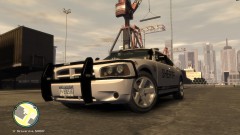
From the album: NickieB Upcoming Releases
Will be released in the next few days. Vehicle will have minimal lighting. Skin by NickieB -
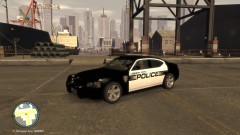
From the album: NickieB Upcoming Releases
Will be released in the next few days. Vehicle will have minimal lighting. Weymouth skin by NickieB. Will be included in the download -
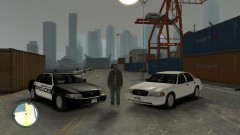
From the album: NickieB Upcoming Releases
Whelen Slim-miser, inner edge and LED stick in the grill. Traffic advisor built into rear inner edge. Weymouth Skin by NickieB -
I changed all my mappings so I don't know what the defaults are. @sKuare - I play online so when your in a chase with multiple people its necessary to use the ELS siren so it doesn't screw up the pursuit. Granted you only hear it on your end and it doesn't affect the traffic but its mostly just for realism.
-
The number for the middle mouse button is 4. It works, I have mine setup that way. ELS Siren is mapped to middle mouse button and the GTA Siren that makes them pull over is mapped to the right mouse button
-
Doesn't have anything to do with admin. Its the taser thats giving you a problem. If you would have searched the LCPD:FR Support forums you would have found the answers your looking for. Just run the installer again and un-check "install taser" and it should install fine. You just won't be able to use the taser. You can try the "fix" for it, the video is stickied in the top of the FR Support section

