




Cyan
Management Team
-
Joined
Everything posted by Cyan
-
Your topic has been moved to GTA V Support, this is not LSPDFR related. Please post in the correct location in the future.
-
Your topic has been moved to LSPDFR 0.4 Support. Please post in the correct location in the future.
-
This topic has been moved to the appropriate forum. Please post in the correct location in the future.
-
Your topic has been moved to LSPDFR 0.4 Support. Please post in the correct location in the future.
-
If you can post the crash from Event VIewer, perhaps LMS can look at why NVE is crashing GTA V / LML is his spare time.
-
Your topic has been moved to GTA V Support, this is not LSPDFR related. Please post in the correct location in the future.
-
This topic has been moved to the appropriate forum. Please post in the correct location in the future.
-
Your topic has been moved to LSPDFR 0.4 Support. Please post in the correct location in the future.
-
This topic has been closed because you are asking for support regarding pirated software. We are unable to provide support to pirates, or people using cracks. If you feel this topic has been closed in error, please report this post.
-
Your topic has been moved to GTA V Support, this is not LSPDFR related. Please post in the correct location in the future.
-
LSPDFR cannot load assets. Rename mods to _mods and try again. If this fixes your issue, your issue lies with a third party file mod you've installed.
-
I know NVE are saying it, but I'm sceptical that this is an LML issue considering NVE also causes issues with LSPDFR and other mods. It's likely NVE just being a special case, again. If you can post the vfs.dll crash from Event Viewer perhaps LMS could take a look when he has spare time, nobody has thus far sent this. NVE is a paid mod which we do not have so we wouldn't be able to troubleshoot this on our side.
-
This topic has been moved to the appropriate forum. Please post in the correct location in the future.
-
Your topic has been moved to GTA V Support, this is not LSPDFR related. Please post in the correct location in the future.
-
Your topic has been moved to GTA V Support, this is not LSPDFR related. Please post in the correct location in the future.
-
RPH/LSPDFR blocks itself from being used on GTA Online, so no. To start the mod, you start RAGEPluginHook.exe. When GTA V is started with RPH, networking code is disabled so the game cannot connect to GTA Online.
-
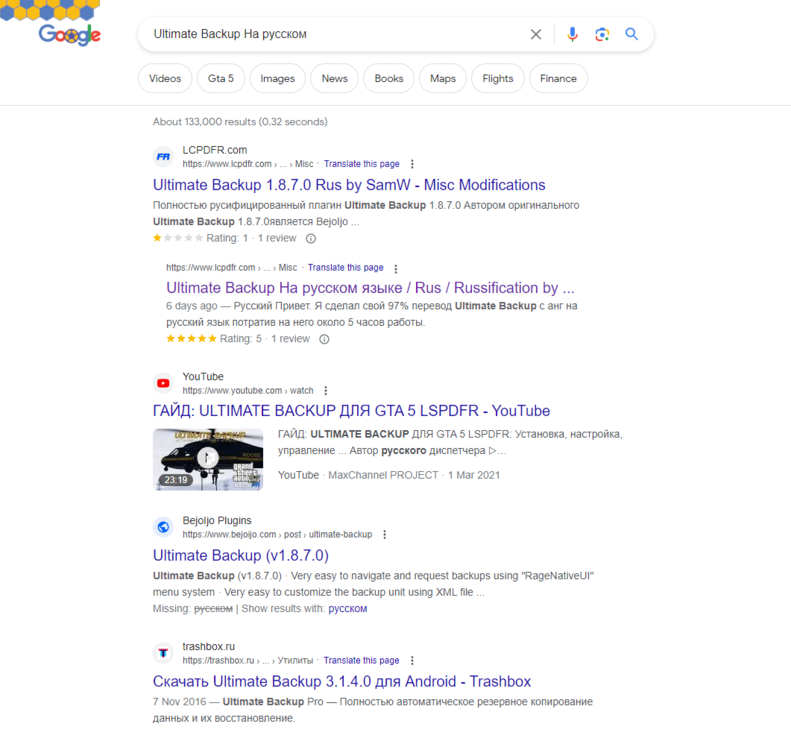
If I search the term 'Ultimate Backup На русском' your file comes second for me: As for why it's not first, sadly that's a question for Google's rating algorithm. We do not control the order in which Google will present suggestions (although I wish we did). Try including the phase you are wanting to be ranked higher in your file tagline and/or description.
-
We're proud to announce today our new Tag Picker is live. chrome_WIga7mLVpl.mp4 Our new tag picker allows you to easily search and discover tags to place on your file. You can search by browsing, by typing and by tag category. Most of our tags are still cantered around vehicles, and will only be visible in the vehicles categories. We're working on additional features and new tags, and we are open to recommendations of new tags and features as we work on the next phase of our tagging system.
-
-
Please translate your post to English; I don't speak Russian.
-
Your topic has been moved to LSPDFR 0.4 Support. Please post in the correct location in the future.
-
Your topic has been moved to GTA V Support, this is not LSPDFR related. Please post in the correct location in the future.
-
Your topic has been moved to GTA V Support, this is not LSPDFR related. Please post in the correct location in the future.
-
Your topic has been moved to GTA V Support, this is not LSPDFR related. Please post in the correct location in the future.
-
Your topic has been moved to GTA V Support, this is not LSPDFR related. Please post in the correct location in the future.




