




Cyan
Management Team
-
Joined
Everything posted by Cyan
-
I've found this issue occurs when you have multiple tabs/windows of LCPDFR.com open. This is caused by rate limiting on our side. Sometimes it's just a transient issue and can go away by itself.
-
Your topic has been moved to LSPDFR 0.4 Support. Please post in the correct location in the future.
-
-
Your topic has been moved to LSPDFR 0.4 Support. Please post in the correct location in the future.
-
-
-
-
-
Hi, there's already a thread about this in the website support section -- we're looking into it.
-
Our provider is saying that a fix should have been deployed. Can anyone who was previously having issues confirm? Not an error on your end personally. Mix of our provider and ISPs. Glad to know it's fixed.
-
I've personally tested from Three UK and Vodafone and not seeing the issues, but it definitely looks like it could be limited to the UK. Our provider is looking into it and knowing them, it should be resolved fairly quickly. Just to clarify, did you see a StackPath error or an error saying 'took to long to respond' when downloading? We're encountering two different (but equally annoying!) issues right now.
-
Thanks so much -- our provider is looking into this now.
-
I wouldn't be expecting to see that error unless you are changing the download method. Try using the default download method (not the 403 issues one) and try again. If you're still experiencing issues, I'd need the output of those commands to further investigate. You can open Command Prompt (cmd.exe) and paste those commands one by one into there. I cannot investigate any further without this information. Considering you are both on the same ISP, I don't think this is a mess-up on our side.
-
Thank you for your error report. We will hand this over upstream and let you know if there are any updates. Can you try again now? If it still doesn't work, I'll need a screenshot of the error page, and the output of the following commands:
-
-
All files on LCPDFR.com are security checked and scored by our custom rule system to try and prevent malware and other threats against the community. The automated check usually takes less than 30 minutes, and is done whenever you upload a new file, or go through the upload a new version process on a file. This process is automatic, but will flag files to us for manual approval based on a scoring system. The lifetime of your account, previous uploads, the result of our rules and various other variables are taken into account before automatic approval occurs. All files will be run through VirusTotal. Files which are flagged by VirusTotal will have to go through manual review, and we will reach out to ask why the file scan failed. Script modifications by established authors are less likely to be held for manual approval through this new scanning system.
-
Your topic has been moved to LSPDFR 0.4 Support. Please post in the correct location in the future.
-
There's not a way of disabling Inside the File at a per-file level at the moment.
-
-
-
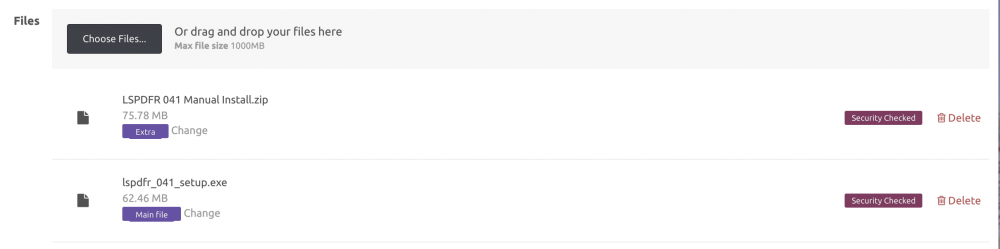
Hi all, It's been a while -- I thought I'd post an update on some work that we've finished. File approval changes I've just finished deploying some changes to our file approval process. You will no longer need your file to be approved again to edit details of your file in the 'Upload new version' screen. Additionally, and this concerns script modifications the most, old versions of your file will be downloadable and your file will no longer be hidden (provided you leave an old version on the Upload a new version file list) whilst your new version is queued for approval. You will also be able to edit the file after the initial automated security check, and whilst the new file is waiting for approval. This is still undergoing testing, and if you see any issues, feel free to message me. Individual file tags (For downloads with multiple files) Sometimes users can get confused on which version of your file to download. This is especially true for script mods, or mods which have extra files which aren't required. You can now choose to tag an individual file as 'Main file', 'Old version' or 'Extra'. These tags will then show next to the file name on the file download page. A reminder: Our advertising guidelines Just a friendly reminder, our Guidelines state where advertising is provided, and it doesn't really include files. We have long overlooked this however, as we acknowledge the efforts mod authors put into their files and that for most files it isn't a problem. However, we are starting to see more and more files where the entire description is nothing but an advertisement for a Discord. We will start to take action if your file description is acting as nothing more than an advertisement. As an example, if your files description is 50% a Discord logo -- or your Discord link is size 36pt and the rest considerably smaller, we will request that you add substance to your description, or remove adverts. We really don't want to go down the path of other sites with restricting the description to just plain text, so let's keep it classy! Inside the File Inside the File is back, which means for most files you can see what's in them before downloading. Check below the 'File Information' on the sidebar of a file page for an example. Cheers Cyan
-
Can you clarify your idea a little bit? Do you mean just add year as a filter option, so then you can sort through them?
-
-
The idea of G-SYNC is that it is a replacement for V-sync, which can reduce your FPS when it is on. You will get about the same performance with G-SYNC as with V-sync off, but with the perceived benefit of V-sync on.
-


