
PimDSLR
Members
-
Joined
-
Last visited
Everything posted by PimDSLR
-
Yes, the model that I uploaded. But if you follow the instructions above you should be fine.
-
I made that skin, and I don't know of it fits for that car. But like Kilyin said, you have to dubbel click on the ytd files and replace ALL skins.
-
-
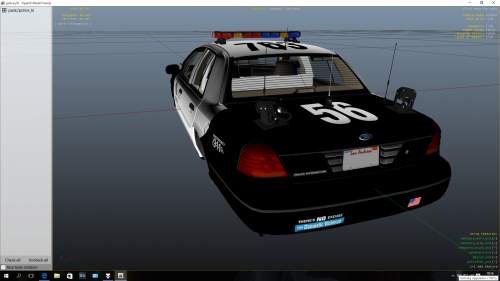 Yeah, and it is stupid of me that I forgot the uploader. But is is a nice car as you can see in the video. The ligbtbar and ALPR are lovely.
- 30 comments
- 2 reviews
-
-
It is a other model (as you can see in the video) then were I made this skin for. Don't know if it has the same template.
- 30 comments
- 2 reviews
-
Yes that's true. I uploaded this skin during the time that it was online. So I let it here, for when it comes back.
- 30 comments
- 2 reviews
-
Maybe on another website. I can't upload it because it isn't my model. I also don't know why it's gone.
- 30 comments
- 2 reviews
-
-
Yes it is. Uuh I don't know that. Probely yes but I don't know how at the moment. But I like them.
- 30 comments
- 2 reviews
-
From the site. But I just saw that is was gone. It had a other template that's why I made this. But I can't upload it because it's not my car.
- 30 comments
- 2 reviews
-
SKIN for the Ford Crown CVPI Whelen lightbar version. So not for the normal CVPI 2008. Only with the Whelen lighbar. Video of the skin and car: https://m.youtube.com/watch?v=rbok5Sp57ug -PimDSLR
- 30 comments
- 2 reviews
-
-

- 1
-
-
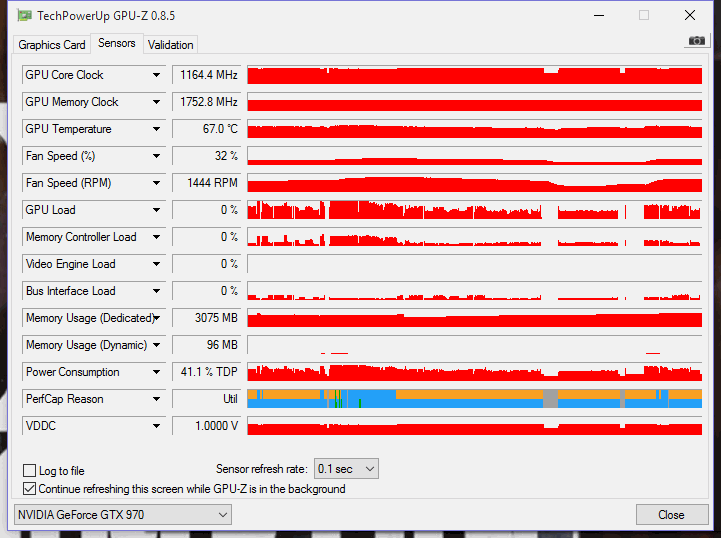
Running the latest version. I have RAGE with callout plugins, and 3 others. Nothing more. Even when I'm in the lowest resolution I'm still getting 40fps ;(
-
It went not over the 3,5 GB's. The funny thing is that if I lower the settings I dont get more fps.
-
Same here. A EVGA GTX 970 2.0. On normaal settings in daylight I get 35-40 fps and ad night time 40-50fps. It's horrible! I have a new Intel I5, 8GB.
-
Hello, I have a problem regarding the lights of the police vehicles. The parking lights (orange) are allways on, on every car. So when I'm in a police vehicle and turn the emergency lights on, my back lights are steady red, and If you look closely you can see a blink from the emergency lights. I changed the visualsettings but nothing helped. -Thanks
-
 Can someone help me? The front and back lights are always on. So when I turn on the emergency lights the big back light is steady on.
- 95 comments
- 38 reviews
-
-
 Here you are, the full list: 0x013F5FE7 - PoliceB Main 0x17DDFB5C - PoliceB Secondary 0x0A8960B6 - FIB Primary 0x0A49B203 - FIB Secondary 0x0D329446 - Police Primary SIREN_2 - Police Secondary POLICE_WARNING 0x0E0DA7BC - Granger Primary 0x16E74B3E - Granger Secondary 0x1C98C4D5 - Ambulance Primary 0x144C8602 - Ambulance Secondary 0x159C9182 - Fire Primary 0x161768E7 - Fire Secondary
- 30 comments
- 12 reviews
-
-
- 1
-
-
It's fixed! Thanks, I'm working on the horn. Please post a review. It's fixed.
- 30 comments
- 12 reviews
-
Yes, I have the same problem after the update, I'm fixing it now. Please leave a review after that. You should place the oac and vehicle folder in one folder.
- 30 comments
- 12 reviews
-
-
-
Ooh don't mind. I've just added their names in the credits. To be sure. ;) Yeah I love the Rumbler but the weren't available for Gta 5 so I made them. Enjoy!
- 30 comments
- 12 reviews
-
-
- 1
-
-
Thanks man. I really don't know if there from Double Doppler and RageDev. I got them from a free database of police sirens and I added the bit rate that they would fit in GTA. So sorry if I did something wrong
- 30 comments
- 12 reviews
-
-
- 1
-