


pflanagan05
Members
-
Joined
-
Last visited
-
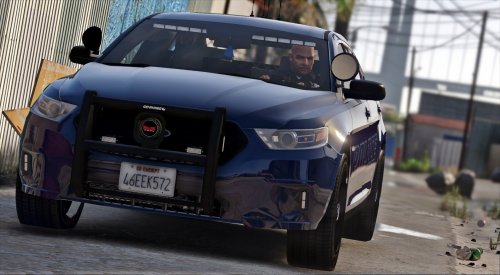 My "Red" lights for this car are yellow and blue lights are teal? Anyone have any recommendation to fix this?
- 31 comments
- 13 reviews
-
 This truck is awesome! I unfortunately also have an issue with the lights being dim. I've installed the RadianceV mod. The lights did become brighter, BUT, they were no longer red and blue. They became all white. Would you happen to have any insight on how to get this resolved?
- 122 comments
- 29 reviews
-
-
 Hey, so I'm actually new to adding liveries. I've added +liveries to the specific vehicles, however, when I try and change my livery in game, I'm unable to do so. Trainer says to press 4 and 6 to change.. and it also says there are 0 liveries. I don't have any livery mods installed. Would you happen to know if one is needed?
- 62 comments
- 26 reviews
-
-
Thanks! I really appreciate it
-
I'm familiar with changing the standard 'H' and 'E' light patterns.. But wasn't sure how to change the 'categories' (I guess is the word) to 'X' or SEC to 'L' or 'R'
-
I keep seeing (on several videos) where players change the PRIM light bar to an X-01.. And SEC to L or R-01.. Does anyone know how to do that? If so, please share!
-
That's what I've downloaded but there's just no ELS folder everyone is mentioning in the zip file
-
Right, when I downloaded the ELS zip file, there wasn't an actual fold that said ELS. But all the videos I've watched says there should be. I remember there was one when I first downloaded LCPDFR a while back.. And I bet that's the issue. No matter where I go to load ELS, there just isn't an ELS folder in the zip file
-
I've downloaded this and installed as well, still no go. When I get into a cruiser, one or two of the LEDs stay turned on... and maybe a taillight.. but I just can't seem to enable the lighting system
-
Okay thanks, I'll definitely try this
-
Hello everyone. I'm having issues with ELS V7 not working. I needed to delete all my files and GTA IV because of issues I was having with the game previously. Now when I download ELS V7, it doesn't work in game. I haven't used any other scripthooks other than what's provided in the LCPDFR download and the file from the ELS download. I have watched countless videos and they all mention a folder that should be in the ELS zip file... but there isn't (for me at least.) I've tried to download it using I.E. and Chrome... still the same thing. Other facts- I haven't downloaded the trainer yet; I've downloaded ELS enabled vehicles; J,K,L don't work. The only siren key that works is "G" and no lights come on; in the ELS setting, all vehicles are set to "ON". Does anyone have any suggestions? LOL I sure do miss my ELS and working lights!
-
Hey everyone! Does anyone know any unmarked or undercover cars with darker tinted windows? I'd create them but I'm new to modding world. Any info would be great! Thanks so much!
-
Thanks but there is nothing there. Says page isn't found. Can you please repost? Thanks! I saw a video on youtube... but I'm not sure if my MacBook is good enough. Here are specs: Processor 2.26 GHz Intel Core 2 Duo Memory 2 GB 1067 MHz DDR3 Graphics NVIDIA GeForce 9400M 256 MB Software OS X 10.8.3 (12D78) Screen- 13-inch (1280 x 800); NVIDIA GeForce 9400M 256 MB graphics Storage- 250GB
