




Four1one
Members
-
Joined
-
Last visited
Everything posted by Four1one
-
'?do=embed' frameborder='0' data-embedContent>> '?do=embed' frameborder='0' data-embedContent>> All i did was type PA state police skin in the search bar...give that a try
-
Exactly....if there was documents then we would know....and they would be in big trouble. I personally believe the US government knew about it and let it happen so they could push their big war on Terrorism and to allow agency like the NSA to do whatever they wanted including breaking national/constitutional laws. Im not saying they flew the plans in the buildings and all that, but if they would let something like this happen it would cause enough motivational drive from the public and allow us to drop are guard all in the name of national security. Evidence is not required, but i will say name one thing you know the that the government doesn't.......
-
Actually Military and police are very similar because they both instill order. While the military is sent to fight wars on foreign soil....Law enforcement fight's the "war" on crime in the homeland....so they really aren't much different.
-
Yeah...that way he can shoot back at you. It's never a officers intention to go out and kill a person....but at the end of the day when it comes down to you living or the other guy trying to kill you....you gonna kill that fool.
-
I probably would have turned this into a fire dept pack cause of the color...but yep, it all looks pretty good.
- 11 comments
- 2 reviews
-
-
 Me like....
 -
*Skip to minute 0:50
-
That has to be one of the coolest/most effective commercial i've ever seen. Hope they get the point out that domestic violence is bad and shouldn't be tolerated.
-
-
That was actually really cool and fun....didn't know you could do that with youtube. Good find.
-
-
Yeah you're right.....he's currently working on his NCSHP pack but it wouldn't surprise me if he work back on his FPD pack afterwards.
-
Back in February 2012...almost 2 years!
-
Happy Birthday! Now you got to survive on your own!
-
Ahhh, the new RDU airport skins.....where in the world did you find these....lol
- 11 comments
- 5 reviews
-
-

- 1
-
-
Well that's embarrassing....
-
Well....now that, that's taken care of...i wonder how police works in Britain? I mean in the US we have city cops who patrol the city, Sheriff''s who patrol the county, and state troopers who patrol the state....how does it work in England, Ireland, etc.?
-
From what i understood from it, if a felon is good they can receive the certificate that states that they are a "good person" and should be allowed to work almost anywhere with in reason. (Just from what i understand)
-
Read this on the news...seems like some states are starting programs like the one you mention above.
-
-
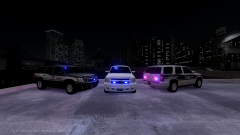 Tahoes are looking good my friend!
 -
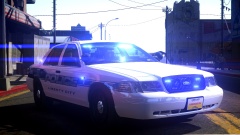 MY EYES!!!!! LOL...just kidding, looking good!
 -
Yeah probably something small like you accidentally changed or erased a letter from the wft/wdt. or you forgot to rebuild and save...but hope that helps clarify things.
-
You mean like change the file name like lets say you downloaded a car and it's "fbi" and you want it to be "police2"....if so then what i do is drag the files to my desktop, right click, "re-name", and import it that way. Again, assuming this is what you are talking about.

