


OwenAb
Members
-
Joined
-
Last visited
-
Currently
Viewing File: [ELS] [DLC] [Reflective] LSPD (Houston Police Dept) Pack
Everything posted by OwenAb
-
 Yeah, I'll be looking into a solution for the MLOs. Regarding custom tasers, you can already customize the stun gun icon and title, but if you mean an addon weapon, I'll be introducing that in the next update.
 -
I appreciate your suggestions. I'll look into implementing them in the next update.
-
Unfortunately, it's not very viable to allow a change to the armory's location. By default, the armory is the entire front desk room. You'll just need to find the location that aligns with the MLO used by the default PD. There's a small popup at the top left telling you when the armory can be opened to help.
-
It keeps it, though if you want to remove it, there are other plugins out there that can do so.
-
Join the Discord support server for help and updates on future projects.Premade Custom Icons + Support Channels on the Discord! 😁 Expanded Inventory - v1.0 releaseExpandedInventory is a singleplayer immersion focused inventory system inspired by FiveM's overextended_inventory. It adds an organized way to carry and store weapons, ammunition, police equipment, medical supplies, food, and other items. example of somebody's patrol setup FeaturesFull freedom to customize every icon & title for a more realistic experience. Functional weapon magazines and ammunition. Usable food, drinks, medical supplies, armor, and equipment. (Most have animations) EUP compatibility, with toggleable gloves and helmets/hats. Key Fob that will lock & unlock your personal vehicle. Mini economy system with a starting cash balance and stores for purchasing food and drinks. Controls` Opens or closes the inventory. PageDown Selects your personal vehicle. Use the car key to lock/unlock your vehicle. X Stops an active animation. Right Click Opens an item's actions. You can left click and drag an item to move it, and can right click while holding an item to separate it. Also shift click to easily move an item from one inventory to the other. action notifications Important StuffThe Mission Row Police Department holds the armory with majority of the equipment. Write, gotopd in the LSPDFR console via the F4 menu. Or just drive there. InventoryConfig.ini is the main configuration file. InventoryNames.ini is used to rename every item. Police cars have a specific trunk loadout. If you're using an addon car, the XML name will need to be added in the Config INI for it to receive the items. Must have RageNativeUI, RagePluginHook, and GTA V Legacy. Please view the README as it holds a lot of important information. There is no in-game menu, and any configuration needs to be done inside of the INI's. The full tutorial for changing icons & titles is on there as well. If you couldn’t already tell by my activity on this site, my goal is to bring realistic, FiveM style plugins to LSPDFR. Suggestions and bug reports are always highly appreciated. Demo Video
-
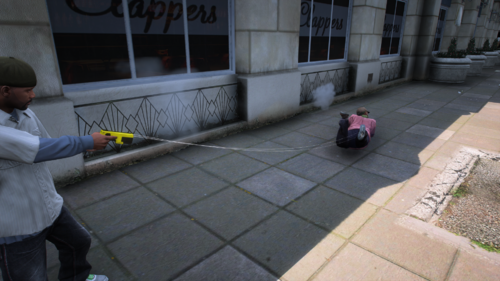 Sweet plugin. One suggestion, though. When the prongs attach, the person gets tased indefinitely until I release them with Backspace. It’s not a big problem, but it would be nice if the stun only lasted 5 seconds, with a separate keybind to reactivate it while the prongs are still attached to the ped. edit, i just saw the showcase which doesn't have that problem. so that may just be a bug on my end.
- 30 comments
- 6 reviews
-
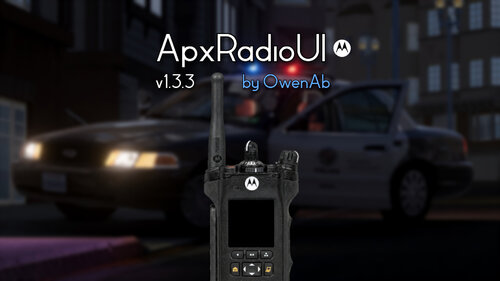 Tomorrow I'll be putting out the newest version. It includes all the fixes, plus some extra QoL features I added. It's midnight for me now, so it'll be about 15 hours from now.
- 83 comments
- 10 reviews
-
-

- 1
-
-
I'll put a rush on the next update and get that fix in. I appreciate the nice words.
- 83 comments
- 10 reviews
-
You can just set the controller keybinds in the INI to "None". I'll have to fix that; I mistakenly made it fall back to the default keybind when set to "None". However, it can still be mapped to whatever combo in the INI.
- 83 comments
- 10 reviews
-
-

- 2
-
-
Yes, I've been working on that for a bit now. It's coming either tomorrow or sometime this weekend. I've been super busy; I'll get this update out asap. I will have that as an option on the menu.
- 83 comments
- 10 reviews
-
 Definitely a permanent plugin for me, nice job!
 -
.thumb.gif.cfe905cb641c197299efbf8404f20c71.gif) Thank you, I'll add the volume changing in the next update, and there is already the ability to toggle the sounds but I'll add a bit more configuration to it. Sure, I'll allow for more configuration to the overlay next update.
Thank you, I'll add the volume changing in the next update, and there is already the ability to toggle the sounds but I'll add a bit more configuration to it. Sure, I'll allow for more configuration to the overlay next update.- 17 comments
- 2 reviews
-
-
-
- 2
-
-
I've been busy lately sorry about the delay but I'll go ahead and keep looking into it, and I'll add that feature where you can just keep it on the day mode just to be safe. I'm seeing a lot of complaints about it not working with NexusDispatch so I'll look deeper into it. I don't exactly have a copy of NexusDispatch to do my own testing with but I'll see what I can do, and will release a new version in a few days. Nobody's caught that until now, I'll fix it in the following update.
- 83 comments
- 10 reviews
-
-
- 2
-
-
I just re-released it, this SHOULD fix the issue, if not my only guess is your on an older LSPDFR or RPH version and you'll have to update. If this isn't the case and your on the newest version please DM me I'd like to help fix the issue. Account is on my profile.
- 83 comments
- 10 reviews
-
Sorry you guys are having this issue, I'm hoping this next update will fix it. First time I'm seeing this bug. I'm not 100% sure what you mean, here is an example of what having multiple channels should look like under a zone, except it would be up to 10 in your case. If your config looks exactly like this but you have problems dm me I'll try to help you out better.
- 83 comments
- 10 reviews
-
I'll look into a better alternative, I am unfortunately just limited to base game animations so I'll see what I can find. I will implement this in the next update, glad you could get it to work. It's Nvidia's game filters, I don't have an actual graphics pack installed.
- 17 comments
- 2 reviews
-
If you want to shoot me a dm my user is on my profile I'll help you troubleshoot. Same with you @Joshua2Shmood808 .
- 83 comments
- 10 reviews
-
Yes, I’ll definitely look into making that. I just need to do some research and find some good photos of it online, then I'll see what I can cook up.
- 17 comments
- 2 reviews
-
-
- 1
-
-
Yes I will implement this next update. Make sure you have Raw Input on, settings > keyboard/Mouse > Mouse Input Method > Raw Input If that doesn’t fix the issue, you’ll need to change the plugin’s keybinds so they don’t conflict with your game controls.
- 83 comments
- 10 reviews
-
-
- 1
-
-
Join the Discord support server for help and updates on future projects.AxonSolutions UI - v1.1AxonSolutions UI adds an interactive Axon Body 3 UI to your game. Power the camera on, start and stop recordings, move or resize the interface, and customize controls and settings through an in-game menu. quality better in-game FeaturesAxon Body 3 UI showing a realistic status display Chest tap animations when recording starts or stops Bodycam sounds and button feedback Movable and resizable interface Saved controls, position, size, serial number, and preferences In game configuration menu Options to disable the interface, overlay, sounds, or animations Default ControlsHold ] to power on or off Double-tap [ to start recording Hold [ to stop and save Press = to show or hide the interface Press F12 to open the configuration menu, the position/size of the UI's can be changed there. All controls can be changed in the configuration menu in-game. Read the instructions.txt!! InstallationCopy the included plugins folder into your main Grand Theft Auto V directory and merge the folders. Grand Theft Auto V\Plugins\LSPDFR\AxonSolutions.dll RequirementsRagePluginHook LSPDFR RAGENativeUI The Body 3 UI can also optionally be used with other bodycam plugins, such as Axon Signal, by matching the keybinds and disabling the built-in audio and overlay in the configuration menu. (I wont add step by step instructions for this because it's self explanatory). This plugin works great alongside ApxRadio UI :), and to just to make this clear, this was NOT ripped from FiveM and the original design came from Axon's social media page. YouTube Demos
- 17 comments
- 2 reviews
-
-
-

-
- 5
-
-
The instructions.txt explains how to do it, but it's Left Shift and =. F9 only unlocks the mouse to click the buttons. If your still having issues feel free to dm me my acc is on my profile. Isn't that for FiveM? This is a singleplayer plugin, though it's compatible with everything since it's just a UI display.
- 83 comments
- 10 reviews
-
If you have the newest version, the config for it is inside apxconfig.ini towards the bottom. ; ADDING MORE CHANNELS: ; 1. Set ChannelCount to the total number you want. Minimum: 3. Maximum: 16. ; 2. Copy and paste the channel template below for every additional channel. ; 3. Increase the section number by 1 each time: [Channel4], [Channel5], etc. ; 4. Replace the example top and bottom text with your own names.
- 83 comments
- 10 reviews
-
There is. You can add up to 16. Maybe. I haven’t really thought about it yet, but for now my goal is improving this one. If it continues to do well, I’ll look into making different skins.
- 83 comments
- 10 reviews
-
Load the plugin on startup through gtav > lspdfr > lspdfr configurator.exe or just use the console in the F4 menu to "LoadPlugin". It should also just be in plugins not inside lspdfr.
- 83 comments
- 10 reviews
-
v1.2 is out, if you've had the issue of the transmission text not working properly this will fix it. There's also a few other nice additions to this version like working LED's and more configuration, so check the update log above this message to see what they are. Next big update will be in a week or two so feel free to give suggestions in comments, I'll see what I can cook up.
- 83 comments
- 10 reviews
.thumb.gif.cfe905cb641c197299efbf8404f20c71.gif)