Skip to content
View in the app

A better way to browse. Learn more.

LCPDFR.com

A full-screen app on your home screen with push notifications, badges and more.

To install this app on iOS and iPadOS
  1. Tap the Share icon in Safari
  2. Scroll the menu and tap Add to Home Screen.
  3. Tap Add in the top-right corner.
To install this app on Android
  1. Tap the 3-dot menu (⋮) in the top-right corner of the browser.
  2. Tap Add to Home screen or Install app.
  3. Confirm by tapping Install.

Expanded Inventory 1.0.0

(1 review)

2 Screenshots

Join the Discord support server for help and updates on future projects.

Premade Custom Icons + Support Channels on the Discord! 😁

Expanded Inventory - v1.0 release

ExpandedInventory is a singleplayer immersion focused inventory system inspired by FiveM's overextended_inventory. It adds an organized way to carry and store weapons, ammunition, police equipment, medical supplies, food, and other items.

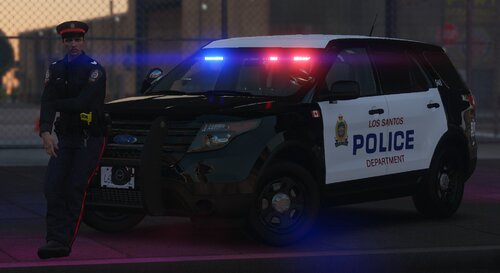
image.png

example of somebody's patrol setup

Features
  • Full freedom to customize every icon & title for a more realistic experience.

  • Functional weapon magazines and ammunition.

  • Usable food, drinks, medical supplies, armor, and equipment. (Most have animations)

  • EUP compatibility, with toggleable gloves and helmets/hats.

  • Key Fob that will lock & unlock your personal vehicle.

  • Mini economy system with a starting cash balance and stores for purchasing food and drinks.

Controls
  • ` Opens or closes the inventory.

  • PageDown Selects your personal vehicle. Use the car key to lock/unlock your vehicle.

  • X Stops an active animation.

  • Right Click Opens an item's actions.

You can left click and drag an item to move it, and can right click while holding an item to separate it.

Also shift click to easily move an item from one inventory to the other.
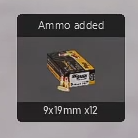
image.png

action notifications

Important Stuff
  • The Mission Row Police Department holds the armory with majority of the equipment. Write, gotopd in the LSPDFR console via the F4 menu. Or just drive there.

  • InventoryConfig.ini is the main configuration file.

  • InventoryNames.ini is used to rename every item.

  • Police cars have a specific trunk loadout. If you're using an addon car, the XML name will need to be added in the Config INI for it to receive the items.

  • Must have RageNativeUI, RagePluginHook, and GTA V Legacy.

Please view the README as it holds a lot of important information. There is no in-game menu, and any configuration needs to be done inside of the INI's. The full tutorial for changing icons & titles is on there as well.

If you couldn’t already tell by my activity on this site, my goal is to bring realistic, FiveM style plugins to LSPDFR. Suggestions and bug reports are always highly appreciated.

Demo Video

Edited by OwenAb
fixed desc


Short Description

ExpandedInventory adds immersive item, weapon, and magazine management through an extensive, fully customizable inventory.

AI disclosure

The author has disclosed that AI tools were used in creating the following aspects of this file:

  • Mod and Mod Content (Substantial)

Debugging. (Icons were from outside sources. Their use of AI is unconfirmed.) Code appears to be heavily written by AI. Author did not disclose this.

User Feedback

Recommended Comments

nemty

Members

Here is the mod I wanted :)

what does it do with the inventory that lspdfr gives you

OwenAb

Members Author

5 hours ago, Supervisor Pettigrew said:

what does it do with the inventory that lspdfr gives you

It keeps it, though if you want to remove it, there are other plugins out there that can do so.

malikhagen

Members

This Mod is great! However I do have a custom LAPD station with other interior. How do I know where the armory was?

OwenAb

Members Author

2 minutes ago, malikhagen said:

This Mod is great! However I do have a custom LAPD station with other interior. How do I know where the armory was?

Unfortunately, it's not very viable to allow a change to the armory's location. By default, the armory is the entire front desk room. You'll just need to find the location that aligns with the MLO used by the default PD. There's a small popup at the top left telling you when the armory can be opened to help.

xDuvii

Members

(edited)

1 hour ago, OwenAb said:

Unfortunately, it's not very viable to allow a change to the armory's location. By default, the armory is the entire front desk room. You'll just need to find the location that aligns with the MLO used by the default PD. There's a small popup at the top left telling you when the armory can be opened to help.

how about adding a code where it reads the coordination of the mlo using xml file, the user will have to use a coordinator mod that shows x y z of the mlo and add it themselves.

i saw this mod this morning before work and ran all of way back home to try this, it look so good.

Edit: Also forgot to add the hotkeys from 1 to 5 and adding a code to disable the weapon wheel for people using Tab instead of Oem3.

Edited by xDuvii

RiccRacc

Members

if we could get the ability to add more armory's for other stations that would be great

OwenAb

Members Author

1 hour ago, xDuvii said:

how about adding a code where it reads the coordination of the mlo using xml file, the user will have to use a coordinator mod that shows x y z of the mlo and add it themselves.

i saw this mod this morning before work and ran all of way back home to try this, it look so good.

Edit: Also forgot to add the hotkeys from 1 to 5 and adding a code to disable the weapon wheel for people using Tab instead of Oem3.

I appreciate your suggestions. I'll look into implementing them in the next update.

RiccRacc

Members

22 minutes ago, RiccRacc said:

if we could get the ability to add more armory's for other stations that would be great

btw if we can add them ourselves, with the use of a menu or anything, this would solve the issue of people with custom station MLO's

also the ability to add custom taser compatability would be sick

ThatGuySens

Members

THIS MOD IS A W! CAN"T WAIT TO SEE WHAT THE FURTURE HOLDS FOR IT

OwenAb

Members Author

2 hours ago, RiccRacc said:

btw if we can add them ourselves, with the use of a menu or anything, this would solve the issue of people with custom station MLO's

also the ability to add custom taser compatability would be sick

Yeah, I'll be looking into a solution for the MLOs.

Regarding custom tasers, you can already customize the stun gun icon and title, but if you mean an addon weapon, I'll be introducing that in the next update.

lssdson

Members

It's a very good plugin, but my Combat Pistol has 17 rounds in the mag, while this plugin has only 12 rounds in the mag. How can I fix it?

RiccRacc

Members

13 hours ago, OwenAb said:

Yeah, I'll be looking into a solution for the MLOs.

Regarding custom tasers, you can already customize the stun gun icon and title, but if you mean an addon weapon, I'll be introducing that in the next update.

I meant addon weapons, thanks for including it in the next update

Create an account or sign in to comment

Account

Navigation

Search

Search

Configure browser push notifications

Chrome (Android)
  1. Tap the lock icon next to the address bar.
  2. Tap Permissions → Notifications.
  3. Adjust your preference.
Chrome (Desktop)
  1. Click the padlock icon in the address bar.
  2. Select Site settings.
  3. Find Notifications and adjust your preference.