




Zeepsopjes
Members
-
Joined
-
Last visited
Everything posted by Zeepsopjes
-
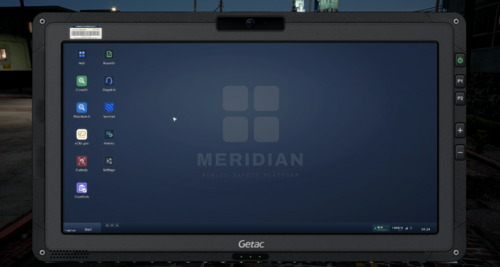 Added in the newest version! Thanks Ickthy appreciate it! <3
 -
-
XCF is for GIMP and PSD is for Photoshop, these are the raw files where you can tweak the bezel or taskbar however you like. Once you’re happy with it, just export it as a PNG. That file you can then drag and drop in pdComp assets folder
-
It’s underway! Thanks for the suggestion! I’m actually working on a new set of icons right now that are way better, and they’ll come in both color and transparent versions. I actually use the yellow background myself at the moment and don’t run into this problem. Could you shoot me a DM with a screenshot showing what’s not visible for you? Maybe it’s something I can take a look at and fix.
-
Hi Jaden, you're right, it's the one from your mod. I had a look yesterday and mistakenly thought they were the originals from pdComp. I'm actually working on a custom bezel right now that I'll upload later today. My apologies! In the meantime, I'll credit yours for the bezels. Again, sorry about that, it wasn't my intention!
-
-
Glad that you like it man! If you have any suggestions feel free to let me know!
-
Thanks for the heads up! I just reuploaded it with the correct spelling 😅
-
There are two ways I am aware of You either open the config.ini and change wallpaper name png to the one you like. In your case that would be: [Desktop] Wallpaper = desktop-background2.png Or while in game open pdComp -> Settings -> Appearance -> Change name of wallpaper png -> Go off duty -> Go back on duty
-
What's Next: Panasonic FZ-G2 Bezel both for Laptop as Tablet pdComp Modern UI Pack | MeridianGiving pdComp a fresh coat of paint. The pack includes redesigned icons (each with its own app lore, if you're into that) and renamed apps so they feel less generic. PED LOOKUP becomes CrossID, VEHICLE LOOKUP becomes PlateWatch, and so on, plus new wallpapers, matching cursors, and Getac-inspired bezels for both the laptop and tablet. It's all built to feel like one cohesive set. Nothing over the top, just a more modern spin on the default look. Need help? If something's not working right, leave a comment below or shoot me a DM. I'm always happy to take a look and get it sorted, and honestly, it only helps me catch and fix whatever's going wrong. Don't be shy! ⚠️ Requires pdComp. This is an add-on pack, so you'll need pdComp installed for it to work. App lore Install Guide Term of Use (TOS)
-
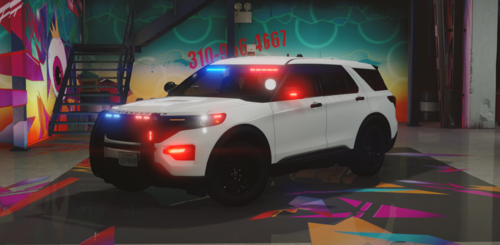 Looks goods, will test it out!
 -
-
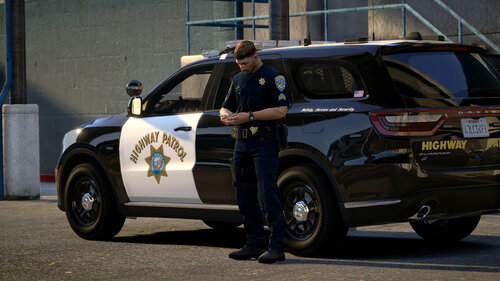 Thanks BJ! Appreciate it :)
 -
 Great job! Love it
 -
Thanks, appreciate it! The car model is from C3
-
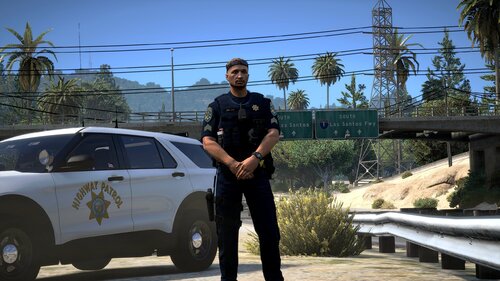 Glad you like it!
 -
CHP Battle Dress Uniform | Textures for Hanako's BDU Pack V1.0A CHP-style retexture for Hanako's Battle Dress Uniform Pack V1.0. Texture only you need Hanako's BDU Pack V1.0 installed for this to work. It contains no models and will do absolutely nothing on its own. What's IncludedShirt, Pants Textures and two decal variants: Utility - standard CHP markings and chevrons K9 - CHP markings with K9 unit decals and chevrons Matching Vest AvailableI've released a vest texture colour-matched to this uniform — grab the BDU Match variant from Seen in the screenshotsUniform: Hanako's Battle Dress Uniform Pack V1.0 Requests welcomeGot an idea for a texture, a recolour, or a custom variant? DM me on Discord: @Zeep1946. I'm using these projects to sharpen my skills, so I'll take on just about anything that sounds interesting, and requests stay open for as long as I'm enjoying it. Reference photos always help. Terms of UseNo re-uploading or mirroring without permission Do not paywall this pack Big credit to Hanako for the BDU models. Enjoy!
-
Thanks!
-
CHP Vest Textures | Hanako & EUP Match (Beige & Blue)A CHP-style retexture for Delwood's Vest and Belt Pack 1.0.0, in beige and blue. The tan is colour-matched to Hanako's Generic Duty shirts and pants, so it actually sits right next to them instead of clashing the way most vest textures do. Texture only - you need Delwood's vest model installed for this to work. What's IncludedFour variants, all with CHP logos and patches: Hanako Match - colour-matched to Hanako's Generic Duty shirt and pants beige Hanako BDU Match - colour-matched to my custom CHP texture for Hanako's Battle Dress Uniform Pack V1.0 EUP Match | Beige - colour-matched to the SAHP EUP uniform beige EUP Match | Blue - colour-matched to the SAHP utility uniform blue The beige and blue variants also include a matched accessory option, with the pouches, straps and attachments recoloured to the vest. Seen in the screenshotsBodycam: 10-8 Arsenal Body Camera — rename it to berd, hand, or any other free prop slot so you can wear it on the vest as shown. Shirt: Hanako's Generic Duty Shirt Pack V2.0 Pants: Hanako's Generic Duty Pants V1.0 BDU Uniform: Hanako's Battle Dress Uniform Pack V1.0 Requests welcomeGot an idea for a texture, a recolour, or a custom variant? DM me on Discord: @Zeep1946. I'm using these projects to sharpen my skills, so I'll take on just about anything that sounds interesting, and requests stay open for as long as I'm enjoying it. Reference photos always help. Terms of UseNo re-uploading or mirroring without permission Do not paywall this pack Big credit to Delwood for the vest model. Enjoy!
-
 It's not an ELS issue, I believe It's a YMT limit error
 -
 Love it! Quick question: is there a workaround to prevent it from interfering with my keybinds, without enabling the pause game option in the config? Or do you have any idea which other mods might be causing this?
- 375 comments
- 35 reviews





.thumb.png.37aea5b9796867ffe512606c9aabc3d5.png)
